I would like to measure the total distance an object moves during a game. As I am very new to Python and Blender, I wanted to check my thoughts before spending time on a poor solution.
I was thinking of calculating the distance every frame using a simple method like in the link below. Each time, I’d add the incremental distance travelled to the total distance so far.
Does that sound reasonable or have I missed something? If yes, can you please give me some pointers on how to run the script every frame (or similar) and how to store the calculated values between each run.
Accumulating the distance traveled each frame is one way to do it. The main problem that you might have is with rounding and accumulating small values. You might test your system and have the object travel from point A to B when you know that A and B are 10 units apart but accumulating each frame might return 9.998 or 10.002. A slightly more accurate method would be to track the point where the player picked a direction and then when they change direction compute the entire length and sum it then.
Without knowing more about what this value will be used for or how the objects travel then it is hard to offer any other advice.
kastoria, can you help with how to trigger the script on every frame and how to store values between each run of script?
In terms of what I’m doing, it is a controller for the arm on the space shuttle. I am trying to use the distance travelled as a measure of how accurately the user controls the arm (more distance travelled means less accurate). I know it is a bit crude but will suffice for what I’m doing I think.
I’m not sure how you would trigger that every frame. The typical “main game loop” looks is generally something like:
update physics
update AI decisions
render results
I would assume that the BGE has hooks into some kind of “update” callback, but I have never worked with the BGE myself so I don’t know the technical details.
Tracking something like the shuttle’s arm will probably require some different math than has been suggested. The function you have computes a straight line between two points. If you are tracking an arm then that tends to rotate so things move in arcs. In this case, you could accumulate every frame and get a close approximation of the arc (but will also accumulate floating point errors). If you want to measure between changes of direction (or rotation in this case) then you will have to compute the arc length based on the rotation instead.
How many joints does the arm have? Are you just trying to track the total distance that the end of the arm moved?
Just some more suggestions for ways to track “accuracy” of the arm would just be to time how long it takes somebody to deploy the arm and complete the mission. Another relatively easy metric is to just count the number of times the user instructed the arm to move. That would imply that shorter mission times with less number of arm movements = accurate control.
kastoria - I am planning to use a timer and number of user instructions. The other metric I was thinking of was collisions.
I think what you’re describing for distance is what I was (poorly) describing in my OP. i.e., accumulate delta distance every frame (or at some other relatively short trigger point). I’m not overly concerned about small errors. Essentially, what I was thinking was putting an ‘empty’ at the very end (tip) of the arm and then measure the distance it travels as follows:
Frame 1: Store location of empty - call this LocA
Frame 2: Get current position of empty (LocB) and work out distance travelled between LocB and LocA
Repeat above until game ends
What do you think? Any ideas of how to store values (of LocA, LocB, etc) between each calculation? (I’m guessing using the object properties but want to check).
Easily enough you could have it store the position on the object every frame, then at the end of the game loop through and increment the distance.
import bge
import mathutils
def store_distance(cont):
    own = cont.owner

    trigger = cont.sensors[0]

    if not trigger.positive:
        return

    if not 'points' in own:
        own['points'] = []
    own['points'].append(own.worldPosition.copy())

def calculate_distance(cont):
    own = cont.owner

    trigger = cont.sensors[0]

    if not trigger.positive:
        return

    points = own.get("points", [])

    distance = 0.0
    last_point = mathutils.Vector()

    for point in points:
        distance +=  (point - last_point).magnitude
        last_point = point
    print(distance)
EDIT: Oops, i rushed this!
I’ve edited it to work.
It looks like agoose77 almost has the solution that you need. The only issue is that you need to accumulate the magnitude of the vectors between the individual points. If you don’t do this then moving from point A to B and back to A will look like “0” distance.
But other than that, it sounds like they know more about attaching this data to your game objects than I do.
def calculate_distance(cont):
    own = cont.owner

    points = own.get("points", [])

    distance = 0.0
    last_point = mathutils.Vector()

    for point in points:
        # Code change here
        displacement = (point - last_point).magnitude
        distance += displacement
Thanks guys! So the ‘points’ array is not destroyed each time you leave the function (sorry if it’s a stupid question)? Just that, if I understand correctly, I call store_distance() at each frame and my previous programming tells me that ‘points’ is a local variable that will not exist once the function exits!
By the way, how do I call individual functions in Blender? I’ve only used logic bricks so far to call an entire script rather than individual functions.
‘points’ would be attached to your Object so this data would be persisted across function call. I would assume that it would be saved in .blend files as well.
I’m not sure how this would tie into the BGE to get called each frame. You might try posting something in the BGE support forum.
Hmm. It doesn’t work. I wanted to know how far my camera travelled in the 3D scene. I attached this script to the camera object via logic brick and script, but everytime I press the P button, the console says “no module named bge”
As I understand it, bge is only available when the game engine is run. But I ran the game engine but it refuses import bge.
Suggestions?
Firstly there is a slight error in the code. See changes below.
As I understand it (and I am fairly new to this) bge is for Blender 2.6 and higher. Before that I believe it used GameLogic. What version of Blender do you have?
import bge
import mathutils
def store_distance(cont):
    own = cont.owner

    if not 'points' in own:
        own['points'] = []
    own['points'].append(own.worldPosition.copy())

def calculate_distance(cont):
    own = cont.owner

    points = own.get("points", [])

    distance = 0.0
    last_point = mathutils.Vector()
    last_point = points[0] # Change here
    for point in points:
        displacement = (point - last_point).magnitude
        distance += displacement
        last_point = point # Change here

    own['total'] = distance
@dpatel: Thank you. I am using 2.49b, because my old scene does not display properly in 2.62. I will give it a try.
@agoose77: That’s something new! I never knew that you could you (filename).modulename. amazing! Thanks. I will give it a try. If this works I will try to extend it to give me avg angular velocity as well. Thank you all. I’ll let you know.
I implemented as suggested for Blender 2.49, based on agoose77 implementation.
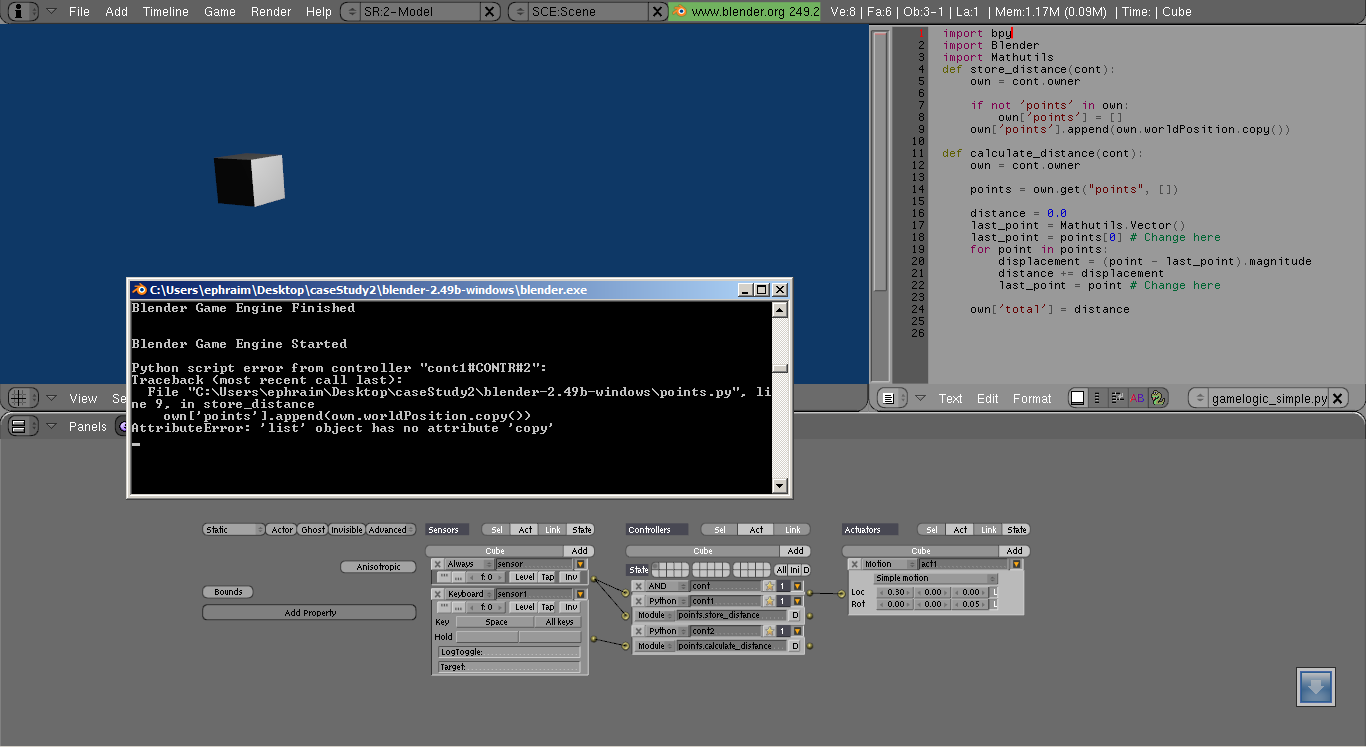
However, when run, Blender complains that there is no .copy attribute. Is there a workaround this? Or am I missing import? I changed “import bge” to “import bpy” as it complains that “no module named bge.”
Furthermore, I changed “import mathutils” to “import Mathutils.” Any help to get this script work would be great. Thank you. I attached the .blend file. This is 2.49 Blender file.
I don’t have a copy of 2.49 to hand but I took a look at your file in 2.62 and noticed some errors:
Bear in mind that this script will run in the Game Engine (ie when you press ‘P’ to play) and cannot be run independently (i.e. Alt-P or View->Run Script will not work).
When you want to run the script you attach to a Python controller (as you’ve done) but you did it incorrectly. If the Python function ‘my_fn’ is stored in ‘file.py’ then in the Python controller you set the module to be file.my_fn. In your specific case it should be ‘gamelogic_simple.store_distance’, etc
The always sensor needs to have True level triggering enabled (the button on the sensor that looks like “”" )
The last line of the code stores the distance in a Game Property called ‘total’ which you needed to add (added in the file I’ve uploaded).
I’ve corrected the file attached that will work in 2.62. You will probably need to change import bge to import GameLogic; and I’m not sure but in 2.49 you might not need the .copy() so the code would end up something like this (bear in mind it’s not tested):
# import bge
import GameLogic # I think this is imported by default so you might not need this line at all!
import mathutils

def store_distance(cont):
    own = cont.owner

    if not 'points' in own:
        own['points'] = []
    own['points'].append(own.worldPosition) # Perhaps try the .copy() first then delete

def calculate_distance(cont):
    own = cont.owner

    points = own.get("points", [])

    distance = 0.0
    last_point = mathutils.Vector()
    last_point = points[0] # Change here
    for point in points:
        displacement = (point - last_point).magnitude
        distance += displacement
        last_point = point # Change here

    own['total'] = distance