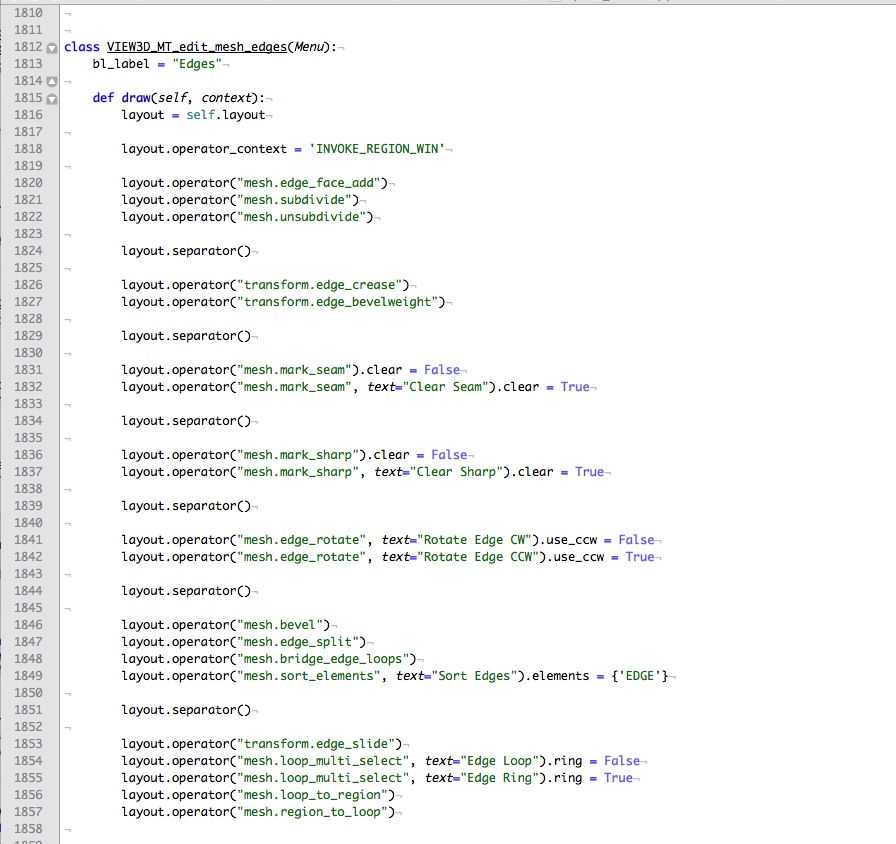
I recently switched from a pre-BMesh build to the latest Blender release. I’ve been pretty happy about the additions to the Blender toolset. However, some additions have caused changes to menu order (I have Ctrl-E in mind, specifically). At work, I mostly model and texture, so those tools are very important to me and my workflow. Having the menu order for “mark seam” and “clear seam” change from 3/4 to 6/7 is a big jump away from the letter ‘E’. Actually, it’s a huge jump, it’s the difference between instinctively selecting the correct keys without interrupting focus/workflow to requiring a look at the keyboard in order to hit the correct option or having to select the option with the cursor… both are not optimal.
So my question is:
Can I customize the order of menu popups to increase the efficiency of my workflow? If so, would somebody please offer a link or explanation? If scripting is a requirement, that’s perfectly fine. If taking you out for beers afterward is a requirement, I’ll see you at 6.
Thanks in advance!