Changing multiple materials at once? or copying a single color from one surface to

The blender surfacing system is really frustrating for me.

How would you copy a single base color in one principle material to another without messing with nodes.
I thought I could right click and copy color, select another surface and paste it directly in the same properties tab, or drag and drop to another surface, but that doesn´t work.

What I can do however is to open another properties tab, and pin the surface tab, that allows for dragging and drop to the color channel in another surface, or use color picker and select the one that is pinned.

But it should be simpler than doing it that way, or create drivers.

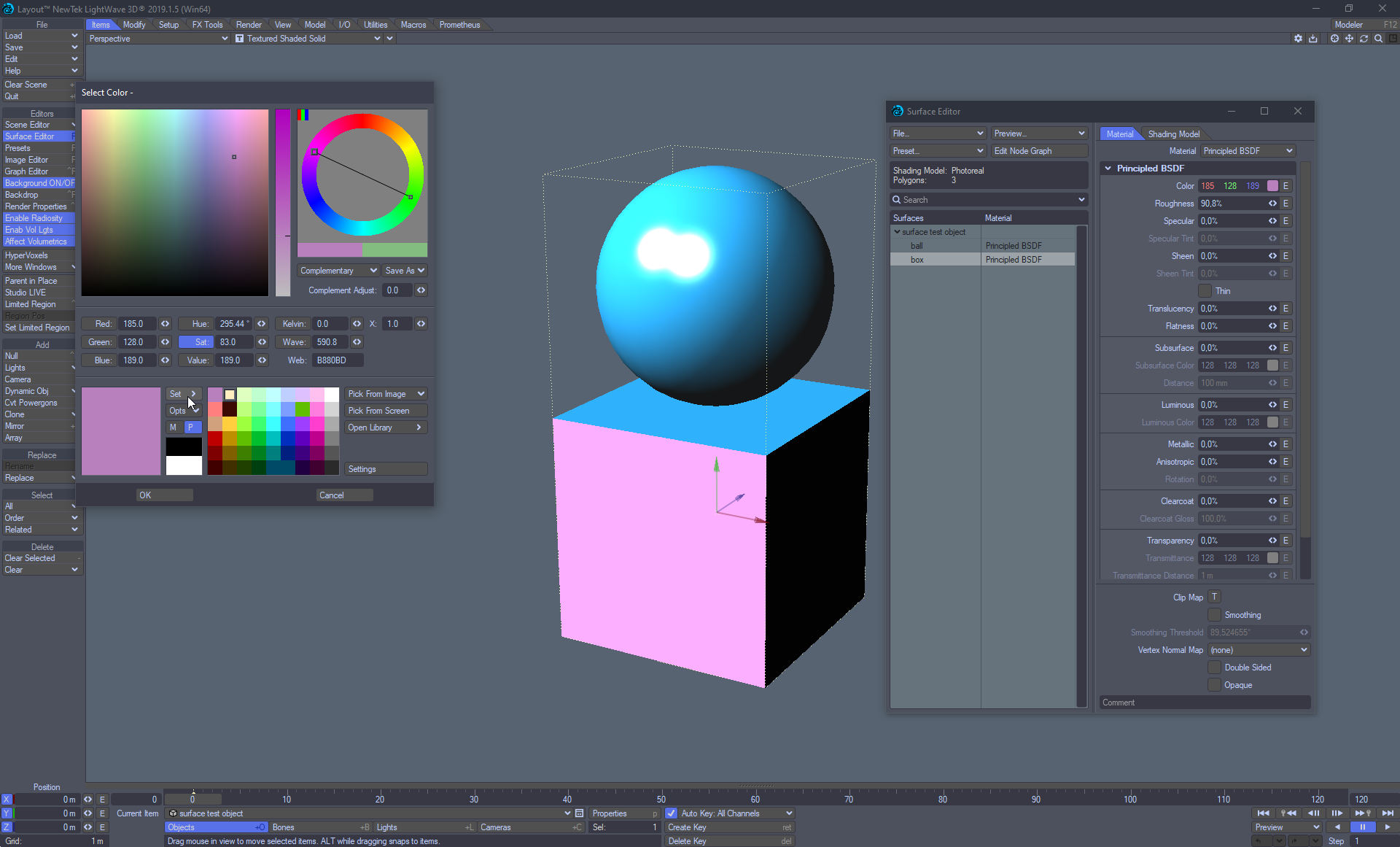
Now…in lightwave, I can select all surfaces I want and that means they are multple editable, so if I set/tweak glossiness, roughness etc, all selected materials will change, and only those channels I tweak, the others are intact if they differ.

So a similar option for multiple surface edit of single pbr material channels would be nice to have in blender.

Ctrl-L > Link Materials.
This works FROM the Active Object to all other Selected Objects.
It replaces the first Material if there is more than one.

Go join Right Click Select.
That is the correct place to post requests for additions / changes in Blender.
With lots of the side panels, and the properties window panel and tabs holding down ALT will make all selected objects get tweaked. This is not yet available in the Shader nodes yet. Do go and remind them it is needed. As the Principled Node has just been rebuilt someone should know exactly what needs to be done.

There is an addon that comes with Blender called ‘Interface: Copy Attributes Menu’. It adds things to the standard Copy/Paste CtrlC/V.
It should be able to copy color from selected to active objects. It does not work. Activate the addon and have a look. Its good to have available for other things.
So if you do post your complaint on Right Click Select, please also post a reminder that that part of the copy / paste addon is broken…

Nop…ctrl links isn´t what I asked for, that would replace the whole material…if it works, and I can´t see how you can link surfaces since you can only select one surface at the time. going in to editor for mesh selection and link would be absolutly horrible.

and what I referenced to with lightwave surfacing, when selecting specific surfaces as multiple selection, you go in and change roughness for one of those surfaces, the others surfaces roughness values will change direcly as well, but all other channels will be intact, as well as images linked if different.

As for the other copy attributes menu…though I have it installed, it gives no options to right click anywhere to copy any colors, nor can I find it in any view3d menu either.

here´s how it really…really should work, select the desired surfaces, select channel to tweak, change color of both surfaces at the same time, other channels not affected by this color channel will not change, and have their own unique roughness, and you can see the channels to be a in a mix edit state.

Lightwave is similar in the sense you can not copy a color directly in layout, but with the color picker if you click on any color channel, you can set the already tweaked color to be saved in the swatch pallete, then go to the other surface and open the color picker for that color and select the previously saved color from the other surface.
it is that or if you want to select multiple surfaces and change color the same for several selected surfaces, or change transparency for only selected surfaces at once.


hover mouse over color swatch, ctrl+c, hover mouse over other color swatch, ctrl+v

First of all: Blender is not Lightwave!

You are assuming that materials in Blender are restricted to one PrincipledBSDF node, and that a diffuse color or a glossiness value is present in all materials… That’s a wrong assumption!

There are plenty of cases where materials don’t even have a PrincipledBSDF (or it has many, mixed together). This alone is a wall in your reasoning.

Let’s say one of your objects’ material has 5 different Glossy closures in it… Which one should you change if you modify some default glossiness value of a group/set???

But Blender will let you customize things as you want…

You can, for example, write a small script to do the change for you:

for m in bpy.data.materials:
     if m.use_nodes:
         if m.node_tree.nodes.find("Principled BSDF"): 
             m.node_tree.nodes['Principled BSDF'].inputs['Specular'].default_value = 0.75

Another option is to reference some global value in your scene/world/view_layer:

As you mentioned, Drivers are also an option if you need something more dynamic…

You can also use NodeGroups (which are shareable between materials) to store some common values…

And I’m sure that there are plenty more options and solutions that may fit your case even better.

You may try to use vertex colors or a simple low res image to “color” your faces… all other material settings then will be the same…
Another posibility is to to group all nodes except some input RGB and the output material and reuse this in different materials and so only changingthe input RGB node in every (now individual) material which share all other material settings (because of the same node group)…

Super, that´s it…should have guessed it myself though, I was kind of just going, right click and see if there was a copy color menu or something.

But that works now after installing that extra addon for the copy menus, case solved.
Many thanks. :grinning: :+1:

At least for the issue of copying a single color from one surface over to another surface color.

The other suggestions I need to read up on, if it would help with multiple editing of one channel on several surfaces at once.

It is just unnecessary to enlighten me that blender isn´t lightwave…right, you should know I know blender isn´t lightwave.

The description on how it should work was on the emphasis of easy workflows, not an exact copy of doing it the lightwave way…you should be able to understand this point of view and description referencing to how other software are doing it…without necessary being the same software.

And no…I do not assume all materials are restricted to be principle materials.where do you get that idea from?

The evidence for me nor assuming all materials as PBR…can be described in the words of…I have used other materials before, but that is really irrellevant, since I asked for a way to multi edit the principle materiasl of choice, not the other materials, or not if there are any more complex shaders inside the main material, I was looking for a way to tweak the channels on a simple pbr material, don´t assume I need something else, and if I do I would be incapable of recognizing that this workflow wouldn´t work.

Though, it could work the same there, just as in lightwave I can multi edit the standard materials, the old material system.
And…I am talking about the main channels, not individual nodes setups eoither.

There is no wall in my reasoning, if I want a multiple edit of the simpler single pbr materaisl, and not having your case file of different glossy setups, that is not a wall in my reasoning, but in yours since you assume very wrongly what I need for any given material.

It all just comes a cross as you are defending a lack of feature, and refering to other situations where you may not be able to tweak it, the foundation of this is equal in Lightwave, you couldn´t adress all materials, all surfaces in Lightwave nodal material as well, but that doesn´t prevent the dev team from many years ago to have a multi edit function for every material.

Otherwise, to not sound ungrateful, thanks for the other suggested ways.

Just selecting the surfaces/materials I want with a mutliple select, and change the values for the channels I want, isn´t that they easiest way you can do it, if I refer to this is how lightwave do it, do not make it in to a holy battle of software, just recognize if there would be an even easier way in blender, or similar way…or if we have to do it in more complex ways.

I do this multiple edit all the time, like if working on daz figures with split surfacing, but the shading needs to be the same, while the textures are different, so I just choose the two-three or four surfaces that should be the same, and adjust roughness or specularity etc, and all surfaces are changed but, textures intact…

is this a bad workflow you think?
If I encounter materials or create my own with more complex setups in the shaders, that is something I have to deal with then of course, but there are many cases I do not encounter that situation.

In blender I would have to go manually and edit each surface one by one, just tedious, and copy and paste surface wouldn´t work since you would replace textures to one instead of the consisting multitexture setup.

I’d just use node groups. You could use drivers but in my limited experience they tend to break when you link/import them to other scenes and have to be recreated. Not as much of that kind of problem with node groups. Another option is python code. In some situations I think I’d prefer to just define a list of nodes and run one line of code to change them to match. Initial setup is annoying but once you have it, shouldn’t be to bad afterwards.

If you use do this often, then it might be usefull to turn this into a python script…
for example, this operator will copy the default values from the active node to all materials of selected objects, if the nodes all have the same name (Node menu → Copy Values To Selected):

python code
import bpy

def selected_nodetrees():
    mats = set()
    for obj in bpy.context.selected_objects:
        for slot in obj.material_slots:
            mats.add(slot.material.node_tree)
    return mats

def copy_all_values_to_selected(node_name, node_values):
    nts = selected_nodetrees()
    nodes = []
    for nt in nts:
        nodes.append(nt.nodes.get(node_name))
    for node in nodes:
        for i in range(len(node.inputs)):
            node.inputs[i].default_value = node_values[i]
        
def main(operator, context):
    space = context.space_data
    node_tree = space.node_tree
    node_active = context.active_node
    values = [input.default_value for input in node_active.inputs]
    copy_all_values_to_selected(node_active.name, values) 

class NodeCopyToSelected(bpy.types.Operator):
    bl_idname = "node.copy_to_selected"
    bl_label = "Copy Values To Selected"

    @classmethod
    def poll(cls, context):
        space = context.space_data
        return space.type == 'NODE_EDITOR' and context.active_node

    def execute(self, context):
        main(self, context)
        return {'FINISHED'}

def menu_func(self, context):
    self.layout.operator(NodeCopyToSelected.bl_idname, text=NodeCopyToSelected.bl_label)

def register():
    bpy.utils.register_class(NodeCopyToSelected)
    bpy.types.NODE_MT_node.append(menu_func)

def unregister():
    bpy.utils.unregister_class(NodeCopyToSelected)
    bpy.types.NODE_MT_node.remove(menu_func)

if __name__ == "__main__":
    register()
You are free to tweak it / improve it to your like.

Thanks for suggestions, but I do not have time for complicated workflows like this.
I rather see the developer teams to implement a function of multiselect and edit, suggestion will be forwarded in proper place.

After all, it´s not me who should code the software since I am no coder, I am foremost a user and want´s things to be initiuve.

may take a look at it later, too much else right now to do though.

The suggestion has been made thousands of times. Investigations and plans have been made several times over the year. I don’t expect it to happen for shader nodes until after it happens in other areas and I don’t forsee it happening in other areas for several more years. Step one is identifying all areas that current work that way when holding the alt key and all areas that you’d expect to work that way with the alt key but don’t based on the other areas that already work with the alt key. Those have to be identified and fixed and normalized to work the same way via the same code structures. After that happens, it should be easier to refactor. Unfortunately I think we might have to pass through a phase where the functionality is available everywhere but always requires the use of the alt key. After that it could be easier to make it not need to use the alt key.

Good to hear that this option this request is at least noticed and listened too, that is all I can ask for.

At least I found a way here to use the extra copy/paste functionality from the preferences/addons.

so I just have to hover over the channel I want changed and copy and paste and leave the other channels intact, it´s not as smooth as lightwaves way of doing it, namely select all the surfaces you want to change, and do so with one single value change for the selected channel, quick and easy.