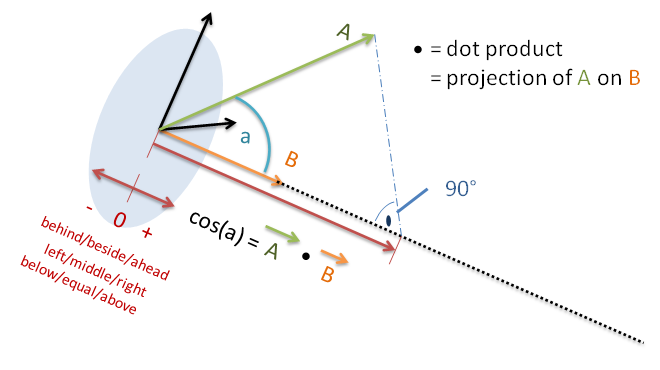
I changed your script to be a module. Modules are much better for several reasons. The changes to convert a script to a module are quite minimal.
You approach was to have one “control” object (the cube) that searches or the two objects to check. I kept that approach as it does not really impact the workflow and has nothing to do with the requested processing.
I introduced the function side(a,b) to check two objects against each other.
a.getVectTo(br)
# is the same as
b.worldPosition - a.worldPosition
because the positions are Vectors already. The result is A in the above diagram.
The position of the control object does not matter in out situation. It can be somewhere.
dotproduct = y_vec[2] * node_vec[2]
is not the dot product. You need to add the multiplications of ALL terms not just the Z axis.
mathutils.Vector already provides you with the dot() function doing that for you.
Now the more complicated things:
We need a vector pointing left or right of the “master” object. It must point exactly 90°.
In local space this is the vector (0,1,0)
Unfortunately as (0,1,0) there is no use to it. We have to transform it to world space. That means the orientation and Position of the master object need to be taken into account.
This is done by creating the masters transformation matrix (Local space to world space).
Now we can transform the local side vector into world space = B in the above diagram.
Now we can simply create the dot product of the vector between the two objects and the side vector (all in world space).
The value of the dot product does not really matter just the sign. This is a special situation in math. It makes the formulas really small and efficient. If you care the values goes really complicated. Just look at the Wikipedia ;).
As long as I did not something completely stupid this should be the solution.
Stopping
The naive approach would be to stop when the dot product is 0.0. It is naive as it is unlikely to ever catch this value. It is like buying a piece of beef with EXACTLY 500.0 g (not just exact g also mg and µg).
So you need a tolerance which is usually exactly the amount for the last step. I would just try it out.
(Remember the dot product is not angle. Which means if you do a 1° step when the dot product is near zero it has a different value than when not near zero.)
So you can change the check in this way:
    limit = own.get("limit",0.1)
    if abs(leftRight) <= limit:
        own["leftRight"] = "middle"
        # if you want "auto correction":
        master.alignAxisToVect(other.worldPosition-master.worldPosition, 1)
    elif leftRight > 0.0:
        master["leftRight"] = "right"
    elif leftRight < 0.0:
        master["leftRight"] = "left"
Remark: If you do auto-correction as mentioned above it is a good idea to check behind/beside/ahead. Otherwise the auto-correction would take place when the target is behind the master producing an 180° turn.
I hope it helps