Collision depth check (using geometry nodes) - Possible?

Hi !

I’m making a post to ask a question about geometry nodes. I didn’t get much into geometry nodes, but I’ve tried to recently because I wanted to tackle an annoying issue animating always had : Collisions.

For example, a character sitting on a couch. How would you tackle the cushion deformation workflow ? Cloth simulation, shapekeys, dynamic paint…

The best I think is cloth simulation, but it’s annoying to setup, and often has collision quirks that need a lot of attention. It can be very time-consuming, especially on slow machines.

Shape keys are very limited, because if you need to change the animation in the end, you have to remake shape keys. And also, you can’t preview the result while animating, so it’s mostly trial and error.

Dynamic Paint works good, especially with geometry node workflows, but is limited to boolean results, meaning a vertice can only be either 0 no collision, or 1 has collision, so black and white texture without depth falloff.

Here I am testing some addons, that use geometry nodes simulations to simulate deformations, but I am stuck at the depth issue. With a cube in a scene, animate a sphere to go into the center of the cube, and as soon as the sphere goes lower than the face of the cube, the collision will no longer be detected.

https://i.imgflip.com/3klvck.png?a487392 This is a meme template that perfectly shows what I wonder if is possible to do with some geometry nodes setup.
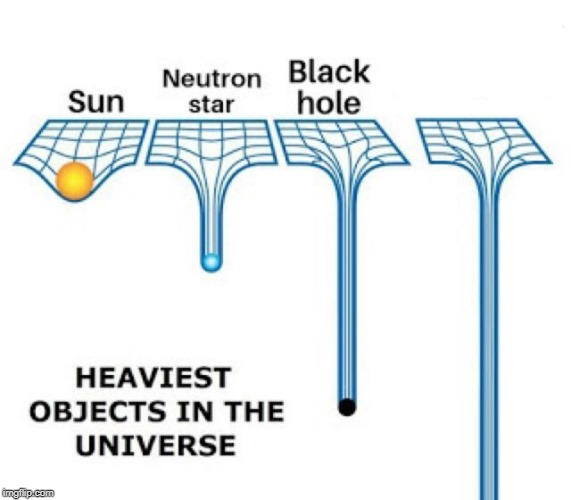
Has anybody tried this before, or knows how a geometry node setup to achieve the same result ? I’m a geometry nodes noob so I have a hard time figuring this out.

An easy way is to use a hook modifier on the cushions (via vertex group assignment), and another object to create the deformation.

Obviously, you should make the range of deformation basically match the size of the character’s butt, so that the illusion works once they sit down.

That was one example from the top of my head, but this way of doing it still requires a lot of manual tweaking, especially for other more complex examples.

Imagine a scene where you get 100 soldiers walking on a battlefield. The ground is extremely muddy, and you want them to leave footprints and deform terrain. As far as I know, if the boot doesn’t sink under the mud, lots of different solutions can work like dynamic paint. But depth is the issue, as if one of those characters has an animation offset where the mud would be thicker, and the boot would sink deeper, the collision will be limited to the general scale value of the displacement.

Or have a glass filled with water. You put a U shape geometry inside it, where the longer side of the U is outside the glass, and the goal is to have the water mesh to be pushed down using the shorter side of the U mesh. Even if the U shape would go extremely low, even clip through the glass and water, the water mesh should still follow the shape, instead of resetting as it doesn’t detect the mesh’s base anymore.

Or last example : https://encrypted-tbn0.gstatic.com/images?q=tbn:ANd9GcRNoHb7hitWwt8CdhZtWdut4BNWYXu0cmw9PQ&s
Imagine putting a hand in a mesh, and make the mesh follow the hand as far as you’d need.

The glass example can use a simple hook to achieve this result, sure. But with more complex scenes, I was just wondering if it’s possible to achieve this result today using geometry nodes, and have a procedural setup that doesn’t require go through houdini to use heavy simulations. Instead, have simple mesh displacement based on geometry nodes.

One way I’d see this work in a simple way, is if a dynamic paint brush could on collision with dynamic paint canvas, instead of painting to a value of 1 = fully white, paint between 0.000 to 1.000 based on how far into the mesh the collider would move based on normal maps, and multiply the intensity with a math node or something.

I don’t know if I make enough sense, but I think having a procedural geometry node setup like this (if it’s possible to achieve), allow a very easy solution to deform surfaces on collisions without all the heavy calculations and issues behind existing solutions.

https://youtu.be/iCRYitOrYVY?t=1436 This is a very nice addon that uses the latest geometry nodes simulations to achieve this result, but the moment the cube would go under the surface of the plane, the collision would reset to 0 as it would no longer detect the cube touching the plane.

You can’t really go from “character on stting on cushion” to “100 people walking on muddy ground” + “water moving in glass” and come up with a generalized solution using geometry nodes.

Anything is possible with geometry nodes, and thankfully “procedural” techniques exist. That’s why I made a post to ask if somebody who knows much about geometry nodes, knows a node setup to allow depth collisions. Those are just use cases to illustrate the problematic.