I’ve watched several tutorials and have matched all the settings, but my greenscreen footage still shows the green when exporting.
I tried to upload screenshots, but the site wouldn’t accept any image that I tried to upload.

I don’t know if it’s possible to transparently process and save the video.
Perhaps if the video is stored separately as an image and alpha, it is correct that the video has a chroma key.
In this case, the chroma key video and alpha are saved respectively.

You will have to make the background transparent by synthesizing the chroma key image and alpha in the blender.
Use the Set Alpha node for this task.
https://docs.blender.org/manual/en/latest/compositing/types/color/alpha_convert.html
I don’t understand how this is relevant. My compositor is showing that the greenscreen has been removed. However, when I render, the greenscreen remains. The movie clip contains no alpha.
I didn’t see the current problem, so I wrote it down as an estimate. 
Usually, we do not use video clips for synthesis, but instead convert them into image sequences, so we do not fight the same problems as mentioned. 
Hmm, from what I can see, that should be working.
Sorry I don’t have a solution, but I can confirm that you aren’t crazy, lol
I agree with @SterlingRoth , it should work imo too. have you checked the outputted images from the output file, do they have the background still left? And as you are using compositor, have you checked the render result window settings, so that it shows “composite”, not something like “combined” or “color” etc.? It can be changed to show different passes for example, if passes are being rendered, but if you want it to show the final composite, it should be set to it. It should be set to “combined” if you are rendering an image from a camera in the 3d scene to see the final result, but if you use compositor it must be set to “composite”.

I see no output node in the compositor.
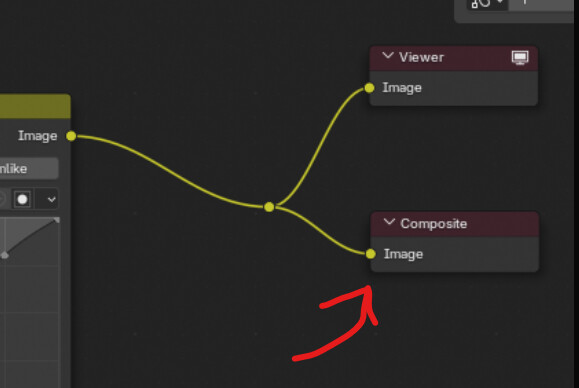
Sorry, I meant to save the output from the compositor.

Here is the output

Have you tried a different version of the blender.
Alternatively, delete the Composite node and add a new Composite node to connect
It seems clear that it is not a normal outcome.
If you want to test, you can test it by providing the file of the video.
The size that can be attached to this place is 5mb.
You can cut a part of the video and attach it.
With avidemux (free), you can cut a video without rendering.
If possible, you should attach it as the same video format for the test.
Original file is a MXF but I have tried with a MP4 version.
here is a 2 second verson
I downloaded version 4.0 and it is the same,
I can output normally.
Test it with the attached file
test.blend (722.5 KB)
Add…
I downloaded and tested the MXF file sample to see if it is a problem related to MXF file processing, but it is processed normally.
Well, I figured it was something simple. I also had the video file in the video editor so I guess the output was a combination of the video in the video editor and the results of the compositor.
Thanks for the help, everyone.
The output of Video Editing is stored without going through Composing.
That’s why it’s rendered as Video Editing, ignoring all outputs. 
That doesn’t seem optimal. It would be nice to have the ability to pull the video editing into the compositor