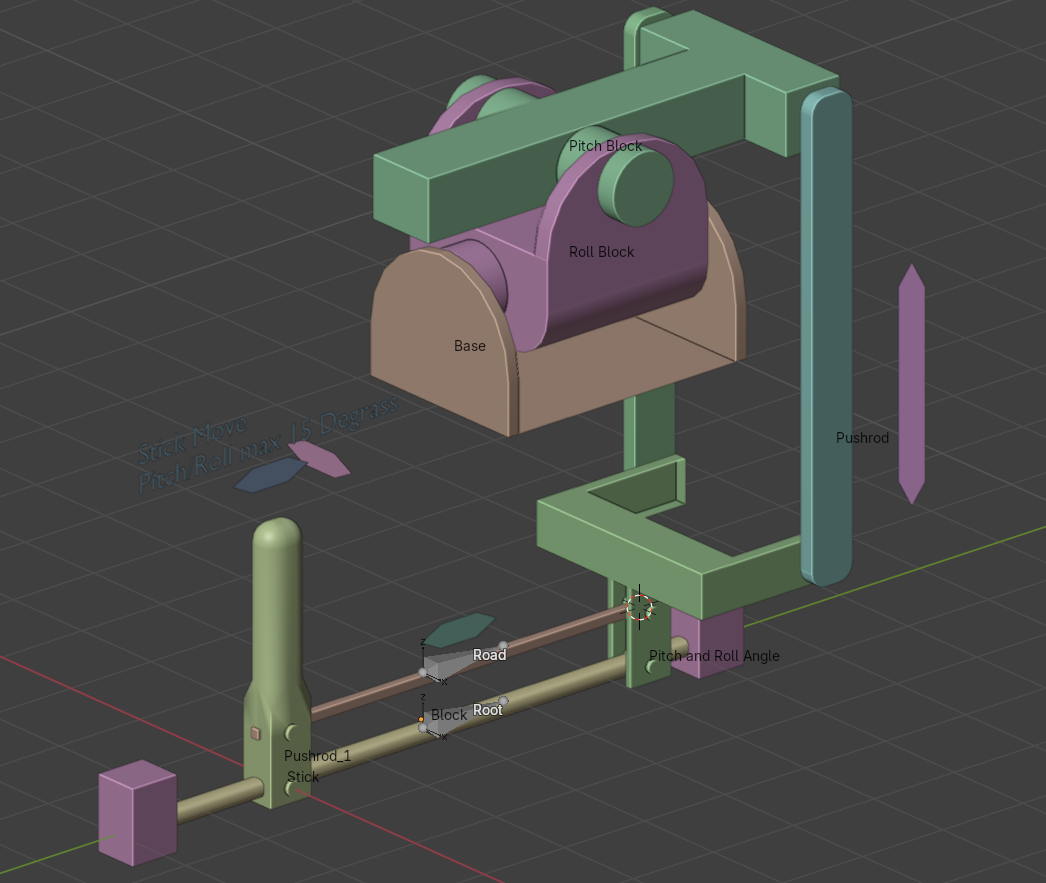
Could you please tell me how to create a rig for my control mechanism? I’m not sure how many bones are needed or how to connect them. Please advise.
If this thread becomes a “teach me all about rigging” exchange, it will be locked sooner than later.
Hi and welcome to the forum. You will get better respond if you have made an effort to rig it yourself and then ask for help in a specific point in the rig. What you have at the moment is a bunch of objects you call; “Control mechanism” no arrows to show movements, no drawing no referances.
There is also the awesome forum search function (top right;  –icon) .. so one might find “similar” questions:
..and of course also the Docs-Blender Manual: animation → introduction: rigging ..
It’s hard tfor the members of this forum to give general advice or “courses” and it is always better to ask “specific” questions.
 for makeing a proper image to illustrate
for sharing the blend file..
..but then.. i’m not sure what i even see here: Your Plane might be some “stick” connected to Plane.004 movable over/across Plane.002. But what next ??? How should this influence Plane.003 and should this also move Plane.005 and Plane.006 ? if this is all connected then you might even join those objects so you can move them as one. The upper part seems to be meant to move “wiggle” because of this controll movement…
I guess this is only part of your intended setup ? So this is almost imposssible to give any advice than the “usual”: try to learn this step by step.. 
I modified the file a bit, but I still don't understand how many bones are needed or whether to use "Track To."
You might not need any bones at all.. it might be done by constrains only.
..and it seems hard to find something using no bones “nowadays”..
..because for hardsurface models some parts are bind to some bones only.. no weight painting (also not via auto).. so one also can parent and constrain the movement directly.
Again: have alook at the documentation and trying things step by step.. that’s usually the way people do learn new skills.
I’ve taken my first steps in the setup process. While things have started moving, I’m not sure I’m doing everything correctly—especially regarding the linkages; something feels off there. I’ve modified the file, so it’s a new version now—could you please take a look?
Thanks !!!
With mentioning constraints i meant without bones at all.. anyway:
I still do not fully understand “what this is” or how this “should work” in general so i do not know if this does what you want (correct is such a specific word).. so you did not read the other replies ?
So this is very confusing:
For your controller bone you do use some Limit Rotation constraint using world space but the bones is rotated, visible by the show local coordinates.. so: if you enable the axis in the object properties like you did for your Pushrod_2 object then you see the differ..
That’s very confusing because the default axis for interaction are set to global so i was wondering what’s going on at all..
You also constraint to world X and Y only so one can rotate to anything in Z (world = global)..
It might be a good idea to constrain this too or even lock this in the bones properties.. there you could also lock Location and Scale..
To “summarize” or “repeat”:
It’s hard to “read” what you really want here and so very hard to give “advise”.. especialy when you seem to ignore them.
You simply has to learn something more about it.. this will not work by try and error and asking the same question again and again (“does it work now ?”)..
And i take back:
Imagine you do not know what this should be and imagine this in the real world, because this is what “we” base any evaluation of mechanical things on. There is no way this could work; there are missing some fixed parts and it’s hard to identify the moving parts, especially how they should move..
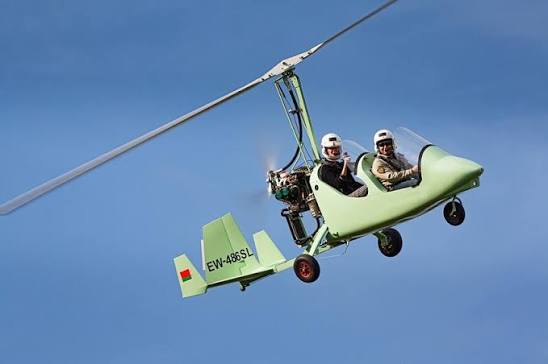
Ahhh.. now i start to understand.. something like this (still missing some parts…):
This is a bit complex and i do not kow if any bone/armature with “blender logic” will translate flawlessly into the “game engine logic”. I used constraints and driver “direclty” and for the missing parts i would need to think a lot more about it. It’s still not “correct” yet..
Again: transfering some of these object movements to another one (or by some bone) is not really some “beginner task”.. and also again: especially if the gma engine can not some of this things or needs some “additional info” ( special root bones or somethign like that..).
Edit: Ohh wait…
..for blender or for the game ???
I’ve figured out the animation for the simple elements and they work, and I created the blade bend using five bones with automatic weights—which also works—but I still haven’t quite grasped how to animate the handle.
rotor-rigging-01.blend (1023.4 KB)