Could someone explain normalize in vector math (geometry nodes)?

Could someone please explain to me (perhaps with an example) what the normalize function does in the vector math node?

I checked the docs but i find the explanation unsatisfactory and playing around with it using a viewer nodes also doesn’t really shed any light on it.

Thanks!

It makes the vector into a unit vector, which means a vector of length 1

OK!

I just watched this video:
https://www.khanacademy.org/math/linear-algebra/vectors-and-spaces/vectors/v/intro-unit-vector-notation

I understand what he’s saying but it doesn’t help me (i never heard of a unit vector or a vector having length) get to grips with my original question.

Any chance you or anyone could give me an example including the viewer output of how this relates to the vector math normalize function?

If this video, and Hadricus’s explanation don’t help you, nothing will. There’s nothing more to be said. I would suggest taking some time to learn the basics of vectors and linear algebra. You don’t have the foundational knowledge currently for any answer to your question to be useful to you. Luckily, this foundational knowledge is simple and easy to gain

You’re absolutely right, unfortunately i left high school at 15 with no qualifications.

But i do think any kind of actual example might help.

Basically what i got from the video was:

Start at some arbitrary point on the graph.
Go some distance X.
Then go some distance Y.
The distance from your start point to your end point (as the crow flies) is your unit vector or vector length.

Ok, but how does this relate to normalize and how do you (if you do) express this in the 3 numbers of a vector?

About that he wastes no words and i’m none the wiser!

As Hadriscus said, the normalize operation makes the vector have a length of 1 while keeping the direction of the vector. It means that the ratio between X and Y (and Z) remains the same.

As you saw in the video, you can write a vector v this way:
v = x.i + y.j
where x and y are the distances you go along the axis X and Y.

To normalize v, you have to divide x and y by the length of the vector. Since x and y are divided by the same number, the ratio between x and y remains the same.

Let’s say |v| is the length of v and nv is the normalized version of v. nv is given by :
nv = x/|v| .i + y/|v|.j

This is the operation done by the normalize in the vector math node :slight_smile:
I hope it helps !

I am not an expert but:

The first question would be, what is a vector?

A vector is a line from an origin that describes a direction and a length (magnitude)

So a vector of x50, y8, z15 is a line that goes from the origin to x50, y8 , z15. It has an angle and a lenght.

You can calculate the length using the vector math node set to length, but what if you do not care about it’s length and only want to know the direction it is pointing in.

When you normalise a vector its length becomes 1 (it’s direction stays the same as it was).

Say you want to use that vector’s direction to draw a line but want to define its length yourself.

Well you can normalise the vector and multiply the result by what ever length you want.

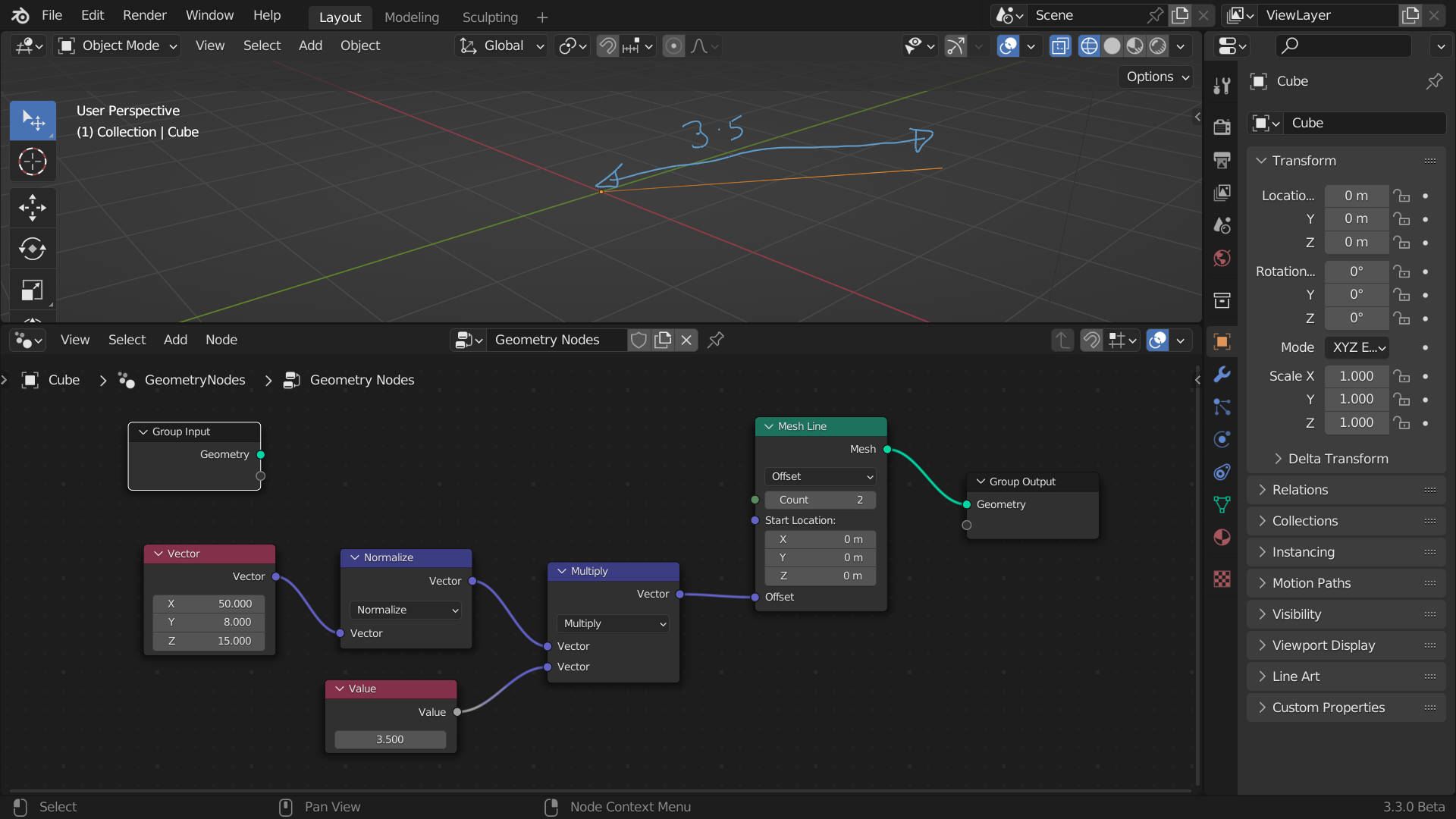
Here I created a mesh line with 2 points.

I want it to be in the direction of the vector 50, 8, 15 but I want it to be 3.5m long (not the length of the vector which I do not care about)

So I normalised the vector and multiplied the result by 3.5.

Now I have a line in the vectors direction that is 3.5m long. If I had used the origional vector without normalising it the line would be much longer.

A unit vector means the vector’s length is 1.0.

A sum is the result of an addition. Example: 1 + 2 + 5 = 8. The sum is 8.
A product is the result of a multiplication. 2 * 3 = 6. The product is 6.
The square is a product of a value multiplied by itself.

12 squared is 144, because 12 * 12 = 144.
3 squared is 9, because 3 * 3 = 9
1 squared is 1, because 1 * 1 = 1

The square root is the number we need to multiply with itself to produce a square.

The square root of 100 is 10.
The square root of 9 is 3.
The square root of 8 is 2.82842712474619 (because 2.82842712474619 * 2.82842712474619 = 8)

The reciprocal is the result of one (1) divided by a number.

1 / 10 = 0.1. The reciprocal is 0.1.
1 / 0.5 = 2. The reciprocal of 0.5 is 2.

The length of a vector is the square root of the sum of all its dimensions squared.

sum = (x * x) + (y * y) + (z * z)
length = sqrt(sum)

The length of Vector(10, 20, 30) is 37.416573867739416

sum = (10 * 10) + (20 * 20) + (30 * 30)
length = sqrt(sum)

This vector is not normalized, because its length is not 1.0.
To normalize a vector means to scale the vector’s x/y/z so that when we compute the length, it produces 1.0.

We normalize by taking the reciprocal of the vector’s length and multiply it with each of x/y/z.

r = 1 / 37.416573867739416 = 0.026726124191242435

x = r * 10 = 0.26726124191242434
y = r * 20 = 0.5345224838248487
z = r * 30 = 0.8017837257372731

The normalized version of Vector(10, 20, 30) is… drumroll
Vector(0.26726124191242434, 0.5345224838248487, 0.8017837257372731)

We now have a unit vector. A normalized vector.

Hello !

Understanding what does Normalize do isn’t that complicated. Maybe the questions you’re asking is why it’s useful ?

When dealing with vectors, we can be interested in different things :
It’s values, like maybe it represents a position in 3D space.
But a vector also represent a direction / orientation,
And lastly , sometime we can use it’s length.
A vector of (0,5,0) has a length of 5. For a vector of (10,60,45), I can’t tell you it’s length like that but we can calculate it with the length function.

So depending on the case, you might be interested more on the value, the orientation, or the length of a vector.

When you are more interested in the orientation, it’s much better to normalize the vector. And makes sure it’s length = 1.
Why ? because on some operation like dot or cross product you won’t get the same result if the vector isn’t normalized.

Say I’ve got my vector (10,60,45) we can say that’s a position, if I want it to have a length of say 50, I can normalize it first, and multiply the vector by 50.

Why doing that ? I don’t know but in some case it’s useful :smiley:

I hope that helps a bit , there isn’t a lot to understand about what it does, but more when it’s interesting to use it !

Good luck !

Thank god we have the vector math node! :rofl:

Many thanks guys, because you took the time to explain it, i now understand what the normalize function does and the math behind it. :pray: :pray: :pray:

But there’s one (probably more than one haha) area where i’m still foggy:

In @DNorman 's example, he talked about the vector’s line from the origin, which conveniently in the example is 0,0,0,

Origin, hmmm, i guess the origin is just the start point of the vector before the transformation?

So is an edge in fact a start point (vertex / origin) and a vector (which defines the line length and direction)?

Because i always thought of an edge as a start point and end point. But i guess either way of describing it is ok. In fact isn’t it one and the same thing? But if you take the origin as being 0,0,0, even though it’s not, and apply a vector to it, that yields completely different results?!

I’m not even sure what my confusion is or if i have a question, i’ve just never had to think (in Blender) about vector directions and lengths, to me it was just all about vertices and their locations.

Could anyone concoct and example where using normalize or not would yield different results (in terms of geometric shape) when dealing with multiple edges?

My example is very simplistic, in my example the vector’s origin is the orgin of the object with the GN modifier.

In other cases it could be the world origin or the origin of any other object etc.

The important thing to know is that a vector point (0,4,8) could be anyware if you do not establish an origin.
It is a point in space from an origin.

The origin is always 0,0,0 but where is 0 ? The big crunch.

I used a line object to represent the vector for clarity.

You can shift the origin in my example by changing the start point of the line but you are not really moving the origin, you are offsetting the line respect to the original origin.

In material shader nodes the origin will depend on your texture coordinates, the texture coordinates establish the origin.

An edge can be represented with a vector but they are not exactly the same thing. Unless the edge starts on the objects origin (even then the start point would be 0,0,0) you need two vectors to define it

Start and end point, which are defined by 2 points (0,2,5 and 5,6,8) respect to the objects origin.

Yes vectors can represent several things. They’re two or more values, but what they mean depends on the context in which you’re using them : for instance magnitude is disregarded in the context of vertex normals, because the only thing that matters in that case is the vector’s direction. In case the user stores non-normalized normals on a mesh, I assume the shading code will just disregard it.

On the other hand, if you’re using vectors to move points in space, obviously both direction and magnitude will matter. From there on, they could either represent an absolute position to move the points to, or a delta/offset -like with shapekeys. This is what the position and offset sockets in the set position geonodes do, they offer different handling of the same data.

How edges are stored in mesh data structures, I don’t know. I would probably think they’re constructed from two vertices rather than storing the first point’s absolute coordinates and the second point as an offset from the first. But I don’t really know, in any case your reasoning is good.

Erindale has a node in his bundle to visualize vectors on a mesh, it’s a very handy way to wrap your head around them. I haven’t bought it but made my own the other day, let me post it here.

visualize_vectors.blend (1.1 MB)
I should mention that I made this to inspect mesh normals, so the arrows will always appear the same size… they’re not scaled by their magnitude

Yes I highly recomend Erindales tutorials on vectors I have watched many.
It is probably better to start with the shading nodes ones and go into the Gn ones later.

Edit:
I still have a lot to learn myself I take it in “sips” !