JFK_Numbers
(Open Source 3D Model of Dealey Plaza)
1
Since I use Linux computers at work, I developed a command to take a look at the innards of 3D files. It may be used with files of *.max, *.mb, *.ma, *.blend file formats. Perhaps others as well (Not *.c4d). The first thing that I discovered (using the “file” command) is that there are two kinds of *.blend files: uncompressed and compressed. The latter ones must be uncompressed first (using the “gunzip” command).
Some time ago, I found the blender asset tracer. Played a bit with it. Might be interesting?
$ bat blocks Rocks_1.blend
Opening Rocks_1.blend
Inspecting Rocks_1.blend
Block type                          Total Size Num blocks   Avg Size     Median
----------------------------------- ---------- ---------- ---------- ----------
MLoopUV-DATA                            3.0 MB         34    89.0 kB    73.5 kB
MLoop-DATA                              2.0 MB         34    59.4 kB    49.0 kB
MEdge-DATA                              1.5 MB         34    44.5 kB    36.8 kB
MVert-DATA                              1.2 MB         34    37.1 kB    30.7 kB
MPoly-DATA                            757.2 kB         34    22.3 kB    18.4 kB
Link-DATA                             510.7 kB       4785      109 B      108 B
MDisps-DATA                           108.2 kB          2    54.1 kB    84.9 kB
Brush-BR                               89.0 kB         43     2.1 kB     2.1 kB
Panel-DATA                             78.8 kB        360      224 B      224 B
Link-TEST                              64.0 kB          1    64.0 kB    64.0 kB
----------------------------------------------------------------------
Biggest MLoopUV-DATA block is 144.0 kB at address 139676194929672
Finding what points there
     <BlendFileBlock.Mesh (ME), size=1576 at 0x7f08ede5b308> b'mloopuv'
     <BlendFileBlock.CustomDataLayer (DATA), size=208 at 0x7f08e5e390e8> b'data'
or …
$ bat list Elfenbeinturm.blend
Elfenbeinturm.blend
    Texturen/Terrain Displacement.exr
    Texturen/Elfenbeinturm Base Color.png
    Texturen/Elfenbeinturm Displacement.exr
    Texturen/Elfenbeinturm_Plateau Base Color.png
    ParticleTextures/Forest Density.png
    compositr/Ivory1.png
    Texturen/Terrain Diffuse.png
    Texturen/Terrain Metall.png
    Texturen/Terrain Roughness.png
    Elfenbeinturm_Materials.blend
1 Like
JFK_Numbers
(Open Source 3D Model of Dealey Plaza)
4
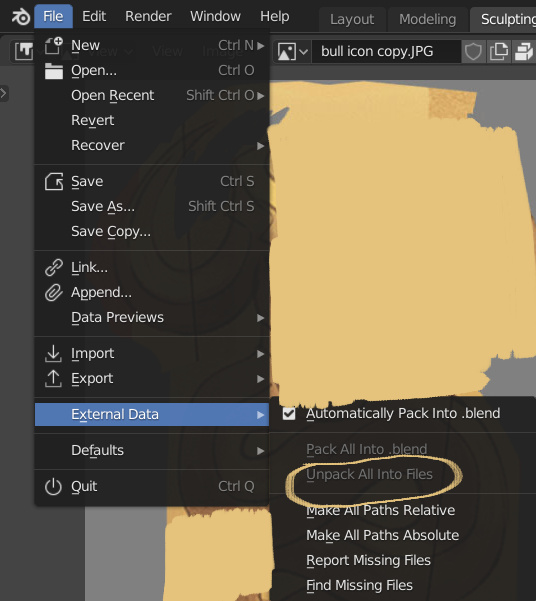
This is the question. We can all realize that the names of the graphics file (*.png, *.jpg, *.hdr) are mentioned inside .blend files. But are the files themselves inside?
The reason I ask is because the author of that car includes a folder with the texture maps. That is very kind of him. However, if you take the Blender files alone (Cycles and Eevee), double click on them, you will see the car with full colors, golden, etc.
The only explanation is that the graphics files are contained.
JFK_Numbers
(Open Source 3D Model of Dealey Plaza)
6
Great! Is there any way to extract those assets?
Notice that both PDF files (“Export Image”) and YouTube videos have ways to retrieve files, but they are not the same as the originals. If you need access to the exact original video (per MD5sum), use Vimeo.
TIA
-Ramon JFK Numbers
JFK_Numbers
(Open Source 3D Model of Dealey Plaza)
7
Being a newbie, I was so excited when I made that discovery that I posted this: