Cursor Selection Distance

Hi
Thought I’d post here in the hopes someone may know what’s happened.

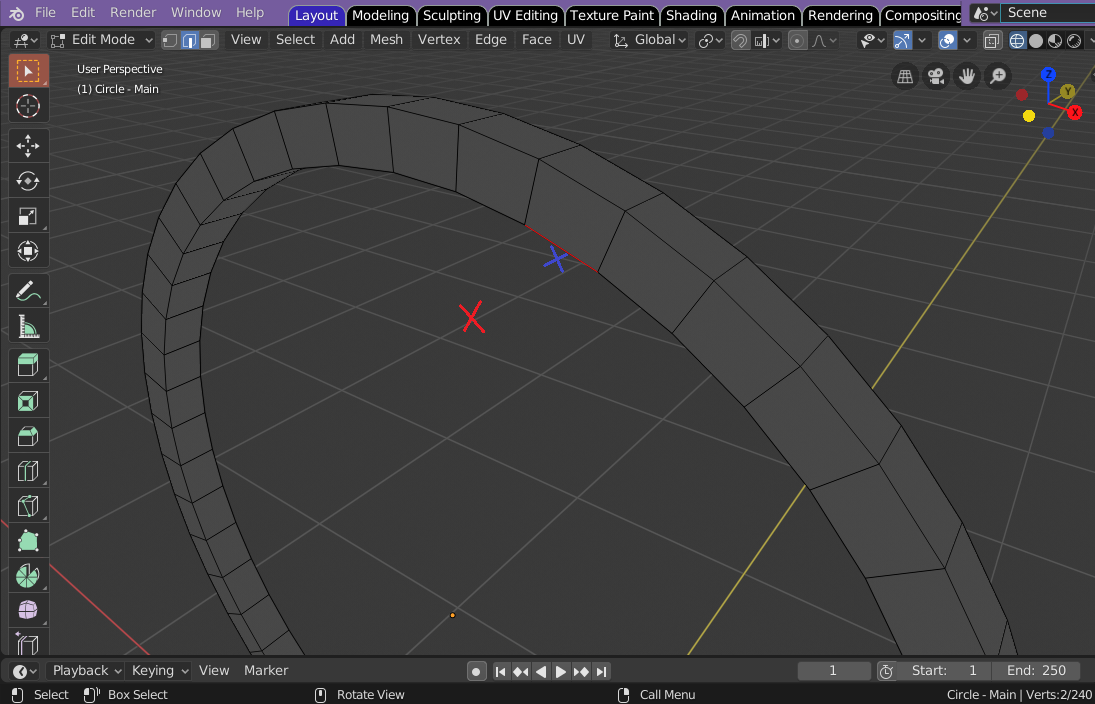
Recently it seems that the distance the cursor is from a vertex/edge/face to select it, is larger.
Please see screenshot for example:
The Blue X is the original distance the cursor position needed to be to make a selection, but now I can make a selection from the position of the Red X.


This has become quite problematic as it is easier in more complex meshes to select unwanted parts without knowing, even though the distance reduces when you zoom in on a region. So now I have to spend extra time checking the mesh for unwanted selections :neutral_face:
I was playing around with merge vertices by distance to see what effect it had but this has been reset back to default distance [ 0.0001m ] and also Select Tab > Select Similar [ Shift + G ] but can’t see how this would cause such a problem.

Could I have done something weird like a multiple Shift / Alt key while scrolling mouse wheel accidentally and changed this selection distance?
Any help would be appreciated. Thanks.

No you didn’t hit anything by mistake…It is just that way…there is a discussion about it on https://blender.community/c/rightclickselect/LTcbbc/

I also find it VERY annoying… as it will also not click things you want and something to the right or left at a 5 unit distance…
as it is now to select what you want…you need to be right on top of it…and to deselect it, hit that scroll wheel or zoom out to click empty space/// yeah I know tap AA but I sometimes find that annoying as well…ie: zoomed in really close and FLASH whole screen flashes yellow!!

The idea of being able to adjust the setting like in the circle select is appealing! and actually I use it more than anything…

Hi RSEhlers,
Thanks for the link, yes I have read that post when researching the issue, I have also read through various sections of the Blender User Manual.
Version 2.80

The Circle Select is an excellent feature and I also tried changing the radius, then going back to normal select to see if that had an effect on the distance but there didn’t seem to be any correlation.

Here’s the thing though, it’s not like I noticed this change after a day or more of not using Blender, I noticed it while I was actually using the software.
I was working on a mesh and changing between files to do some experiments on a ‘work-horse’ file, then switching back to my main file to continue working…so I noticed this change in real time, so to speak.

I’m sure it’s not my imagination :upside_down_face: I was quite happy with the cursor selection distance, in fact, occasionally I’d think, wow, you have to get that cursor really close to an edge to select it…then suddenly, it seemed to change to a very wide distance!

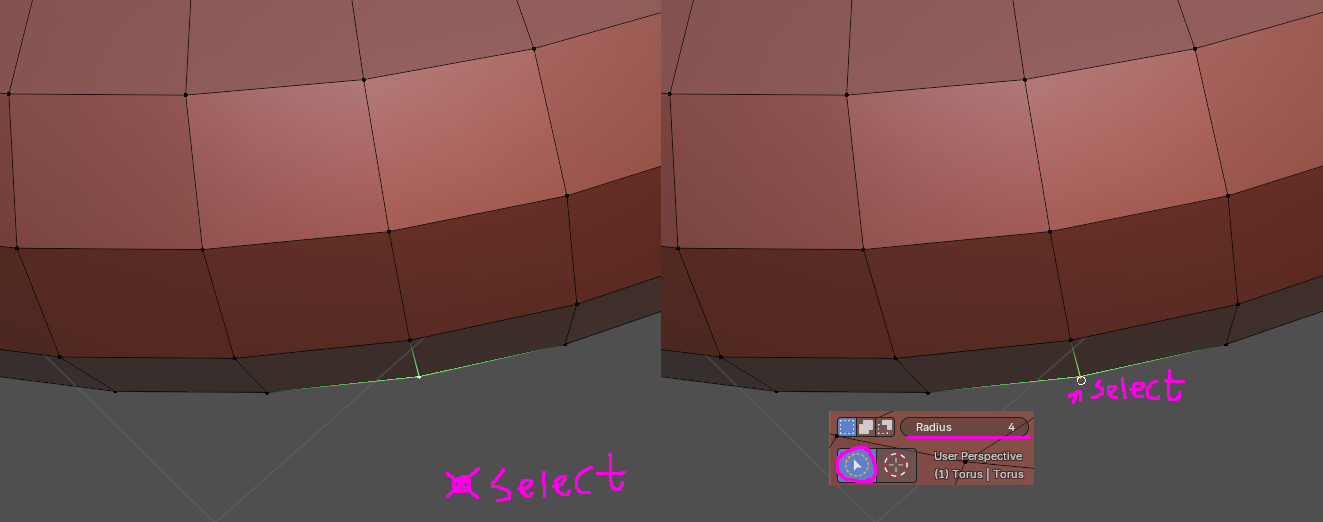
Yes, I believe I have had the same problem…just didn’t realize it at the time…and of course I end up zooming in and out more than anything. That is why I use circle select almost exclusively now…along with box select…having to hit right on an edge was just frustrating…it also seems to happen when I am trying to grab windows and scale them up…it might take forever to get the cursor right at the point I can select the perfect place to be able to grab and pull up… annoying!

Generally speaking, a good quality mouse with suitable cursor settings and a large monitor helps :grinning:

A Razer Deathadder polling at x&y 5000 stages, combined with a 32" monitor…and yes it is far better than back in the 19" monitor days…I went that direction when using Rhino a lot…you think this is bad…try to select an vertex in Rhino in a side view…it looks ok till you rotate in perspective and find you have picked a location off in the stratosphere!

Hey man…it’s cool, I am enjoying learning Blender, (Just started this year) although I’m new to 3D CG I can see Blender is a very powerful artistic creation software tool.
The cursor selection issue isn’t causing too much problem atm, but just putting it out there as it seemed to be something I did that changed and thought another Blenderer had knowledge or solution :vulcan_salute:
Happy Blending!

I have this problem too

I’m not sure how to set the click range, but it seems that’s how it was originally designed.
If you need precise positioning, try using Circle. (It clicks the exact location, but this method may be more inconvenient.)

I’ve always had this problem, and honestly I thought there was some weird configuration with my system or something. User error and all that.

I’ve never used any other program that the arrow cursor somehow does not use the point of the arrow, as the point of contact…

Until I saw this case’s question, I did not feel at all that this was a problem. :sweat_smile:

If you compare the two methods, you will feel that the current approach of selecting the approximate range is advantageous. :slightly_smiling_face:
It’s too difficult to use if you can only click at the exact mouse point

I’ve found it to be the opposite. I click on “nothing in space”, start doing something, then realize that Blender had selected some random edge or point.

I don’t know this for sure, but it almost seems like selection raycasts from the selection point until it hits something. I’ve learned to work with it, but it is certainly strange

I have never found it to be a problem: RMB to select, LMB to place cursor (yeah, I”m old-school). IDK what the current standard setup is (and I don’t care, don’t care enough to read whether this is an issue for y’all, brain barely functioning atm, sorry). I always assumed it to be reversed or something. It appears I am wrong?

There is historical context.

IDK whether it is Blender itself doing the picking or the underlying GUI library (OpenGL or Vulkan) (not without picking through the source code, which I don’t care to do, sorry).

The idea is that you have chosen to select something, so the idea is that something must be selected. Extra code needs to be written to increase or, in your case, decrease the selection range wrt the 2D projection matrix through which you are viewing the scene.

When there are many items close by, the selection picks through the closest to furthest. Again, this is library code, not necessarily Blender. The 2D range to the cursor is irrelevant. The nearest object to the cursor from the projected POV is what matters.

Hence, if nothing selects, the range (around the cursor from your 2D POV) widens until something does select.

This is the most natural way to handle selection. Before this was common, selecting 3D objects in 3D software felt very capricious was almost intolerably obnoxious. This selection algorithm made all the difference — the basics of its function have remained relatively unchanged for ages.

Frame Challenge

Which leads me to my frame challenge: I think you are posing an XY problem. How is your setup configured that you are clicking and unsure whether that click is a “select something” click or just a “position cursor” click?

(Or am I mistaken and this is the normal default problem for new Blender users these days?)

No, the idea is that when I click in space, i expect anything that is selected to become unselected.

Blender creates some “range factor” to the cursor. It’s NEAR something, not ON something. Nothing else i use does this weird behavior. The cursor point IS the point of interest (or, should be). I’m not using a brush with some… soft falloff.

Do buttons in Blender, or even the web browser you’re using, activate when you click NEAR them, or when you are ON them?

Unfortunately, the idea is old and well-established… and disagrees with you.

If you wish to deselect, press A. Don’t click around. Clicking is for selecting.

Except that it also deselects.

Seriously not understanding why you want to die on this hill to defend flakey behavior.

I’ll just grab me some :popcorn:

Am I the only one who never even noticed until this thread?
Over 16 years using Blender and I had to try it out to confirm what it was all about.

Right, so I will accept that I had a knee-jerk reaction and phrased my response in a way that violated community guidelines. For that, I apologize, and hope this reword will suffice.

It doesn’t change my opinion. Nor does it justify your attack on me (for which I notice you are not censured).

See how disagreeing with you gets all the hearts, because you are a mod, and you get to say that I am seeking to die on some hill, when this entire thread is about building a massive hill over what is in my opinion an anthill.

So, let me rephrase:

Literally millions of people download and use Blender without significant difficulty from the issue under discussion: accidentally selecting things when clicking what the user thinks is sufficiently empty space.

I am sure that some people do have this very same frustration. When I first began messing with 2D-3D space picking waay back in the late nineties, I noticed the same thing. Heck, I still have to click through sometimes to select the object I am aiming for. And the fact that this here thread exists is proof enough that it happens — picking is a very old algorithm that generally works very well, but not always to the user’s expectation.

But this thread is about applying two different behaviors to a single action.

I therefore suggest people having this problem change their behavior to avoid the problem. Very much like the patient complaining to the doctor that it hurts when he hits his hand with the hammer:

  • Click to select
  • Press A to deselect

Problem avoided. Becomes muscle memory. Workflow improved.

Again, I do not (and did not) claim that the problem does not exist, nor that there isn’t room for potential improvement. I will add that this is an issue I think unlikely to ever be solved to anyone’s liking, unless someone were put the significant effort into patching and owning that very fundamentally significant bit of Blender’s behavior.

So… if the tool won’t bend, maybe… just… learn to use it differently…?

This is my opinion.

It comes by way of historical context learned over 40 years of learning how this stuff works, and I offer it only by way of explanation and a friendly suggestion on how to deal with it.

Now if you dislike that, you have that right. But characterize me as building some hill to die on, especially in context of the tone of this whole thread — that’s offensive, and it is a direct attack on me and not my position, and, frankly, a violation of the very same community guidelines for which the forum software is now bashing me over the head.

Hopefully now BA will consider my involvement here remedied and I can return to ignoring this thread.