Hi,
So what are the differences/advantages of the Layout and Modeling workspaces? I can’t tell any difference between the 2. Very new to Blender so I’m probably overlooking something. I’ve been doing most modeling in the layout tab actually. 
Thanks!
Scotty
Hi and Welcome
Workspaces are only predefined windows (default) … … and can be modified by the user according to his workflow / preferences …
Each user can modify/arrange his own workspace.
Concerning your question, only you can appreciate to model in such or such workspace.
Layout > Timeline presence (do you need it when modeling?)
A link to better understand:
Workspaces
1 Like
I see. Thank you! 
In addition the Layout workspace works more like canvas which shows the position of the objects in the scene while Modeling workspace is focused more on the transforming of the objects in that workspace.
Just exhuming this topic because I feel a more complete explanation is needed for why the “Layout” and “Modeling” workspaces still exist on the default-startup despite being basically identical.
Significantly, there is a video here suggesting that the modeling workspace has “become redundant” because “now you can do it all in layout”. And vice versa?
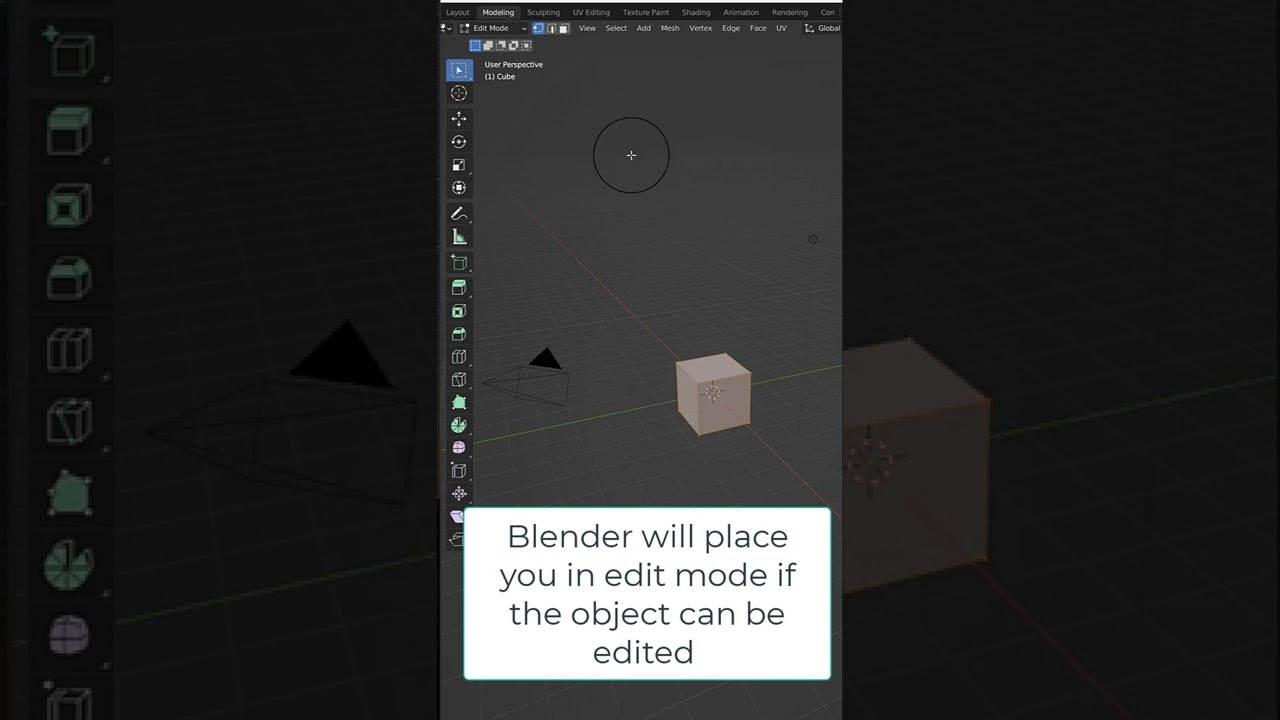
Can anyone confirm that this is correct for static 3D work, and that one of these workspaces could be removed from the default-setup for simplicity? If so, which workspace would you keep, and why? Or should they be merged?
If the argument is that “Layout” introduces the user to the “Animation” features; there is already an “Animation” tab for that. A first-timer is not going to dive into animation before mastering static modeling, so why not merge the “Layout” and “Modeling” workspaces and lose the animation panel in this workspace?
Of course, I can do this myself, in my copy of Blender, but the default seems legacy, no?
1 Like
As someone who just started with Blender, I am glad that both the Layout and the Modeling workspaces are the first two that new users encounter. I am finding it very useful to have the Layout workspace set to a wide view of all the objects with Material Preview or Rendered viewport shading, and using the Modeling workspace in Wireframe mode to do detail work on individual vertices and edges.
Moving the camera, zooming out, and switching the Viewport shading to check the effect of a change, and then doing all that in reverse to get back to modeling takes time and disrupts concentration. Switching between Modeling and Layout workspaces is one click.
People who want to do this could of course always make their own Layout workspace. But you first have to know that this is even an option and that this might be useful or desirable for you. Which as a new user really isn’t obvious.
People who don’t want a layout workspace just have to delete it and save the startup file after doing a new installation of Blender. It takes four clicks in fewer seconds, and then you never have to think about it again. I think the potential benefits for new users far outweigh that tiny “cost”.
2 Likes
I agree that they are similar even though Layout and Modeling are two very different things.
Modeling tab allows to be in edit mode right away which is a big difference but maybe not that useful in practice…
Yeah I think it’s worth tweaking your startup file, at least removing a few of those tabs and maybe add others if needed.
I’ve removed the modeling tab because I’d like to have the timeline and I switch back and forth edit mode rather than fiddling with tabs for that.
But maybe someone who is really into modeling might prefer that one as a starting point.
Anyway, I agree with @Yora ( pretty funny and disturbing that you share both a Kermit avatar, which is also a good analogy to having two similar tab but still it’s two very different things/people… ) It’s ok to have both tabs by default even if ultimately you’re very encouraged to remove one, which obviously doesn’t apply to that Kermit avatar analogy…
Most of the time I tend to keep blender pretty close to defaults, but one of the things I change is that I deactivate Load UI in the preference : This way every file I open always use the same UI layout.
Then I tend to fine tune the default layout based on what I regularly change and eventually I get something better suited for me.
I find the default layout good in the way that it’s a sane starting point and nice generic defaults. But probably not something you should definitely keep as is once you start using blender regularly.
On the flipside customizing blender too much with addons and keymaps is a bit more questionable IMO…
1 Like
Workspaces are screen layout in different areas of different editors with different displays + a mode switch + a filtering of add-ons + dedicated custom properties.
Layout and Modeling workspaces look very similar, because 3D Windows are taking the most of space and have same point of view and similar display options. Outliner is also the same.
Properties Editor differs.
In Layout workspace, it displays Object Properties.
In Modeling workspace, it displays Modifiers tab.
And there is a mode switch set to Object Mode for Layout and Edit Mode for Modeling.
So, difference is not just the timeline.
And users can decide to use different display options for Layout and Modeling 3D Viewports (Random Object Color, World Background Color, Shadow, and World Cavity for Layout. Single Custom Color or Material Color, Theme Background Color, Screen Cavity for Modeling.), different overlays ( Extras, Relationship lines, Light Colors, Origins (All) for Layout, none of that for Modeling), different Selectability & Visibility filters ( All object types enabled for Layout, only the ones supporting an Edit mode for Modeling).
Simply by tweaking 3D Viewports settings, it is possible to obtain an obviously different Workspace, the same way Sculpting workspace differs from Modeling one. Sculpting workspace is a kind of Modeling workspace. Geometry Nodes workspace is another one.
And if you use a lot of add-ons, there is an interest of using more workspaces to avoid conflicts between them, to have a sidebar less cluttered.
You may consider that Default template has too many Workspaces.
But a Modeling template could be done, with a Mesh Editing workspace, a Curve Editing one, a Nurbs one, a Metaball one, an SDF one, etc…
That is a preference about multiplying presets of display with ready add-ons or changing display / enabling add-ons on the fly.
1 Like
Exactly! I feel like the universe is sending me a clear message on this topic: It’s hard to change the establishment; but independence and self-autonomy can evolve through intelligent customization.
I’ll streamline the Blender UI design myself for highest logic.
Others can continue as preferred with the establishment-edition.
Thanks for all the kind and informative replies, @Yora @sozap and @zeauro.
1 Like