in my game i need to make description panels attached to the objects that became visible and points always towards the camera when the player is on them with the cursor: i remember this is done with “billboard” but i cannot do it, i’ve searched for tutorials too but i didn’t understand it (in fact i haven’t studied it too much). next i tried “track to” like in animations and… it does works! so, my question is: what difference is there between these two solutions?
as far as i know the BGE has no billboard function, this would also be a useless function because the trackto actuator has the same functionality.
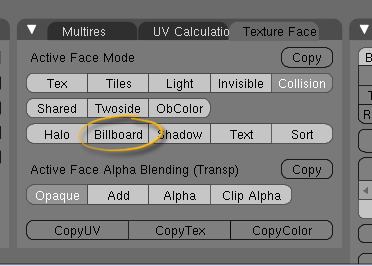
There is a Billboard function in the BGE:
Attachments
Hello
“bilboard” and “halo” are not evident to achieve.
You must add the plane in the standard way ( facing top view", enter edit mode, and in front view rotate all the points -45° ( X axis)
Enable bilboard in the Texture Face PAnel.
It should work now, I hope…
Bye
i thought it could be a matter of performance, i don’t know. maybe “tracking to” an object is more expensive in terms of resource than a “billboard” panel, i don’t know…
incredible. if i use mouselook script the function “track to” doesn’t work.
can you tell me why?
Another difference which hasnt been mentioned is the rotation characteristics of both.
Billboard restricts the rotation of the plane to only the Z axis. So if you look down at the plane from directly above you wont see anything, and it will appear squished if looking down from a smaller angle.
‘Track to’ (or Halo as both are the same) has no restrictions. Thus the plane will always face the camera. No matter what angle or rotation the camera has.
lol, always learning new things…
Ad-Edge: you can set the trackto actuator to only track in the xy-plane
I don’t think these options are in blender 2.48a. But if they are, please tell me were because they would be very handy!
First, you have to be in edit mode, and, second, the object needs a UV map. While in edit mode hit UKEY->Unwrap.
They certainly are still in 2.48a
But you need to unwrap the object (using U in edit mode) then check out the new panel which appears in the editing panel.
OK, thanks a bunch. I never even thought of unwrapping it and then checking if those options where there.
In 2.43 you used the face select tool so I guess it would make sense to use the unwrap tool.
Basically the difference between trackTo and billboard is that billboard is graphical, changing just the appearance of the mesh, while trackTo rotates the object itself which can affect physics and so on. I’d imagine there’s also a performance difference, but I haven’t done the benchmarks to prove it.
well, as i found by myself, with mouselook script “track to” doesn’t work: another difference 
(sound strange, btw)