Does anyone know how one can convert data from a dfx file which contains manually drawn contour lines that should serve as a template to reconstruct the surface of a 3d object.
So far I managed to group all the individual contour line to make one 3d object and convert this into a mesh.
However upon rendering I get only the contour line as an output even though it should be a mesh by then.
How can I convert the object in to a mesh or anything alike in order to really perform surface rendering?
What you need to do once you have your 3d contour mesh is to put a skin on it!
One way is to slowly, manually build up a surface on the network of lines…I haven’t found an automatic way to do this.
So what you need is the great script called point_cloud_skinner
in edit mode, select all, delete faces and edges which leaves vertices only
run point cloud skinner
add a fresh mesh and retopo it to your skinned terrain surface.
likely to be one or two problems, but in Blender, it’s the best solution I have found
good luck!
Thanks for your info. I tried the point cloud skinner and it seems to work more or less.
Now I have two problems with the surface that is generated…
I get a lot of holes in the surface since every time the distance between the points of the mesh is bigger than the triangle size it does not generate any triangles there and there creates a hole in the structure.
The surface triangles of the mesh are often simply to big and this makes the surface in the end look quite irregular.
Do you have any idea how one can interpolate over the generated mesh in order to avoid holes.
Can one control the size of triangles?
How can one extract a finer mesh from the raw data? -> I tried the DXF-3D Importer and varied the is the amount of control points (= segments) in Bezier curve representing circle ( up to the max of 32).
It is possible to further smoothen and interpolate over the resulting surface in addition to the ‘set smooth’ function?
With real life topo data this will often happen. You can adjust the parameters of the Point Cloud Skinner script, but I find that some manual filling in of the mesh is sometimes required.
To fill in holes use F-KEY to create triangular faces.
It is possible to further smoothen and interpolate over the resulting surface in addition to the ‘set smooth’ function?
Point cloud skinner will not produce a pretty mesh. The standard way to fix this: once the holes are filled, in object mode, add a new mesh with whatever resolution you like. Scale it and position it directly over your terrain mesh. Then in edit mode and TOP Ortho view, select all and hit Retopo and Retopo All. The new mesh will be moulded to the shape of the original.
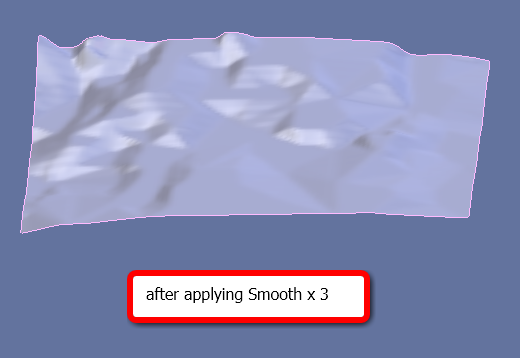
There are various ways to smooth…it depends if you want the mesh for rendering only or for further modeling purposes. Add a subsurf modifier (with or without applying it), or use the Smooth function in Mesh Tools, and or use Set Smooth. Or there is Sculpt Mode.
How can one extract a finer mesh from the raw data? -> I tried the DXF-3D Importer and varied the is the amount of control points (= segments) in Bezier curve representing circle ( up to the max of 32).
So your data is imported as bezier curves? Also I see from your first post that the contour lines are drawn manually. Was that done in another cad app? There are ways of avoiding that if you want, or it may be better to trace the contours within Blender. What is the original source of your contour data?
Filling the holes manually is extremely time consuming I realized. In addition, I do not manage to retopo the second mesh on the 3d structure (maybe because I did not fill all the holes?)
The raw data I’m working with is a 3d stack containing aligned .tiff files. The program I used from manually drawing the outlines in the 3d dataset is called Neurolucida, which is a CAD program that is spezialied for reconstructing and quantifying from biological data with a focus on the morphology of neuronal structures. Basically, it is just a particular case of an ordinary reverse engineering approach of any real 3d object… Since that program is handy for quantification of my data but rather limited in respect of 3d modeling/rendering I would like to export the outlines from there and use Blender for any modeling and rendering of the reconstructed data once I have the contour lines of the objects.
The format to export I currently use is .dxf since I have not the option for exporting .vrml at the moment (licenses…) Using the Autodesk dxf file importer I realized that one can actually import dxf as meshes, Bezier- and NURBS curves. So far I tried only meshes and Bezier curves because I assumed they would be most logical for my purposes.
The idea is to generate a nicely smoothed solid 3d model without holes of one these 3d objects and if possible to model adjacent objects to the first one. I do not dare do use the sculpting mode since I should stay as much as possible to the original data.
If you have any suggestion how to make the whole process easier just let me know…
I see your problem is more complex than I thought. When you mentioned contours, I assumed land! Presumably the structure you are studying has some type of spheroidal shape?
Are you running on Linux? Because Blender may not be your easiest choice. Still I am sure that Blender does have a solution somewhere!
I am assuming the tiffs are actual images from some biological imaging process? Then you manually trace the outlines. It would help to see one or two of your traced contours. Do they contain internal structure?
If you want to post your blend file here it would help to make the problem clearer.
I tried to run the morphmesh script but there was a problem regarding the python version I was using.
With 2.5 it works actually fine… In addition I played a bit more aroung with the Point cloud skinner and started to fine some good parameters (though the calcuation of the mesh is rather slow I have to say).
It’s not an easy problem to solve…keep us posted with your progress. With morphmesh I found I had to open the script in a text window and run it from there. I think with both those scripts there will be a learning curve before one can understand all the parameters.