Emulating the Screen's Area layout in a Panel Layout

Hi,

I would like a Panel layout that emulates the screen’s area layout using boxes. I did some coding for this a while back but have misplaced it. I’m snowed under with trying to clean up speaker tools for release and would much appreciate if someone could have a go at this for me.

I’ll post the code I have so far, if I find it.

Cheers.

A screen’s area layout? Can’t picture how that would look and be like. Can you provide a sketch?

eg the default layout screen has an info area crossing 100% of the width of the screen and a depth … etc

eg the layoot of the area.types … eg INFO, GRAPH_EDITOR…

every screen in blender is made up of a number or areas, …

surely you know this shit, get the idea?

so a grid based layout?

import bpy


class HelloWorldPanel(bpy.types.Panel):
    """Creates a Panel in the Object properties window"""
    bl_label = "Hello World Panel"
    bl_idname = "OBJECT_PT_hello"
    bl_space_type = 'PROPERTIES'
    bl_region_type = 'WINDOW'
    bl_context = "object"

    def draw(self, context):
        layout = self.layout

        box = layout.box()
        box.scale_y = 3
        box.label("100% width, 300% height")

        split = layout.split(0.33)
        box = split.box()
        box.label("Split")
        box.operator("object.select_all", text="1/3")
        
        box = split.box()
        box.label("Split")
        box.operator("object.select_all", text="2/3")

def register():
    bpy.utils.register_class(HelloWorldPanel)


def unregister():
    bpy.utils.unregister_class(HelloWorldPanel)


if __name__ == "__main__":
    register()


Hmmm,

Thanks for the heads up on simple layouts., and yes something like that but for the area layout


import bpy


context = bpy.context
window = context.window
print("WINDOW", window.width, window.height)
screen = window.screen
print("SCREEN:", screen.name)
for area in screen.areas:
    print("	", area.type, area.x, area.y, area.width, area.height)

Which for the default screen (with a text editor not a timeline) gives


WINDOW 1016 738
SCREEN: Default
        INFO 0 704 1016 34
        PROPERTIES 840 0 176 595
        TEXT_EDITOR 0 0 839 76
        OUTLINER 840 596 176 107
        VIEW_3D 0 77 839 626

The areas x and y are relative to the BLH corner of the window. I’m after a box layout to emulate this screen layout.

Replacing with


for area in screen.areas:
    print("	", area.type, area.x, window.height-(area.y + area.height), area.width, area.height)

gives me a top left hand corner approach.


WINDOW 1016 738
SCREEN: Default
         INFO 0 0 1016 34
         PROPERTIES 840 143 176 595
         TEXT_EDITOR 0 662 839 76
         OUTLINER 840 35 176 107
         VIEW_3D 0 35 839 626

Properties and outliner share a horizontal edge (840, 176)
as do view_3d and and text_editor (0, 839)

I’m after an algo that spits these up into boxes to put in a panel layout. I envisage someway to merge them into one to the window size, then pop them back out as a panel layout.

Is this what you’re looking for (where the Hello World Panel in lower right mimics the other areas)?


(NOTE: This was done by hand to help understand what you’re asking for)

BHB,

exactly, I was too lazy to do that.

Some kind of algo that if two share a vert edge, join them so they “pop” as cols
if two share a horizontal edge join so they pop as rows

do this until the joined boxes match the window area.

making a binary tree

then recursively pop them to draw the layout… I can see it in theory but can’t quite get my head around the coding… or more to the point aren’t putting the time aside to do this.

Once it is done it will create a virtual screen layout which then has application to many things I’m doing

I’m trying to earn brownie points to get more help with my property problems in the other topics. :yes:

The picture that I posted was done by hand in a paint program (just to help illustrate the concept).

I’m trying to code that static case in Python right now, and I’m having some trouble. I can get the first row (INFO and IMAGE_EDITOR), and I can get the first two areas of the second row (TEXT_EDITOR and VIEW_3D), but I’m having trouble adding the Console window below those two. Here’s my static code so far:

import bpy

class HelloWorldPanel(bpy.types.Panel):
    """Creates a Panel in the Object properties window"""
    bl_label = "Hello World Panel"
    bl_idname = "OBJECT_PT_hello"
    bl_space_type = 'PROPERTIES'
    bl_region_type = 'WINDOW'
    bl_context = "object"

    def draw(self, context):
        areas = bpy.context.window.screen.areas
        print ( "========= " + str(len(areas)) + " Areas ===================" )

        for area in areas:
            print ( "	", area.type, area.x, area.y, area.width, area.height )

        layout = self.layout
        row = layout.row()
        split = row.split(0.75)
        box = split.box()
        box.scale_y = 2
        box.label("INFO")
        box = split.box()
        box.scale_y = 2
        box.label("IMAGE_EDITOR")
        
        row = layout.row()
        
        leftsplit = row.split(0.65)
        leftcol = leftsplit.split()
        leftrow = leftcol.row()
        editsplit = leftrow.split(0.5)
        box = editsplit.box()
        box.scale_y = 10
        box.label("TEXT_EDITOR")
        threed = editsplit.split()
        box = threed.box()
        box.scale_y = 10
        box.label("VIEW_3D")
        
def register():
    bpy.utils.register_class(HelloWorldPanel)


def unregister():
    bpy.utils.unregister_class(HelloWorldPanel)


if __name__ == "__main__":
    register()

This gives:


By the way, this would be one of those times when it would be handy to indent the code to show nesting of boxes rather than nesting of scope.

Ok,

Here is some code that puts the screen areas into a binary tree structure… It was the bloody plus one that stopped the infinite loop.


import bpy


class box():
    #class to hold two screen areas
    def __init__(self, area, x, y, w, h, left, right):
        #if they share a horizontal edge 
        self.x = x
        self.y = y
        self.h = h
        self.w = w
        self.left = left
        self.right = right
    def __repr__(self):
        return "box %d %d %d %d" % (self.x, self.y, self.w, self.h)
        
context = bpy.context
window = context.window
print("WINDOW", window.width, window.height)
screen = window.screen
print("SCREEN:", screen.name)
areas = []
for area in screen.areas:
    areas.append(box(area.type, area.x, window.height-(area.y + area.height), area.width, area.height, None, None))
   
# sort areas by x, y
areas = sorted(areas, key = lambda k:(k.x , k.y))


#make a tree


#searh for areas that share an edge make an area by adding the two and pop them off the list.
#should come to one area with same dimensions as screen.

# not add one pix when adding.
nodes = []
i = 0
while len(areas) > 1:
    for area in areas:
        # share a vert edge
        se = [a for a in areas if a != area and a.y == area.y and a.h == area.h]
        
        if len(se):
            a = se[0]
            print("share a vert edge")
            print(area)
            print(a)
            n = box(None, min(a.x, area.x), area.y,area.w + a.w + 1, area.h, area, a)
            areas.pop(areas.index(area))
            areas.pop(areas.index(a))
            areas.append(n)
            print(n)
    for area in areas:            
        # share a horiz edge
        
        sh = [a for a in areas if a != area and a.x == area.x and a.w == area.w]
        print(sh)
        if len(sh):
            print("share a horiz edge")
            a = sh[0]
            print(a)
            print(area)
            n = box(None, area.x, min(area.y, a.y), area.w, area.h + a.h + 1, area, a)
            areas.pop(areas.index(area))
            areas.pop(areas.index(a))
            areas.append(n)
            print(n)
        print(len(areas))
        
print(">>>>>>>>>>>>>>>>>>")
for a in areas:
    print(a)  

Now there is one box node. If there is an area it is a leaf, if box.area = None there are children. The parent box is the same size as the screen … all good. Now to twiddle the box class to traverse the box tree and spit out columns and rows

I wonder what you need this for batFINGER?
If it’s for personal use only, you may draw directly into viewport, or build Blender with Campbell’s PyButtons patch. Should be much easier than the bpy layout stuff.

@BlenderHawkBob:
maybe represent the layout as class with nested class definitions? The top class could provide a method to iterate over itself and let every subclass return layout code… But maybe better use a dict and format that accordingly, then turn into layout instructions?

import bpy

def render(layout):
    
    box = layout.box()
    box.label("hi")
    
    split = layout.split(0.3)
    left = split.box()
    right = split.box()
    
    def render_left(layout):
        layout.label("Left")
    render_left(left)
        
    
    def render_right(layout):
        layout.label("Right")
    render_right(right)
        

class HelloWorldPanel(bpy.types.Panel):
    """Creates a Panel in the Object properties window"""
    bl_label = "Hello World Panel"
    bl_idname = "OBJECT_PT_hello"
    bl_space_type = 'PROPERTIES'
    bl_region_type = 'WINDOW'
    bl_context = "object"

    def draw(self, context):
        layout = self.layout

        render(layout)


def register():
    bpy.utils.register_class(HelloWorldPanel)


def unregister():
    bpy.utils.unregister_class(HelloWorldPanel)


if __name__ == "__main__":
    register()


I’ve given this problem a little more thought overnight, and I think (but could be wrong!!) that the Blender dividers will always be arranged such that the top level window has at least one dividing line (either vertically or horizontally) that runs the entire length of that dimension which divides the screen into two rectangular subregions. I think that same thing will also be true of each of those subregions - their subdividing lines will always be arranged such that at least one of them (again, either vertically or horizontally) will run the length of that dimension.

If this is true, then that suggests an algorithm that searches the dividing lines (both vertically and horizontally) for one that runs the entire height or width of the parent rectangle. Once found, the algorithm divides the rectangle into two parts separated by that line and recursively call the same function on each of those two parts.

I apologize if this is obvious to everyone, but I thought I’d mention it since I didn’t see it.

Yep,

that’s why I split it into a binary tree in post 10. Each pair of child nodes is a vert or horizontal split. Each leaf node is an original area. The root node is the size of the window. Each “meta” box (ie a sum of two is marked as whether it is a vert edge join or a horizontal edge join.

did you look at post 10?

And CoDEmanEX … personal use only? what do you think I’m going to smoke it?

This explanation was much clearer to me than reading the code in post 10!! :slight_smile:

Some more mud.


import bpy


class box():
    def __init__(self, area, x, y, w, h, left, right, layout):
        #if they share a horizontal edge 
        self.area = area
        self.x = x
        self.y = y
        self.h = h
        self.w = w
        self.left = left
        self.right = right
        self.layout = layout
    def __repr__(self):
        return "box %d %d %d %d" % (self.x, self.y, self.w, self.h)


context = bpy.context
window = context.window


print("WINDOW", window.width, window.height)


screen = window.screen


print("SCREEN:", screen.name)


areas = []


for area in screen.areas:
    areas.append(box(area, area.x, window.height-(area.y + area.height), area.width, area.height, None, None, 'BOX'))


# sort areas by x, y


#areas = sorted(areas, key = lambda k:(k.x , k.y))


#make a tree


#searh for areas that share an edge
while len(areas) > 1:
    #areas = sorted(areas, key = lambda k:(k.x , k.y))
    for area in areas:
        # share a vert edge
        se = [a for a in areas if a != area and a.y == area.y and a.h == area.h]


        if len(se):
            a = se[0]
            if a.x <= area.x:
                left, right = a, area
            else:
                left, right = area, a
            n = box(None, left.x, left.y,left.w + right.w + 1, left.h, left, right, 'COL')
            areas.pop(areas.index(area))
            areas.pop(areas.index(a))
            areas.append(n)
    #areas = sorted(areas, key = lambda k:(k.x , k.y))
    for area in areas:
        # share a horiz edge


        sh = [a for a in areas if a != area and a.x == area.x and a.w == area.w]
        if len(sh):
            print("share a horiz edge")
            a = sh[0]
            print(a)
            print(area)
            # left is top, right bottom
            if a.y < area.y:
                left, right = a, area
            else:
                left, right = area, a
            n = box(None, left.x, left.y, area.w, area.h + a.h + 1, left, right, 'ROW')
            areas.pop(areas.index(area))
            areas.pop(areas.index(a))
            areas.append(n)


#traverse the tree
def traverse_binary_tree(node, layout):
    if node.layout == "ROW":
        col = layout.column()
        left = col.row()
        right = col.row()
    elif node.layout == "COL":
        row = layout.row()
        right = row
        left = row.row()


    else:
        box = layout.box()
        box.prop(node.area, "type", text="")


    if node.left:
        traverse_binary_tree(node.left, left)


    if node.right:
        traverse_binary_tree(node.right, right)


root = areas[0]


class HelloWorldPanel(bpy.types.Panel):
    """Creates a Panel in the Object properties window"""
    bl_label = "Hello World Panel"
    bl_idname = "OBJECT_PT_hello"
    bl_space_type = 'PROPERTIES'
    bl_region_type = 'WINDOW'
    bl_context = "object"


    def draw(self, context):
        layout = self.layout


        traverse_binary_tree(root, layout)


def register():
    bpy.utils.register_class(HelloWorldPanel)


def unregister():
    bpy.utils.unregister_class(HelloWorldPanel)


if __name__ == "__main__":
    register()


need to set up nicer splits scales when making the tree now from the window area.
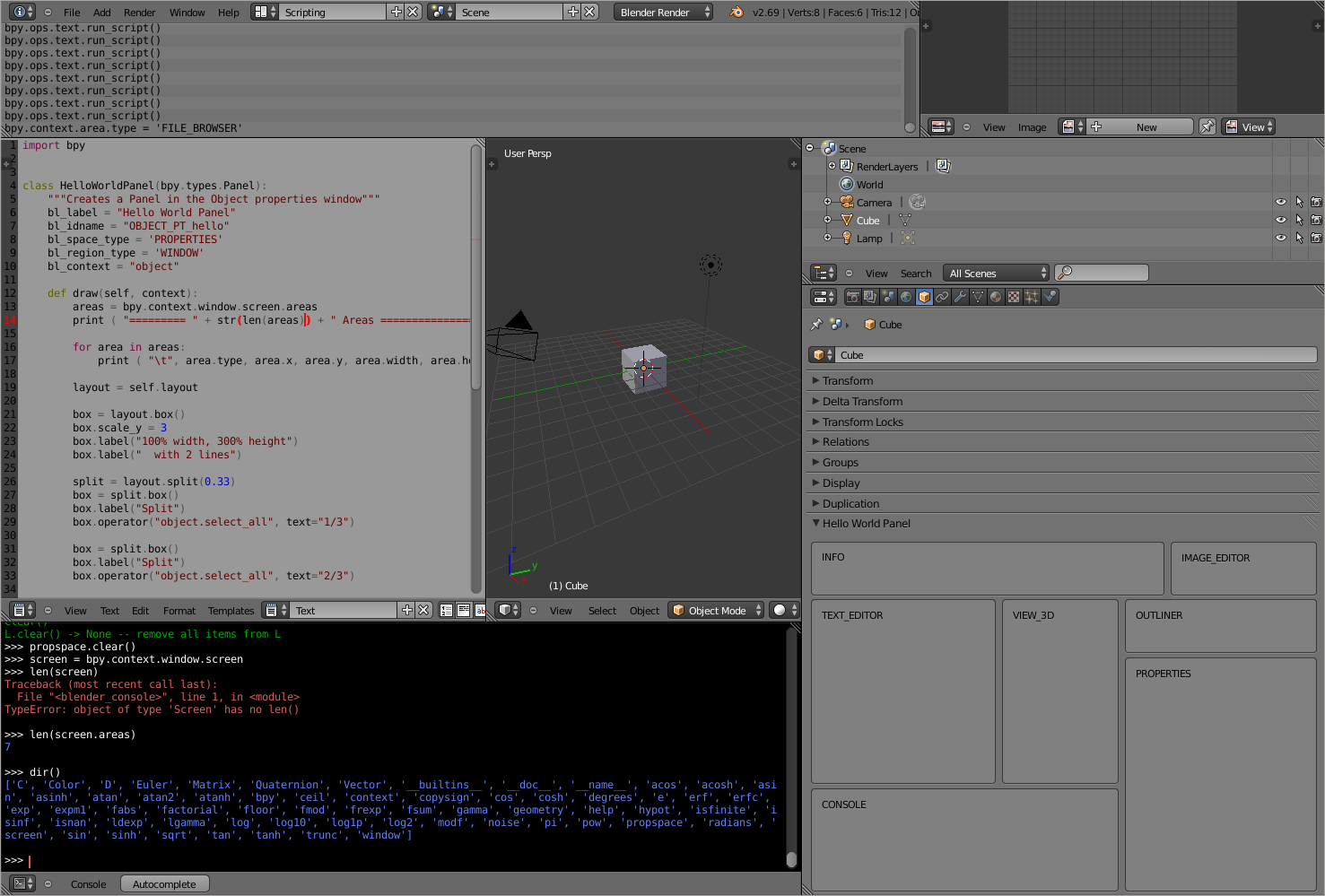
Where “mud” is gold!!

That’s very cool. My experiments were just drawing the names in the boxes, but yours provides an actual selection mechanism to change the area types!!

My hat is off.


Your code is awesome, but I think there might be a minor logic bug.

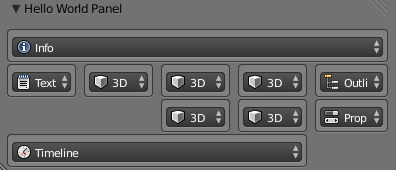
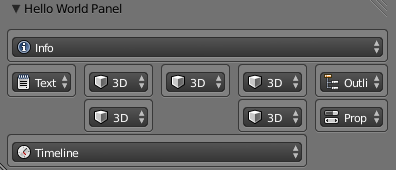
Your test for window lengths and start points doesn’t guarantee adjacency when a single area is split into more than two parts in either direction. Here’s an example (just focus on the 3D views in the center):


Here’s what your program produces from this layout:


But here’s what I think it should produce:


You’ll notice that it was confused because it found that three of the central 3D windows shared the same y coordinate and height (the test you’ve used for adjacency). I think you also need to check that the width of the left window matches the differences between their x coordinates to be sure that they are actually adjacent (and similarly with y and height of course).

Having said all of that, your code is an awesome learning experience for me because you’re doing things that I’ve never seen or done before. Please keep going on this topic!!

Thanks.

P.S. I made that suggested change to your code and it seems to work:

#search for areas that share an edge
while len(areas) > 1:
    #areas = sorted(areas, key = lambda k:(k.x , k.y))
    for area in areas:
        # share a vert edge
        se = [a for a in areas if a != area and a.y == area.y and a.h == area.h]

        if len(se):
            print("may share a vertical edge")
            a = se[0]
            if a.x <= area.x:
                left, right = a, area
            else:
                left, right = area, a
            if (left.x + left.w + 1) == right.x:
                print("most likely share a vertical edge")
                n = box(None, left.x, left.y,left.w + right.w + 1, left.h, left, right, 'COL')
                areas.pop(areas.index(area))
                areas.pop(areas.index(a))
                areas.append(n)
        #areas = sorted(areas, key = lambda k:(k.x , k.y))
    for area in areas:
        # share a horiz edge

        sh = [a for a in areas if a != area and a.x == area.x and a.w == area.w]
        if len(sh):
            print("may share a horizontal edge")
            a = sh[0]
            print(a)
            print(area)
            # left is top, right bottom
            if a.y < area.y:
                left, right = a, area
            else:
                left, right = area, a
            if (left.y + left.h + 1) == right.y:
                print("most likely share a horizontal edge")
                n = box(None, left.x, left.y, area.w, area.h + a.h + 1, left, right, 'ROW')
                areas.pop(areas.index(area))
                areas.pop(areas.index(a))
                areas.append(n) 

I added the test after the left/right swapping so I’d know which way to compare them (left + width == right). I also had to add the “+1” to account for what I’m guessing is the dividing line between windows. I don’t know if that’s something that Blender might change, so you might want to replace that with a range check or other logic to be sure it doesn’t break in future versions.