Enable/Disable manipulator through python?

Hi,

I’m trying to access the manipulator show/hide option through a simple operator, but I keep getting an error.

Here’s the simple code:

 
import bpy
def main(context):
    
    print("Test")

class SimpleOperator(bpy.types.Operator):
    '''Test'''
    bl_idname = "view3d.simple_operator"
    bl_label = "Simple Operator"
    @classmethod
    def poll(cls, context):
        return context.space_data.type == 'VIEW_3D'
    
    def execute(self, context):
        bpy.ops.view3d.enable_manipulator(translate=False,rotate=False,scale=False)          
        return{'FINISHED'}

def register():
    bpy.utils.register_class(SimpleOperator)

def unregister():
    bpy.utils.unregister_class(SimpleOperator)

if __name__ == "__main__":
    register()

This should change the state of the manipulator when it is active. Is there a way to query the state of this button too?
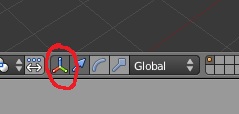

Thanks a lot.

.Gian

How about?


import bpy
def main(context):
    
    print("Test")

class SimpleOperator(bpy.types.Operator):
    '''Test'''
    bl_idname = "view3d.simple_operator"
    bl_label = "Simple Operator"
    @classmethod
    def poll(cls, context):
        return context.space_data.type == 'VIEW_3D'
    
    def execute(self, context):
        space = context.space_data
        space.show_manipulator = not space.show_manipulator         
        return{'FINISHED'}

def register():
    bpy.utils.register_class(SimpleOperator)

def unregister():
    bpy.utils.unregister_class(SimpleOperator)

if __name__ == "__main__":
    register()

http://www.blender.org/documentation/blender_python_api_2_61_2/bpy.types.SpaceView3D.html?highlight=spaceview3d#bpy.types.SpaceView3D

use_manipulator_rotate etc are there too if you wish to control those as well.

1 Like

WOOOO…thank you!