Hi everyone! I’ve been working on an extension that lets you run voice commands in Blender.
How to use
Press and hold Q, say your command, and let go.
Matching system
You MUST say the exact Command or one of the aliases for fastest results. You can also say something like “Go to left view,” and the AI fallback system will usually understand what you mean. However, this takes longer, so using the exact Command or an alias is preferred.
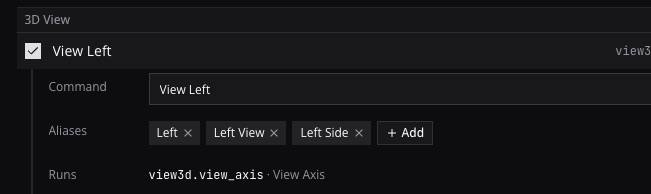
What it’s for
Commands buried in menus, or infrequently used commands. Instead of digging through menus, you just say it: (These are just examples. Depending on your workflow, a dedicated keyboard shortcut might be a better fit.)
Merge at centerBridgeRecalculate normalsFace orientation(toggles the overlay on and off)Cursor to selected- And many more
Adding objects
It’s also quick for adding things: Cube, Monkey, Torus, Point light, without opening the Add menu. Saying Cube and seeing it appear is also surprisingly satisfying.
Adding modifiers
The same goes for modifiers: Array, Subdivision, Solidify, Shrinkwrap, without digging through the modifier list. If the Properties editor is open, it also switches to the Modifiers tab, so you can adjust the settings.
Context aware
It works like Blender’s own shortcuts: it knows which mode and editor you’re in, so you only get the commands that work there. For example, Apply opens the Apply menu in the 3D Viewport, but with your cursor over a modifier, it applies that modifier.
Also useful for
- Keyboards without a numpad. Say
Top,Left,FrontorFrame(frame selected) instead of remapping the view keys or turning on numpad emulation. - Sculpting/Texturing with tablets. Keep one hand on the stylus the whole time, instead of putting down your style and reaching for two-handed key combos.
Is it free?
- The free plan includes 1,000+ ready-made voice commands, with no trial and no credit card.
- There’s an optional paid plan for further customization and for chatting with an AI assistant inside Blender (e.g. for learning without leaving Blender, debugging issues, etc), but I think most people will be happy with the free plan.
Is it slop? (Obligatory in 2026+)
No. I’m a software engineer (GitHub) with an interest in 3D content creation (animation in particular). I’ve been developing this on and off for roughly a year now. Ten months ago I submitted a patch to Blender so add-ons could use the microphone on Mac.
Requirements
- Blender 5.0+ on Windows and 5.1+ on Mac.
- A free account. Speech is processed in the cloud, so no local model competes with Blender for your GPU and memory.
Website: https://exciton.dev/
Extension’s source code: https://github.com/polywock/exciton