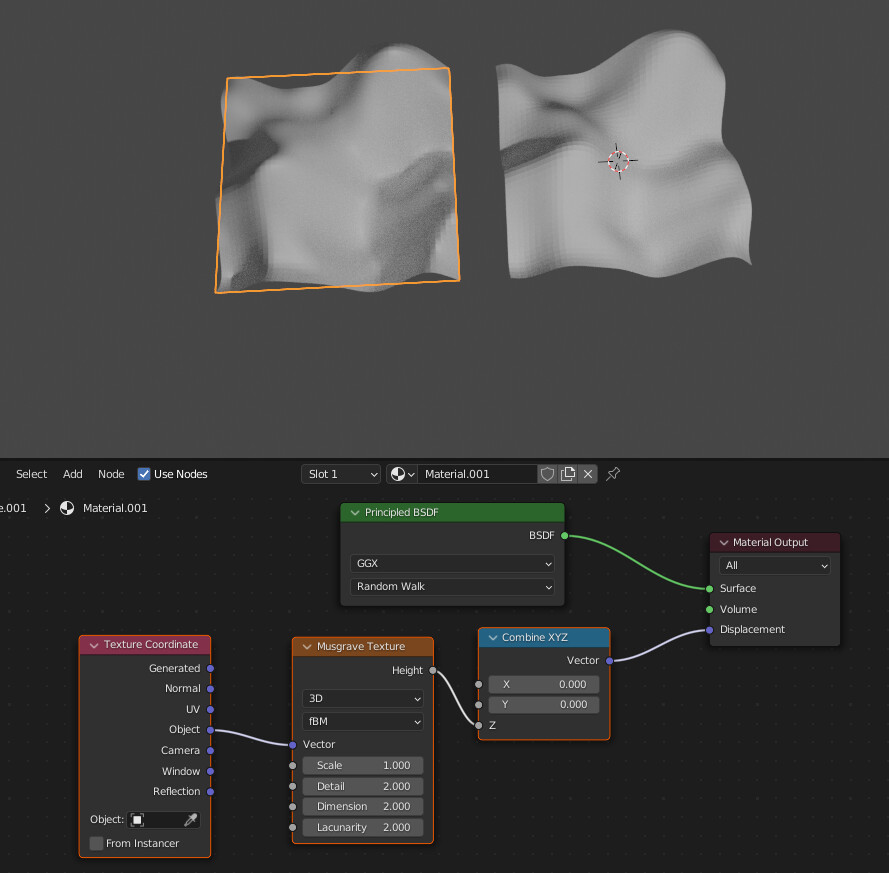
I keep seeing tutorials where unexpected things are plugged into “vector”. I’ve watched A LOT of procedural texture tutorials over the last 4 years but I still have no idea what this input really is/really does/really means.
Also what does it mean to plug in the position attribute to procedural textures in geometry nodes and how is it different or the same as in shader nodes?
If you understand what a real value is (i.e. same as a scalar or float Value) then you’re 90% of the way there. A vector is exactly like a real value, but for more than 1 dimension.
In the case of Blender, which is a 3D (Three-Dimensional) modeling program, vectors are also 3-dimensional - a set of 3 float values representing the 3 dimensions : (X,Y,Z).
Experiment with the Vector Input, Separate XYZ and Combine XYZ nodes to understand this better.
It is the same as using the Object texture coordinates in the shader nodes. i.e. The Object’s positionis its coordinates.
In a pathtracer, every sample invokes the shader microprogram, which will pull up the coordinate at the shading point value and -for instance- use it to look up a specific pixel from a texture. This vector is your coordinate (by default it’s the regular object-space euclidean coordinate), which you can warp, scale, rotate all you want before you feed it into a texture or a shader, so that you can manipulate how it looks.
and playing with with some values in Location you can see it’s “transformes” the basis of the used texture … (indeed the basid of the used coordinate system)…
using Rotation or Scale … well rotates or scales the coordinates used to generate the texture…
So the Vector input could also be named (Vector) Base… (what it is) but Base would also be too short and Vector Base too long
Of course you could use even more math to build up anything you like to project the standard three dimenional space coordinates to anything else… for example some shperical projection
For the differeneces in GN… i know not enough of that… (maybe not so much…)
I was just looking at this the other day, maybe check it out. Under sockets, there is something about the vector input but the whole book leads you through an understanding for shaders… Not geometry nodes but the idea I think is the same.
I think there is some deep but simple underlying math that I just have no awareness off. SO many people just drop a 1 sentence answer and don’t realize these are the same sentences I’ve been reading for years with zero improvement in my understanding.
It’s like when I was in my late 20s and watched Khan Academy and he said “carry the 10” instead of “carry the one” and my brain exploded and suddenly I was able to do basic addition in my head.
I have also worked through the Vector stuff on: https://thecodingtrain.com/tracks/the-nature-of-code-2 a few times over the last 4 years, but this has not improved the fog-of-war in my brain when I look at a vector socket in Blender.
Could you perfectly speak after you hadn’t any milk bottle in your mouth any more… read after going to school some month… and so on…
The Vector input on the nodes is “simply” just some math…
So you have to understand what a mathematical function is so that you can understand that adding a value to a coordinate aka one value in a vector transforms/ move this coordinate/ point in the vector space (2D or 3D space)… ( ← this are all mathematical terms wich do have a meaning)
An of course just some sentences (or videos) can’t teach you math…
(You know that lineare algebra and analysis are two courses over at least 3 years… ? And you need at least the first.)
I’ve seen this several times also but it just doesn’t seem to be the case to me. And I was working on a file to demonstrate what I mean but I have clearly forgotten how to do that effect with geometry nodes even though I’ve asked how to do it half a dozen times on here because I keep forgetting I’ve gotta go find one of the old files where I did it correctly or an old post where someone showed me for the 5th time. This is so annoying. I just can’t get this stuff to stay put in my brain.
I do struggle with math also. Can we say vector is direction + lenght in 3 steps. You want to reach a destination from world origin. Say Y Axis =2 (go in positive direction 2 meters) then X axis = -1 (then go in negative direction 1 meters) then last step Z Axis = 3 ( go in positive direction 3 meters) You reached the destination.
3D Geometry is one of the harder lecture of the geometry.
I can explain most simplistic as I can like this (only for 2D vectors):
You imagine your monitor like a table. For mathematical, transformation of all pixels on your monitor describes with a 3x3 matrix. All pixel of you monitor table describes one vector (XY). When you want rotate this table (image on your monitor) you must multiply each vector value of your pixel with this rotation matrix. Or when you want locate this table you must multiply each vector value of your pixel with this translation matrix. Or when you want scale this table you must multiply each vector value of your pixel with this scaling matrix.
This Vector socket describe your transformation matrix.
I apologize if I led you to believe that I understood it. I don’t I just saw this resource and it looks of good quality. As well as step by step. I have yet to read it. I think I will check out that link though.
Well… there is a reason why every “higher school” up to university have there classical book recommendations which do sum up to hundreds and thousends of books with the title Introduction to Linear Algebra…
(Books… those things which do work without any battery and don’t stop working after an update and
after a while you know where something is written and don’t need and search engine…)
I’m not sure if you even read my reply since you didn’t acknowledge it but know that I also struggle with math, and yet, little by little over the years, and with the help of Cycles nodes, I’ve been able to wrap my brain around some basic principles. For instance it’s important to know that you can read a node tree (geonodes or shader nodes all the same) as a function, knowing that it’s executed for each ray (or for each element in the case of geonodes). The difference this thinking makes is that suddenly you’re dealing with one value at a time, and it’s much more intuitive to understand that trying to imagine what an entire field of values do when they go through a node tree from left to right.
Another thing that helped is learning the basics of programming with Python. Every tutorial I followed lacked something (=expected me to simply understand something that was conceptually out of my reach at the time), so I had to follow several in parallel as well as look up a lot of StackOverflow threads to make sense of some things, but eventually it helped me build up abstract thinking, which I lacked completely before then.
Sorry. Yes I read it. It all feels like there is a full paragraph of meaning behind each piece of terminology that needs to be intrinsic to my brain in order for the full thing to make sense.
I wrote php, js, perl, html, css, and mysql 12 hours a day for like 12 years and it never helped me mathematically until I started doing basic geometry programming in JS on khan academy. Actually starting with one-and-done php instead of real-time javascript did severely limit my cognition and made the transition to real time programming much more difficult than it should have been.
Be careful not to attribute too much “mysticism” to mathematical concepts… as much as people like to point out the many years dedicated to official study of these concepts, you’ll find that most things that pertain to 3D math are pretty intuitive once the concepts “click” (i.e. has some real-world analogue).
I could be wrong, but it sounds like you’ve created a mental block which is making things more difficult than it needs to be… I’m sure there are things you understand now that you didn’t in the past. This is just more of that.
Stay calm, keep experimenting, and eventually things will “click” for you too.
there are multiple pieces of information, all clumped together into one thing.
There is the street number of your house, say 2417
Then there is the name of the street, say Blender Avenue
Then there is the city/state, say Minneapolis, Minnesota
so the full address is 2417 Blender Ave, Minneapolis,MN
With all of that information, you can find a very specific location.
A vector is like that, but for x, y, and z coordinates. It’s a way of bundling related info into a more manageable unit.
I think I know what is confusing you, it confuses me as well so if anyone with more knowledge wants to correct me PLEASE DO SO.
You have to distinguish between a single vector and a vector coordinate system.
A single vector is a point in space that has 3 values and an origin. The origin is always considered 0.
A coordinate system establishes where zero is in 3d space (position and rotation). In the shader editor the texture coordinate node casts infinite vectors from that estblished point to the surface of your object.
All the intersections of these vectors on the surface of your object can be represented by colours.
The intersection that lines up with the x axis as red, the y axis green and the z axis blue. The in between angles form gradients from one colour to another.
The output of the texture coordinate node creates a map of vectors/points.
Vector inputs of nodes read those maps of vectors.
A single vector is not very useful without a coordinate system to establish where it is relative to (where zero is).
You can use it to translate, rotate or scale a coordinate system but on its own it simply gives a colour.
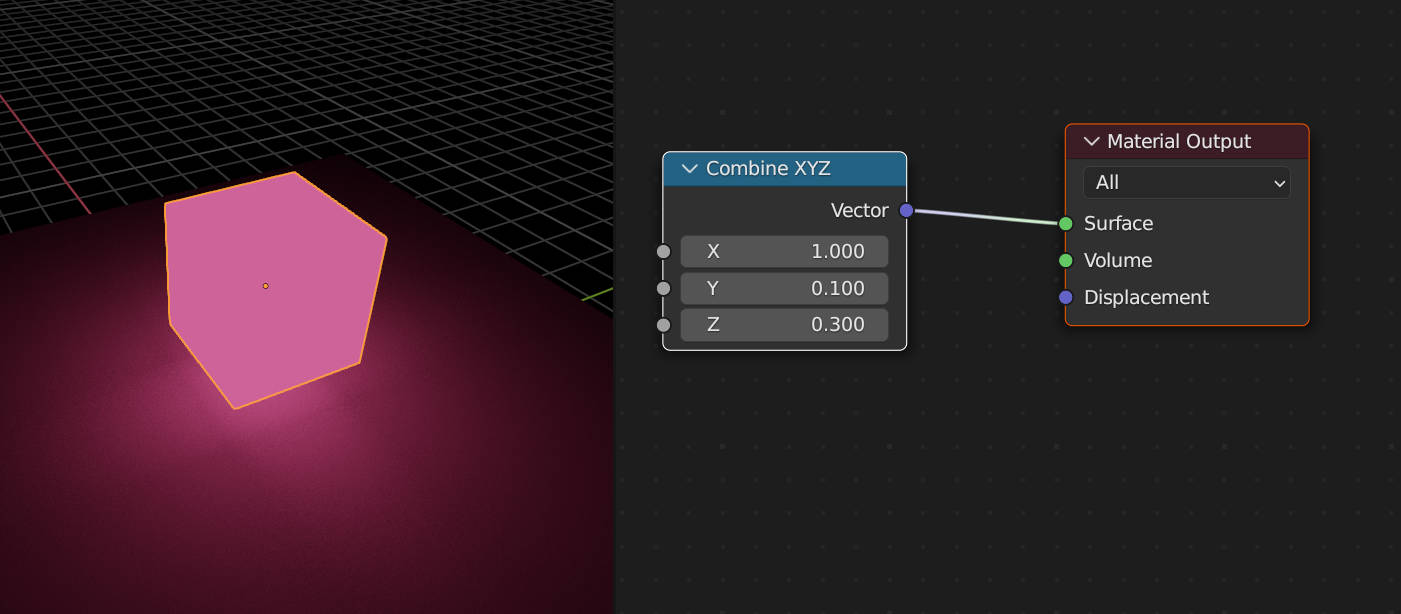
If you place a single vector value into the material output you get a solid emitting colour depending on its xyz values.
The gradients created by a coordinate system are extremely useful as they can be used to map our texture and create patterns by moving there values around.
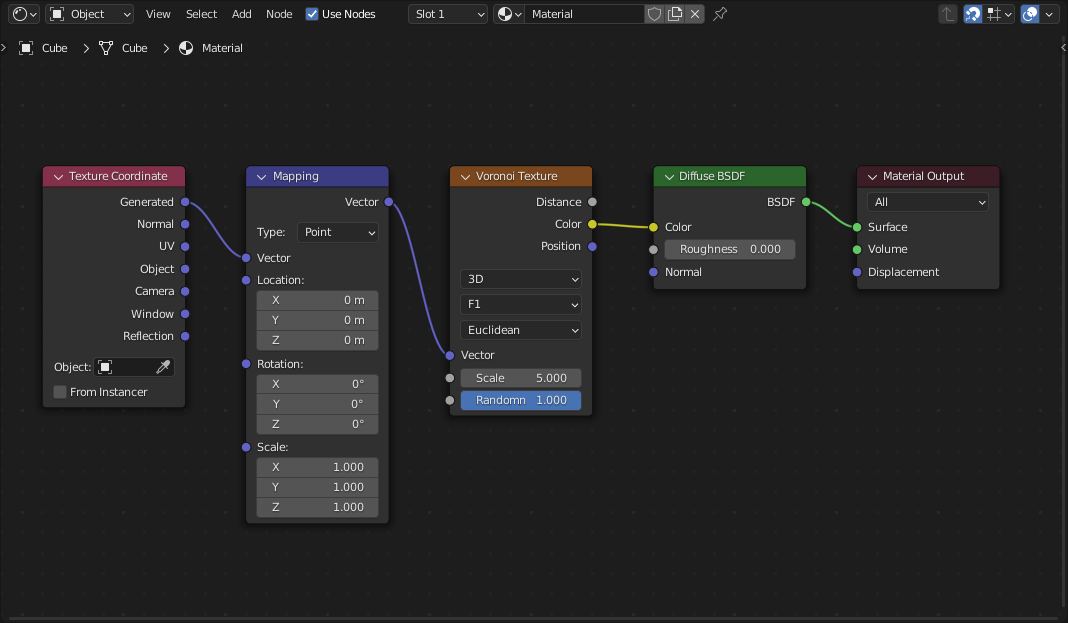
Here are 2 cubes the first one shows what object coordinates look like when used to map a texture.
The second cube has a voronoi texture mapped with those coordinates. I show the node setup of the second cube (the one with the voronoi texture).
The vector input of the veroni texture is reading a “map” of different vector coordinates that in this case go all over the place because I used a 3d noise texture to distort the original object mapping.
I hope I explained better this time!
Erindale has a series of tuts that explain all this very well, but you will probably have to see them a few times for it to click, they are pretty technical but vector maths, procedural textures and nodes are.
First see this one that explains the different texture coordinates.
then go on to these that start to manipulate them:
As a person who isnt really into math, but can work with geonodes, I can say it is easier to understand what certain vector operations are used for, than trying to figure out underlying calculations. Computer will do them for you after all.
For example, subtraction (vector A - vector B) gives you both direction from point B to point A and distance between them. Direction will be (A-B).Normalize (normalize operation makes the magnitude of the vector equal to 1). Distance, in this case, will be a magnitude (a float value) of A-B. In Blender, node for calculating a magnitude of a vector is called “length”.
Another widely used operation is Dot Product (also known as scalar multiplication of vectors). It gives you a float value which measures how much 2 directions in 3d space match. Ranges from -1 for opposite vectors to 1 for parallel vectors. (if you want to use Dot Product this way, both vectors must be normalized) Common use case is mixing a snow material with stone material when making shader for a snowy mountain. You calculate dot product between mountain mesh’s normals and world “Z up” vector (0,0,1), then use it as mix factor in your Color - MixRGB node. Also, can be used to project one (non-normalized) vector on another. Dot Product will equal the projected vector’s magnitude, and you’ll then need to Scale the second vector by it
Cross Product operation is harder to understand; in short, given vectors A and B, it generates a vector C which is perpendicular to them both. There are some hidden rules that determine the order A and B must be placed in, something that has to do with the fact that Blender uses the “right hand” coordinate system. I usually flip vectors (scale by -1) until result satisfies me. Cross Product is used less often, mostly when you need to generate sort of custom coordinate system (normal-binormal-tangent)



 I’ve gotta go find one of the old files where I did it correctly or an old post where someone showed me for the 5th time. This is so annoying. I just can’t get this stuff to stay put in my brain.