Good news, the fix has been committed:
The aliases are now working properly:
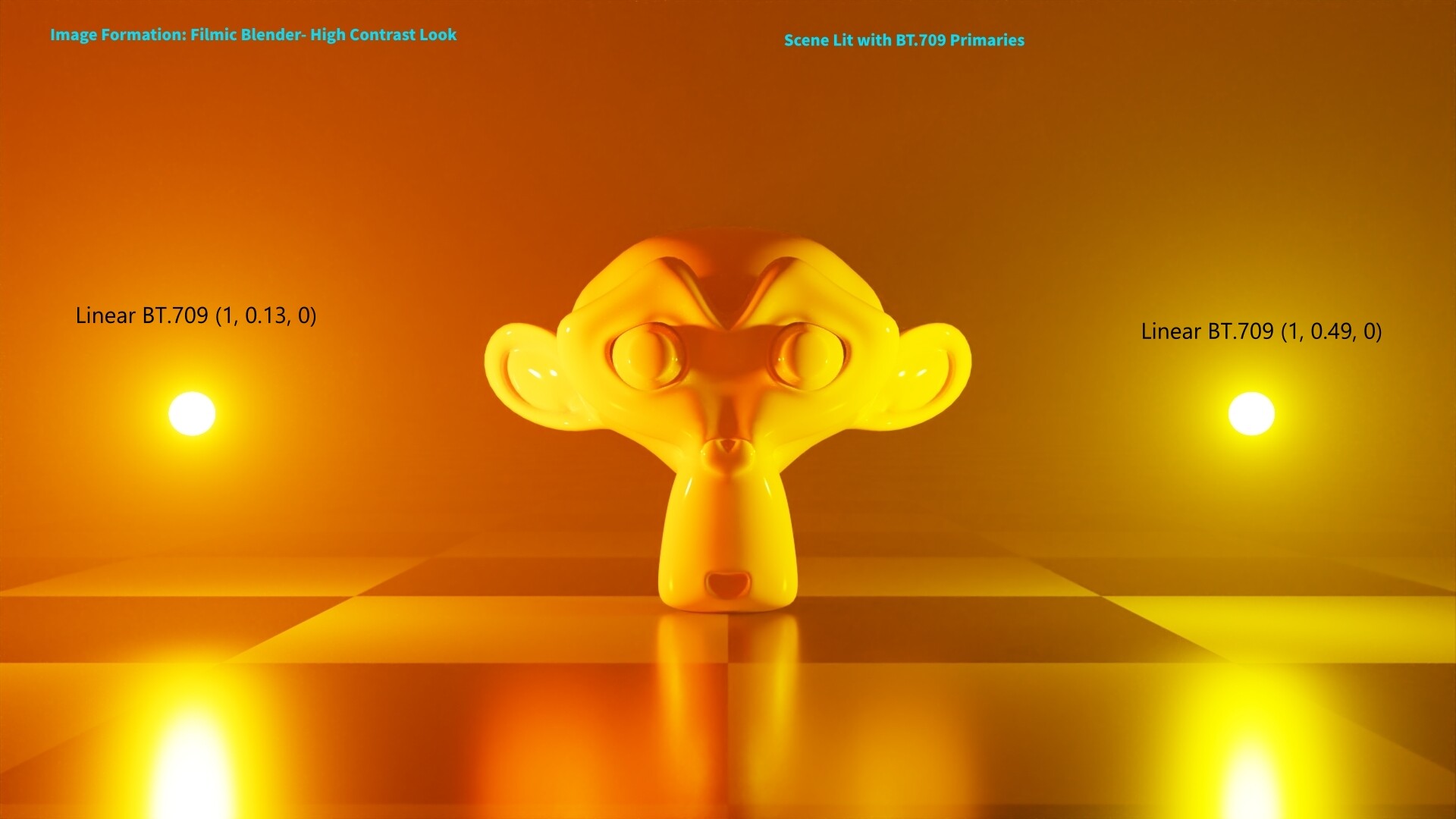
Just made a demo render for AgX, I plan to submit for release notes after AgX merges into official Blender:
AgX Punchy Look:
With AgX you can identify the two lights having different color shined on the monkey.
Filmic High Contrast Look:
With Filmic you just cannot see the difference at all.
Also how has the development been? I see on GitHub a new branch called “OCIOv2 Skeleton”, what is that for? I thought the AgX I am using is already OCIOv2?
Could you overlay the RGB used for the emission shaders in both sRGB and their respective transforms for reference?
Indeed, the digital skewing is much more apparent when values start against the hull.
This was actually by design back then; folks were extremely insistent on something that was basically sRGB-like, and any attempts at more nuanced image formation had tremendous resistance. I believe folks have slowly shifted their creative vantages.
I haven’t had much time other than to push the source code for folks to play with. I was also waiting to see if Blender / OCIOv2 would patch the shader errors on macOS so that we could use the Grading* transforms. Perhaps some of you wise folks could give it a test and see if the shaders still break on macOS with recent OCIOv2 patches.
I believe the Blender community is ready for this, because (for starters) there is now a much better overall understanding on albedo vs. legacy color values (which is a needed topic to discuss if you want to make a good-looking image with realistic color transforms).
To Eary_Chow, I would say go for it and submit a patch.
I think you got it wrong  Troy made AgX, not me… I made a render comparison and plan to submit the render for new feature release notes, the new feature showreel page. I am not trying to submit a patch
If folks expect any sort of useful changes, it will require folks to try and work within the development cathedral.
That’s something that folks like you and the other folks can contribute.
For example, showcasing how a small hackish step such as the inset approach demonstrated with AgX can expose greater creative freedom for Spectral Cycles, as you have shown above, can resonate with the incredibly talented image makers around here in a way that text doesn’t.
Working with the source code to try and generate a configuration can help tremendously here, and establish a working relationship with the developers. Brecht is very capable of appreciating the differences, but he’s also ridiculously busy. Giving him a hand by providing configurations that work and address the general Blender design is a huge win here.
I suspect @claus was hoping for a solid patch of the source “colour” next to the image formed from it as an emission or surface?
Did I get that right @claus?
Hey @troy_s, I’d like to start using the AgX config, but I’m confused between the options in Display Device, View Transform and Look. What should the setup look like? I’m on 3.1.2 by the way. Also, absolutely blown away by the difference between Filmic (and aces) and this. Total novice when it comes to color science, but because of you I’ve become extra receptive to hue skews to the point where I notice it a lot now in many renders lol, so seeing this is beautiful.
Sorry about that. It is one of those things that once you become sensitive to it, it is hard to unsee. Worse, there is so much imagery absolutely riddled with it, that it becomes a sort of cruel experience.
It has always been a goal to give folks enough conceptual frameworks to feel empowered enough to evaluate what they are seeing and be confident about it. Keep at it. I promise it’s not nearly as complex to get interested in the subject in terms of image engineering.
Still the same idea:
The testing configuration uses only views baked with the looks without a separate look selection, as a majority of software doesn’t support looks sadly. As such, it is also more compatible with software like Nuke etc.
Hope this helps…
Yes correct, @Eary_Chow, sorry, should have specified.
I’ve tested this a bunch now and usually find that View Transform → Punchy Appearance (with Look None) is usually the best. “Regular” AgX tends to give rather pale results.
I suspect the situation would be better for AgX if the rendering process was already spectral and the colors could therefore go significantly out of gamut. Especially if such colors could also be input directly.
But either way, this is brilliant. Both AgX and Punchy seem to significantly improve on Filmic.
I tried manually registering both Filmic and AgX in a single OCIO profile but it didn’t work out. Must have done something wrong there.
(The reason for this is ease of comparison. - I know it can be done by rendering out an exr and then processing the exr in two different versions of blender but that’s a bit cumbersome at times)
Could there maybe be a test version that combines both vanilla Blender OCIO config and this new one? Especially now that the OCIO alias bug was fixed?
Another reason for this might be as a legacy option: I’d hope that either AgX or Punchy or whatever you come up with as the end product will someday become the default, but if scenes were built around Filmic, it’d be good to still have that as an option.
I believe the idea of using more robust tonemapping is that once you adjust your materials, you will end up having scenes that are even more realistic than before. From my testing, ‘Punchy’ appears to be a fairly straightforward, yet very noticeable improvement over what Blender ships with by default once the adjustments are done.
I do agree that regular AxG is hard to get rich color from as of now, but it could be that Cycles itself is not yet ready to take full advantage of it (ie. what you said about spectral rendering, then there is wide gamut rendering which I believe would reinvent how color saturation works for starters).
EDIT: Though what would not surprise me, is the idea that if the viewport compositing project allows round-trip color grading and tonemapping from the compositor to the render window in real time (as in, the render is still ongoing), then the tonemapping functions will ultimately move from the render panels to the compositor (which will give a ton of flexibility and power compared to the existing looks feature).
It is probably best to think of the technique demoed in AgX as something that starts from a rather controversial vantage.
A few things need to be made clear:
As such, consider the entry point of the default AgX as the minimum entry point of image formation. The distortion of chroma and intensity are very much still per channel, but achieved in a way that reduces more glaring errors. If one wants to push the formed image outward to more greatly fill the destination medium, they would need to adjust the resulting signal accordingly. This is what the “Punchy” demonstration does.
It is by no means optimal or much beyond a demonstration. The default image formation is the basic shape, and subject to variations as the image maker sees fit.
There should be no reason that this couldn’t work. Perhaps someone in the thread such as @Eary_Chow has already authored such a configuration?
If someone here isn’t able to author it, I might be able to if I can muster up the willpower and time. It would be excellent if someone here were able. I suspect you aren’t far off if you share the configuration on GitHub gists or something?
I don’t quite know how the OCIO format works. Basically all I did was copy a bunch from one OCIO config by hand and paste it into the other. I ended up with having Agx just fine but the old stuff was gone. I don’t think I’m far off. Probably just missed something. But I’m not quite sure why it didn’t end up working.
Even with this being “just a demo”, it’s already a marked improvement over Filmic for sure. And personally I’m fine with incremental improvements. The perfect is the enemy of the good. It can only ever be approximated, I think. And the full extent of shortcomings of any given solution will only fully become apparent once people actually use it.
Oh another thing, is the startup default set in the OCIO somehow or is that a blender setting? Because it defaults to Display Native rather than Punchy when “regular Blender” would default to Filmic, usually.
I suspect that’s just Blender falling back to the closest thing to sRGB because it can’t find Filmic, but if that’s somehow also specified in OCIO, it’d be neat if “the one people most likely want” would also be the default.
And finally, I know it’s just a hack in the face of proper Spectral Rendering but since that now ships with Blender, could there also be a version for ACES? There is one for BT.1886 after all…
The nature of the approach starts with the end point, and stretches the values to fit the destination medium chosen for the primary image formation. In the demo, this is sRGB / BT.709 display as a medium. I have another that uses Display P3, and then takes the image formed and re-renders for sRGB to achieve a base level of colour management.
In the spectral case, and the nature of the primary bit of footprint massaging in the demo, it’s a hard clip. While this approach holds up for all imagery tested so far, there are smaller anomalies that can appear where chromaticities that are along the same angle can get crunched together to create a subtle posterizarion.
If one looks closely at the upper left light projecting through the atmosphere, there is some collapsing near the edges of the lamp. Those values are heavily negative in that region, and as such, end up stacked together in the formed imagery. There are more optimal ways to frame those within the destination medium prior to image formation.
By design. The demo was designed to be more cross app compatible, and as such, the display’s native EOTF inverse encoding is the default.
It literally cannot work due to the discombobulated burning dumpster fire that is ACES, and the confederacy of brain worm riddled zombies shilling it. Anyone who suggests to use ACES, or shills for ACES, is a blinking neon warning sign that they have zero understanding of anything colour related, and should be treated accordingly. It’s a confederacy of dunces.
Looks like a really difficult image. Even so this looks like a massive improvement on Filmic. (Would be cool to see a comparison between Filmic , Display Native, AgX, and Punchy - btw, “Golden” is definitely too golden. I don’t see any usecase for that in particular.)
I guess I don’t actually know the idiosyncrasies of ACES. To me it’s mostly just a set of very wide gamuts and I don’t see how making something for ACEScg or whatever is different than making something for sRGB or BT.1886 or what have you
It’s not that I don’t believe you, I just really don’t know the difference there. So far I’ve heard a lot of grumbling over how ACES is nonsense but I haven’t really seen an explanation for why.
(To be fair, I also haven’t looked very hard for one either though)
That said, I suppose the way ACES is used is usually as an intermediate color space to, like, “have all the information in there” without (or with only minimal) clipping/negative values and what not. So I suppose for that purpose a Filmic of sorts with that as target is sorta pointless. Seems to me this color pushing ought to be more or less the final step of a given compositing workflow
Hahahahah!
Indeed. It is really a tongue in cheek look. The general idea though is how open domain manipulations can’t provide something like that; to achieve a tinting like that, the manipulation must be applied to the image, not the open domain light data. It’s a nuanced take and a rather controversial one, sadly.
Radically different because of the nature of the image formation step. It’s a broken design.
In the vast majority of cases, it simply is not used as anything more than an interchange, largely because most folks are aware as to how absolutely pooched it is. Not that that stops large companies and the Academy from shilling the garbage.
The sole solution is education. That’s the only thing that can work here. The sooner every image maker engages with the concepts, the sooner absolutely broken and unworkable protocols can be kicked to the curb.
Depends on the nature of manipulation.
In the end, the image formation step, and the image that is presented, only exists in the idealized state of the terminating point. So for example, the “Golden” demo tints the actual crosstalked portions of the “interstitial” image; the range of values ascends up to converge on peak display achromatic.
If we apply a yellow grade on the open domain data prior to image formation, the yellow will be attenuated as the crosstalk happens. But this isn’t necessarily the creative goal for anyone seeking a tinting; they want the entire surface of achromatic values tinted.
By forming the image into an “interstitial” state, it allows further manipulations on the image formed. This can also include things like spatial reconstruction (upscaling) which would ideally be reconstructed against the formed image. There are many other facets that require a formed image to perform correctly, such as denoising, etc.
That’s as much as I’ve heard about it. Am clearly not most folks in this matter though
Seems to me there ideally would be some sort of tool that makes such choices relatively easy. If you actually want such an intense golden look, that’s a thing you do in look dev and presumably with a professional colorist or something. Would be kinda cool if Blender had a LUT editor specifically meant for that. I’m sure really cool looks would be possible.
I’m imagining something like, have Punchy as a “default” starting point, and then adjust crosstalk and such with a few simple curves. - No idea how you even build yours. Like, clearly you aren’t manually changing the entire LUT each entry by hand, right? There’s no way you could make it consistent then. There gotta be some sorts of tools helping you along.
It is a nice showcase though, yeah
I indeed have some modified AgX versions in my hard drive, I am just not confident in my modification so I never posted it.
I have been adding back both CIE XYZ D65 from Blender master and CIE XYZ IE from Spectral. I have been trying to use CIE XYZ D65 for file exchange especially spectral files. Feels like it’s rather useful.
Make sure you have their processing colorspace pasted. In Blender master config the Filmic sRGB space and the Filmic Log space both needs to copy to AgX, and then the Filmic luts folder needs to be in the colormanagement folder as well, and the file search path needs to be set to search_path: LUTs:filmic for it to find Filmic’s files.
Notes that you cannot use Filmic’s looks with AgX view, or vice versa, they have different processing spaces, Filmic’s looks are operating in Filmic Log and AgX is in AgX base.