I built an addon that lets you export Blender node trees into a compact text string and import them back again with one click. Its called “Node Runner” and just got approved: https://extensions.blender.org/add-ons/node-runner/
I originally started it in late 2024 because I wanted a cleaner way to share node setups without sending full .blend files around just for one material or node graph. It ended up sitting on hold for a while during a busy 2025, and I recently came back to it, cleaned it up properly, and turned it into something release-ready.
It rebuilds nodes, links, properties, frames, ramps, and node groups, so it works well for sharing setups, presets, experiments, and small workflow snippets without the extra file clutter.
It works with shader nodes, geometry nodes, compositor trees, and other Blender node systems.
Would be cool to hear what people think, and whether anyone would actually use something like this. In my mind it would be super helpful if Blender tutorials would simply paste the hashed string into the comments and I could just copy/paste that instead of downloading a file or recreate it by hand.
You probably know but Nuke works that way and it’s part of it’s strength, you can for instance paste a snippet or your work in a chat for instance.
I can’t really stress test it now but this is definitely something helpful !
This can also in theory helps pipeline TD to automate the creation of nodes without doing it by hand ! If it’s easy to call operator from another script.
That’s definitely true ! Thing is just that there is some kind of a chicken egg problem where the tool needs to be adopted in order to be used and adopted
I think it’s a slow process, first to make sure people know about it, then if it’s solid enough it can become some kind of a standard, like node wrangler !
Even if here it’s a bit more niche
anyway great initiative ! Congrats and thanks a lot for making it available to everyone !
The one thing I suggest is that the copied data be in some form of human readable text - maybe XML. As said above, most comp DCC’s have the node-code human-readable.
And this would open up easier scripting and error-checking.
Yeah that’s such a good idea.
I didn’t think of that because my goal was to make the nodes as small as possible as a string (because of character limits in messages). But I will definitely add a checkbox for that ASAP.
Of course the solution to that is that it should just be part of default Blender.
Given their current move towards an online asset library system, then maybe this could be an option, along with a simple/easy way to ‘cut and paste’ node trees.
The other option would be JSON (yes, XML like), which seems to be used a lot for ‘system’ type stuff and I imagine just as scriptable for a pipeline, etc.
I mean it is open standard and intended for data interchange.
I love the idea. Normally, you can copy and paste nodes between instances of Blender, but only if they are the same version. So copying nodes from 5.0 to for example 5.1 Beta is a nightmare. This solves that problem.
However, I have two suggestions:
I think it would be useful if you included the Blender version in the string/hash. That way, you could add a UI warning if the nodes are copied from an older or newer Blender version.
If there are dependencies, for example images, maybe you could ask the user whether they want to store the absolute path so the image can be loaded.
I think this will become very handy in the future. Thanks for sharing!
Well it’s a complex subject, that would mean two very different way to process nodes to maintain… In other DCC the format used to store data is closer to text data. But as blend files is a memory dump, which is why it’s fast to read / write, it’s more involved to have such option.
At least I think it’s going to take a lot of time to iron this out so I won’t hold my breath on it…
In the meantime, addon such as there allows to test that feature and make some design on how it’s supposed to work. Eventually if this works well it’s way simpler to advocate for something like that …
Anyway, I think devs implemented a way to copy/paste nodes from one blend to another recently… Which makes things simpler at least !
I also think this is a great idea, but I might be biased, as I also built a similar addon One focus in my version was to make the generated JSON small, only storing the needed keys.
Just from a quick test of your addon, there seem to be some things that are not quite serialized/deserialized correctly. I don’t have a more specific bug report at the moment, but I can point you to a test file that helped me quite a bit to find edge cases: https://www.patreon.com/posts/144050634 That is quite a large tree, and also a good performance test. Tree Clipper is quite slow on that file for example, while your version does fine (but does not quite reproduce the nodes accurately yet).
I also have no idea how to overcome the chicken/egg problem, even I don’t want to paste strings from my version somewhere, and tell people they need to install an addon. Maybe the Tree Clipper approach of also having a dedicated website is the best approach for now?
Interesting !! I didn’t know there were already similar tool !
Which is good, but also a good way to add even more confusion, so you end up installing 3 addons to be compatible with everyone…
One way to fix this could be maybe to write actual python code ?
Like the addon write a script that takes either the active GN modifier , active material and creates nodes in it ?
That way you don’t even need an addon to read the file …
But from theory to practice there is a long way
Anyway, @Noah4ever well done for implementing recent changes !
One easy way to do that, would be to just take the json deserializer and bundle it together with the generated json as a single python script. In my version it’s not even that large, and I would guess in any reasonably sized node setup that would quickly be smaller than just generating straight python code to create nodes. This could also just be a mode of the addon, so you only need the addon for copy, not for paste.
Edit: just thinking about this some more, I dislike the secuity implications of encouraging users to copy nodes as code, which should just be data. At least the extensions have a review process, but copying random code, that might even be compressed and base64 encoded for size, and just running it seems very bad.
I’m reading the code right now, this is a really interesting idea.
Just skimming through it. I think you can shorten the generated strings by using a more indirect representation for the links, maybe define all nodes first use the node list to programmatically assign deterministic indices to all sockets, then each link becomes simply a pair of integers. also maybe you can quantize the location of the nodes, you probably don’t need the full 32bit float of the XY coords, maybe compute the bounding box of all nodes and use a relative 8 or 16 bit integer to represent their positions. you could serialize everything as a byte array.
oh wow I didn’t know there are 2 other extensions trying to solve a similar problem. The website approach is pretty smart ngl. I’m actually a fullstack web developer so that seems really appealing
Thank you so much for the feedback @david_for_you. I took a look at the test file and did find out that RGB nodes are not correctly imported (let me know if you found anything else). I fixed that right now and also took the ideas from @Jeacom for making the hash smaller.
I got my own test file from 2900 characters down to 1400 characters. Which is quite a lot I think. Thank you!
I also added a “AI JSON” format which is a stripped JSON and can be given to an AI.
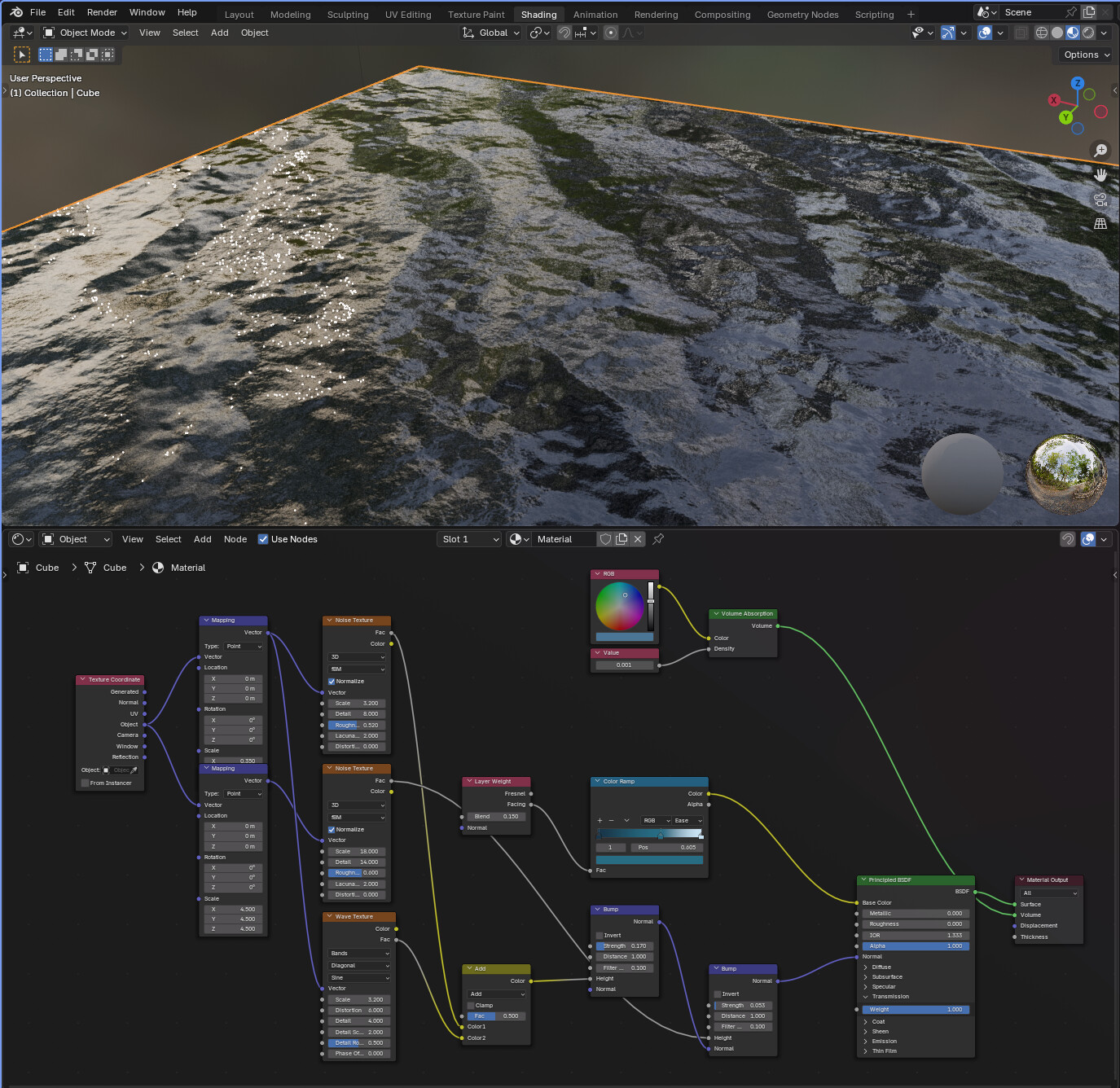
I also created a prompt which can be given to AI to create shaders fast (basic shaders or better a starting point to go from for beginners. The prompt is in the description of the extension here).
To the prompt i just added “Create a realistic water shader” and it created this: