Disclaimer: I’ve created this add-on with the help of Claude.ai - I’m no programmer, but a long-time Blender user, so this at least allowed me to turn a few of my ideas into more or less proper tools to use inside of Blender. There are probably cleaner and better ways to achieve the same things, but I wouldn’t know how to do that. But since I don’t want to make any money with AI-created material, I’m going to release any of these tools for free.
Material Dropper is an add-on I wanted to have to speed up material assignments in large scenes. At first I thought about making it drag-and-drop, but that’s would mean picking up a material each time I’d want to assign it. So I thought of it to work more like a brush or flood-fill, so you pick up a material once, and then you can click on every object you want to assign it to, until you exit that mode again.
The add-on is placed in the N-menu:
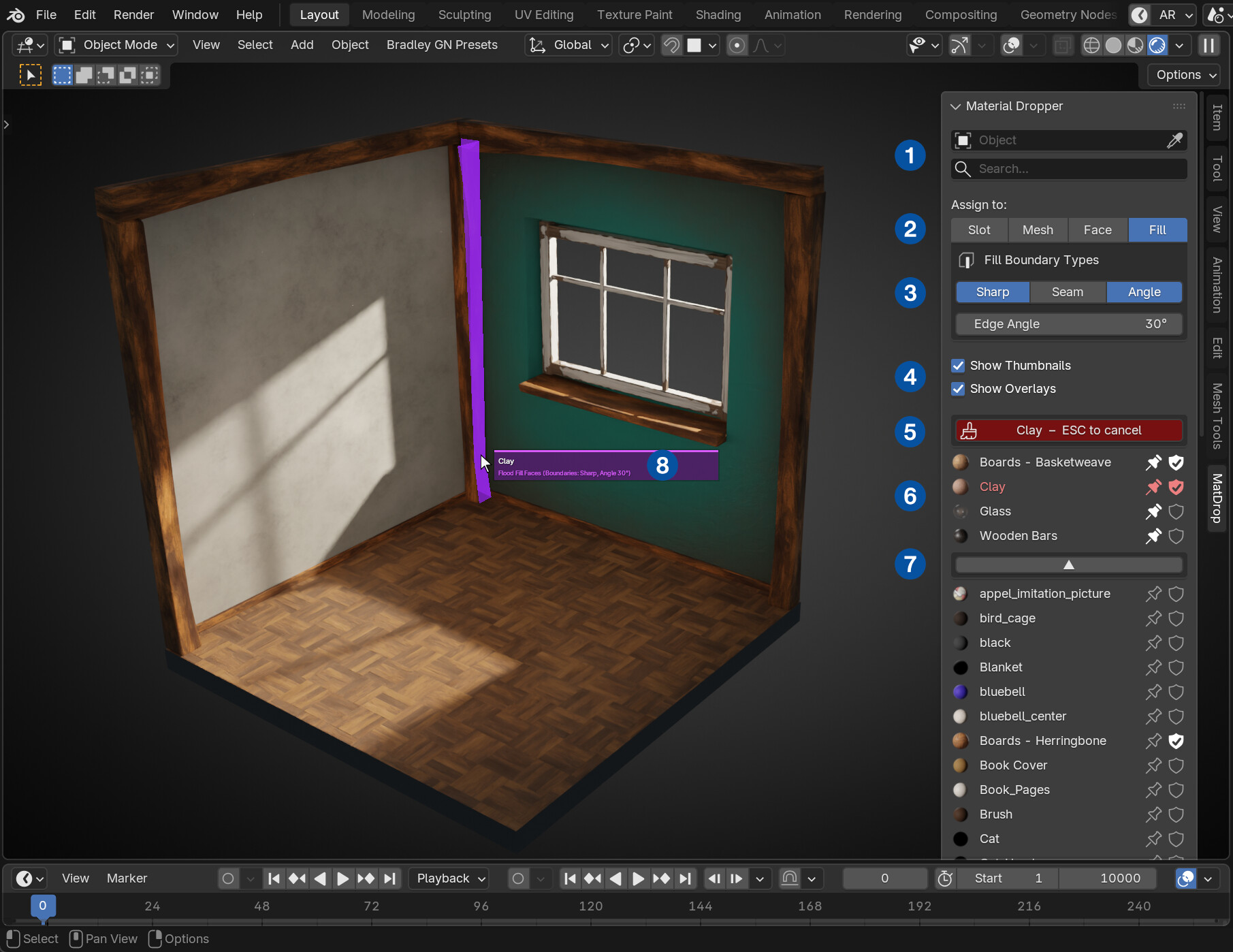
- Filter displayed materials by object and by name (or just show all scene materials, if no filter is used)
- Material assignment can happen in different ways:
Slot: Replaces the material in the material slot under the cursor
Mesh: Replaces the materials in all material slots of an object (but keeps the slot assignment)
Face: Assigns the material to the face under the cursor (adds a new material slot, if necessary)
Fill: Assigns the material to a group of faces (adds a new material slot, if necessary) - Sets the boundary conditions for the Fill mode (multiple can be selected by holding CTRL)
- Show material thumbnails in the list / Show assignment overlay in the view (slow with large meshes)
- The material currently in Drop mode / The last used material
- Materials marked with the pushpin are pinned at the top of the list
- The rest of the material list can be collapsed
- The currently selected material, assignment mode and settings are displayed next to the cursor
Material assignment is using raycasting into the viewport, so doing this in a panoramic or fisheye camera view doesn’t work correctly. Also, the color overlay doesn’t work properly with instanced collections, as it only highlights the original objects, but material assignment still lands correctly. I hope someone might find this useful!
material_dropper.py (36.2 KB)