I have a foot model on which I want to draw lines. These lines should behave as they would in reality, i.e, as geodesic lines. However, I only want to specify a starting point and a direction, but not an end point. The line should then follow its natural path on the model. Is this possible in Blender?
Thanks for your Help! 
Welcome to the forum.
ATM, calculating geodesical fields is not implemented. It’s possible to use Python to create such lines, or even using some external Libraries (i.e. potpourri3d).
But it will still require some amount of code to do it.
Perhaps you could get it faster if you use some other application… I think MeshLab has some functions for calculating geodesical lines and distances, but it has been a while since I last used MeshLab.
You certainly can:


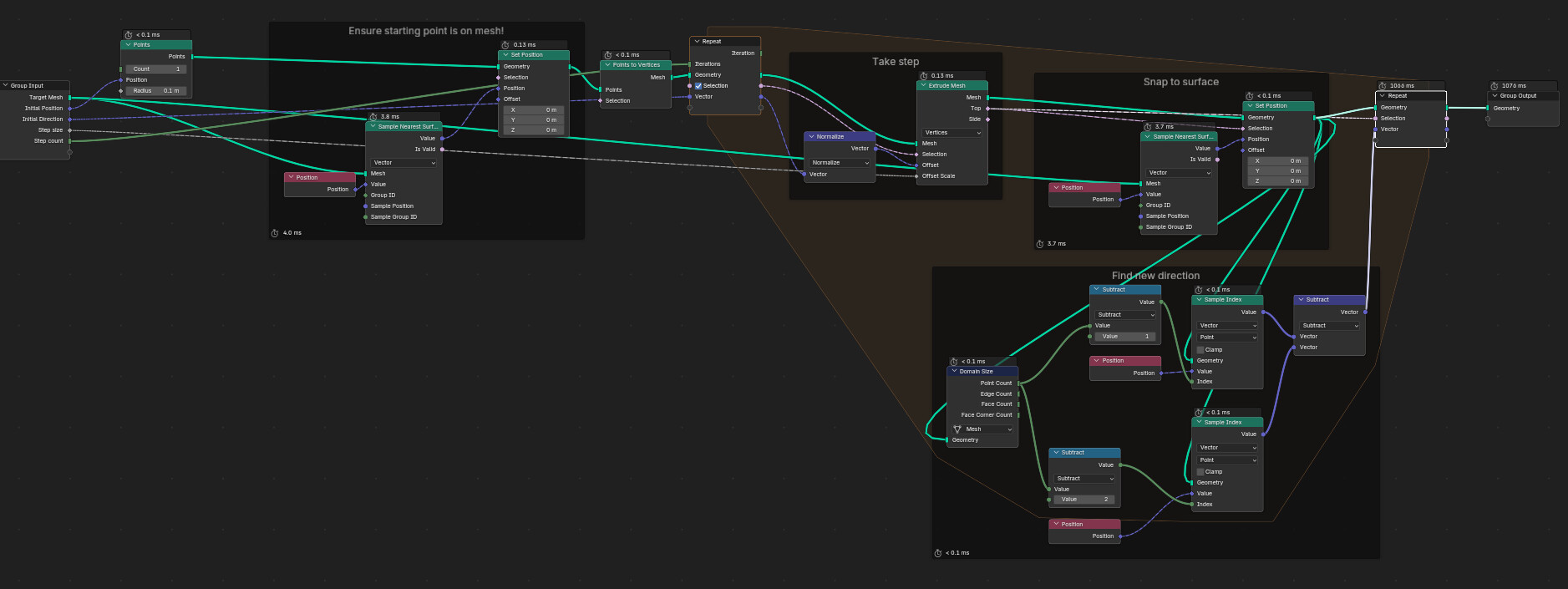
Geodesic tracer - Geometry Nodes - 5.1 - 2025-11-19.blend (138.2 KB)
This works like this: https://en.wikipedia.org/wiki/Geodesic#/media/File:Insect_on_a_torus_tracing_out_a_non-trivial_geodesic.gif

“Initial Position” and “Initial Direction” are the starting point and direction you asked for.
“Step size” is the amount that the previous step’s final direction is projected forward. The shorter this is, the more it approximates a true geodesic, but the more steps are needed for a given length.
“Step count” is the number of steps, so step size * step count should give you (close to: the snapping will affect things) the length of the path.