Hello, I’m new to geometry nodes and could use some help. I’m trying to use geometry nodes to create a sort of “marching ants” effect of instances moving along a sine wave.
I’ve been using several tutorials to help me accomplish this, including this one.
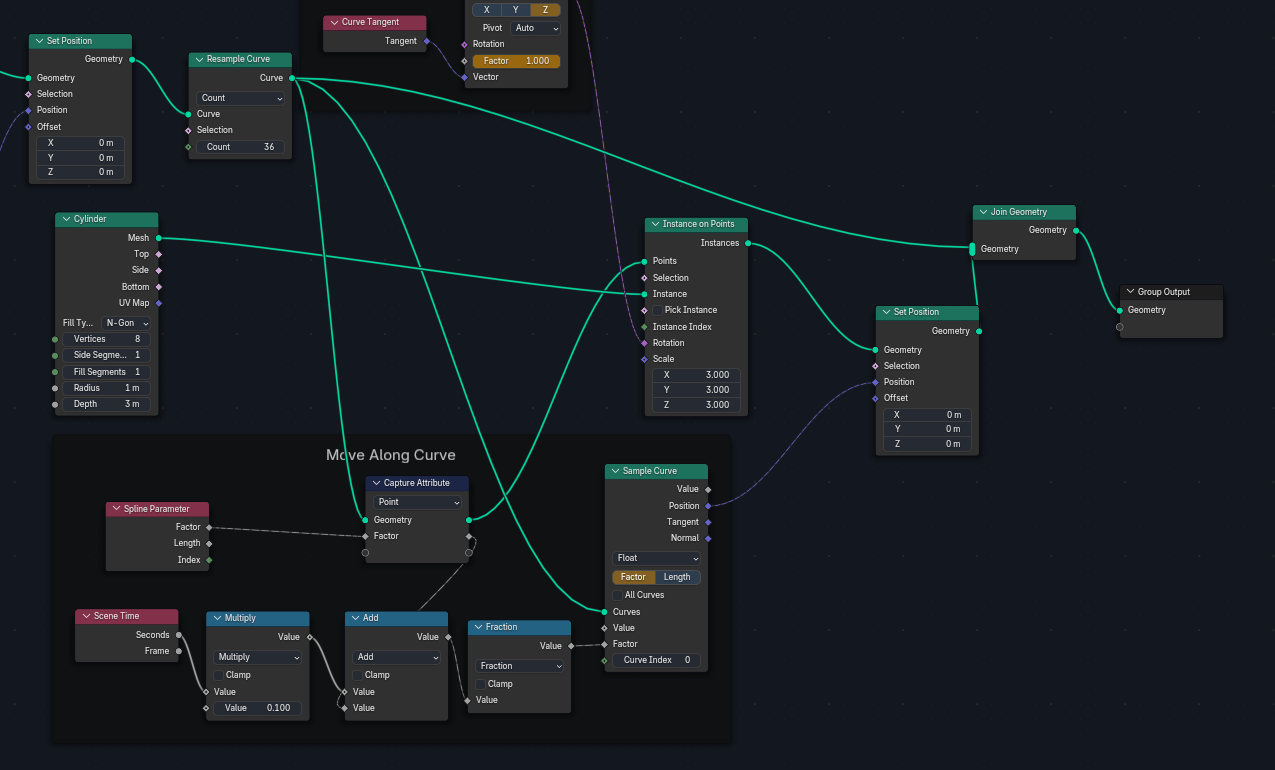
However, after matching the node setup from this tutorial (and connecting the “sample curve” to “set position” node), all my instances move along the curve in the same exact position instead of remaining evenly spaced along the curve.
I’ve searched high and low for how to accomplish this effect, but can’t seem to figure it out. Any help is appreciated.
I wasn’t able to add more than one screenshot to the post. Here is what the instances look like when I connect the sample curve and set position nodes. They all snap to the same position on the curve.
From the quick look, it seems you didn’t place Capture Attribute in the right place.
When you sample from curve, the factor value is taken not from sampled curve, but from points you’re sampling the attribute onto. Or rather, Instances in your case, which inherit that attribute from curve points they are instanced on.
You probably need to move Capture Attribute before “Instance on Points” node instead of “Sample Curve”.
I’m too beginner to fully understand how/why this works but moving the capture attributes node here solved the issue. I don’t know how to get the rotation to also animate with the curve but for my purposes I don’t really need it to. Thank you!
Sample appropriate curve Tangent as well (output just below Position). Then “Align to Vector” just as you did before, and you’ve got a Rotation. You should be able to use it in “Instance on Points” node. Or there’s a “Set Instance Transform” Node if you want to do it later.
Everything will become more clear with some practice Good luck!


 Good luck!