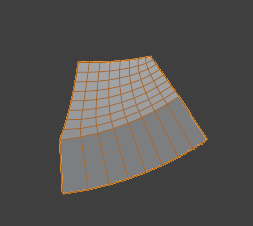
I have a geometry node modifier relatively complex where I struggled to modify the position of each vertex individually.
My setup:
I created a 2D grid with points.
I used “Instance on Points” to create a cube on each point.
What I want:
Being able to offset individually each vertex of every cube of the final geometry.
What I got:
Only the position of the grid points is offset. The cubes are not deformed.
How I achieved the final result.
If I place a “Realize Instances” node before the “Set Position” node, I get the desired result.
My limitations:
I cannot use the “Realize Instances” node because I use a volumetric material on each cube in my source project. Volumetric materials are sensible to the size of the object and the size changes the density and precision. I need to keep the cube size under a certain limit, which is the reason why I divided my geometry into many smaller voxels.
Results:
Below are the results with the geometry nodes modifiers from a test project I created aside of my main project to demonstrate the issue. I feel the vertices are not accessible if instances on the points of an object. However, in my source project, I have been able to modify the vertices positions of the cube, but before connecting them to the “Instance on Points” node.
Any idea about what to do to achieve the desired result without using “Realize Instances”?
The desired effect without using “Realize Instances”:
The geometry nodes modifier. Note: I muted the “Realize Instances” node because I cannot use it in the final project, but activating it shows the desired result.
The object “GN_VertexPosTest_1” is the test main test object. It shows the complex geometry created with cubes instanced on a grid object also created dynamically.
The object “GN_VertexPosTest_2” is a test where I test “Set Position” on an object where the object was already just one mesh and I applied “Set Position”.
With more complex shapes would be better to transform realized cubes and convert them back to instances. There is a node in blender 4.1 that converts mesh islands to instances, but you can do in blender 4.0 too but it’s more complicated.
Thank you for your answer. I’ve done some testing with your solution. It works, but for not all situations. Below, I posted some details about my new experimentation.
I cannot explain why your solution works. Geometry nodes can be abstract sometimes. My new finding highlights other problems that make it even harder to understand.
Here are the details.
My finding:
For the test project, it worked correctly where the values are linear. If I use exponential values, it does not work anymore. In my source project, I was not using your method or approach to connect the “Set Position” nodes, and I also had a different way to calculate the Z position. The voxels represent the atmosphere and are positioned according to the curvature of the Earth (with exponential values). I had two issues happening at the same time.
In the new test project that you can find below, I experimented with different variants on the geometry node setup.
GN_VertexPosTest_3:
Enabling the “Multiply” node at the bottom-left and enabling the “Set Position” node connected to the “Cube” node. The position is not calculated correctly. (Picture 1)
Same thing and enabling the “Realize Instances” node. It’s almost correct. (Picture 2)
GN_VertexPosTest_4_Working:
I enabled all the nodes mentioned above except that I disabled the “Set Position” node connected to the “Cube” node. This is the only way it works with exponential values. In that case, I also added the “Split to Instances” node to allow many instances as this was required for my source project. I consider this one as my final solution in my case. (Picture 3)
Solution:
At the moment, I consider I have a solution with Blender 4.1 and the new “Split to Instances” node. Since version 4.1 is days away from being released, I’ll go with this solution. It works well and the modifier is non-destructible to allow changes in the parameters without having to realize the mesh and break it down after into over 2,900 objects (in my case). More convenient with the modifier intact.
New project:
Here’s the new project with two new objects to test if your interested.
GN_VertexPosTest_3: demonstrate the problem.
GN_VertexPosTest_4_Working: Demonstrate the new solution working with Blender 4.1.
Why would you use exponential values for this? Since your voxels aren’t actual voxels but patches…
Just construct a 5th patch from a dodecahedron (ico-sphere dual):
And then construct it round the dodecahedron:
Cutaway:
This way you only have 1 instance, and it basically just follows from higgsas’ first answer… no realizing instances and then re-instancing them or anything fancy like that… and you can do it in Blender 3.x, no problem.
Thanks for your solution. It seems clever. However, there might have been a confusion with the word voxel. It might not be the same kind of voxels that we’re referring to.
I started with a 2D matrix of cubes (that I called voxels because they are volumetric divisions of a bigger volume). They represent the atmosphere on a section of the Earth where the camera is positioned, relatively near the ground. The whole size is around hundreds of kilometers and the size of the cubes is tens of kilometers in width. I needed to wrap the vertices of each cube according to the Earth’s curvature. In my case, I calculate the position of the ground from the origin (0, 0, 0) on the top of the Earth (sphere).
The reason why it’s exponential is because the formula to calculate the z position (ground position) is related to the sphere equation in the form of:
z = sqrt(r2 - x2 - y2)
The difference seems that you calculate the whole sphere while I just need a segment on the top of the sphere to represent the visible atmosphere to the viewer on the ground. I might use your solution in a different context because it seems very interesting. At least, I have a solution for now.