GPU Memory Management for beginners

Good morning all,

I’m a new user, not strictly an arty person but always been interested in game making, programming, music composition and video editing so always been into what blender could offer (since been a teenager decades ago) I have come and used and left blender several times due to it’s complexiity. A year ago I had some time off work and had a bit of a push and bought ‘the complete guide to blender graphics’ and this got me through the sink your teeth in stage. I am still at the doing basic geometry and shaders level but enjoying it (I can’t believe this is free!).

Anyway, one thing I have to contend with is my own budget - this means a modest PC (ryzen 3600, 32gb ram, GTX1650 super GPU). Whilst my GPU is perfectly reasonable for my modest gaming needs, it has one big problem with blender, not speed, but VRAM. As a modest PC owner I expect my cycles renders to take time, and I’ve sort of baked that into my expectations and will one day upgrade, but I can still enjoy the hobby because I’ll just drink coffee in the meantime. However VRAM is not forgiving in this respect because once you fill the memory space, that is it. It doesn’t slow things down, it just kills you dead.

This hasn’t been a big problem up to press, however I’ve recently started doing a bit of a modest cityscape to go with some music I’m writing, I’ve designed some basic ‘scifi themed’ shops to arrange on a street, and I’ve realised even without going overkill, I’ve filled 3.7GB of my 4GB on the very first shop. This is not going to fly on a streetful, and I’ve used every optimisation method I can think of, reducing texture sizes, linking duplicate objects etc, quite a few videos about it but I’ve not had much success.

So this is coming to the crux of my question - I have 4GB, and a street to populate. One shop is getting me to 4GB. In broad terms even decent graphics card are still in the 8-24GB zone, so selling my soul on a graphics card, even if I could fund it, seems like it wouldn’t actually benefit much because you’d get a few assets down the line and hit the same problem again. At the moment I’ve switched to CPU rendering, slow, excruciatingly so but it does let me render, which is something.

So the question, is my optimisation likely really that bad, or how do the more ‘established’ users who engage in quite intense or ambitious scenes/animations navigate VRAM limitations when dealing with large scenes (without access to a render farm - or is this the trick?).

It’s just food for thought as I’ve always worked on the principle of ‘someday I’ll justify the cost of a GPU upgrade’ however I can’t see budging up to an RTX3060ti with 8gb doing a right lot in this kind of use case.

Thoughts on a postcode? Do excuse me if I’m missing fundamentals…

3 Likes

Couple tips if you want to push your polycount higher:

  • use instances, either do them manually or with geometry nodes
  • objects in the distance can have much lower polycount than those close to the camera
  • reuse textures as much as possible and differentiate them with shader nodes

And most important - start looking for a GPU on a second-hand market. Don’t know your budget but 8GB cards can go pretty cheap. If you are dedicated enough you can find 16GB ones for a good price too.

2 Likes

And that’s why I got 64GB of RAM and a 16GB AMD GPU :grin:. I’ve been in the position of running out and I hate it.

Depending on the scene, I may split it up to foreground, midground and background blender scenes then render them separately and composite it together.
Check your subsurface modifiers. Geo can take up a lot of memory.

One trick I heard of but I haven’t tried yet is Channel packing. You put your Roughness, AO and Metallic on one map but assign them a colour channel. So Red for Roughness, Green for AO and Blue for Metallic (I think that is the standard order). There is a node that will let you split up a texture into its RGB components, so you can access them as if you’ve directly loaded in those textures. You get 3 textures for the price of 1.

Edit: A better link
http://wiki.polycount.com/wiki/ChannelPacking

1 Like

Welcome!

I have a few ideas of what might be happening.

  • You are using linked duplicates and that is a good idea. However, you should make sure those linked duplicates don’t have any modifiers on them, or it will cancel their memory saving effect.

  • Be wary of adding subdivision to objects, as each level will increase their memory use exponentially. If you are making an entire street, you might benefit from using lower resolution models (made to be used without subdivision, modeled directly to their final look).

  • If you are using displacement anywhere in the scene, use bump or normal maps instead anywhere it will make little visual difference.

  • Have you used sculpted objects anywhere in the scene? If yes, they are likely very high in resolution. In that case, you will need to learn to decimate and bake their detail to textures.

  • Do you have multiple materials that use the same textures? If yes, make sure the texture nodes in the material editor are actually set to reuse the same texture. If you have loaded the same texture multiple times, that would consume memory for no reason.

Beyond that, It would be useful to see an image of the scene to better know what the problem might be.

3 Likes

Well, it’s true that 4GB isn’t a lot and you get quickly limited. I actually switched from 3GB to 8Gb GPU a few years ago and while it’s not the fastest I don’t feel limited, but I don’t do massive scene either.

From there, it’s possible to do a lot of things to optimize, but it also asks for a good knowledge of 3D.
The low hanging fruits are textures :

A 4096x4096 8bit RGBA image will use 64Mb of memory. 8k = 64*4 = 256Mb
Checking texture size and make sure they aren’t too big is probably going to save a bunch of memory in many cases.

If you use PBR texture sets, it’s possible to remove Roughness map and tweak the color with a coloramp instead.

If you use grayscale image make sure they actually use only one channel, 4096 RGBA = 64Mb, 4096 BW = 16Mb of memory space.

You can use the simplify panel to test different texture size and see how they affect your render :
image

Then the next area to look into for optimization is geometry, but since it got a lower memory cost, there generally less resources to save there, but still it’s possible.
As said, make sure each duplicated object uses the same mesh, especially if they are heavy.

You need also to find what is really heavy in your scene. For that divide the scene in manageable collections, like 10 /20 or so…
Take a pencil and paper, render each of them separately ( by disabling other collections) and write down the peak memory for each of them.
Do another render with overriding the material with a simple texture less material :
image and write down the peak memory.
That way you have an estimate of the geometry and textures for all the collections. These renders can be low sample and resolutions so they are fast to produce.

Once you’ve done that for all collection, you should know what is the biggest memory drain.
This is super important since most of the time we blindly optimize irrelevant stuff. If something take like 12mb in memory, your best shot is to save only 12MB, however, if something take 1Gb it’s very possible to cut that into half in most cases, which will save 500Mb in one go.

So you know where to find heavy stuff, try to find the objects / textures / particle system responsible for these high numbers. Do some changes and render again, take note on how much space you manage to save. And do that until you get back to something good.

TBH filling the memory is something that appends from time to time with heavy scenes, most of the time it took less than a working day to get things on track, but it’s a bit long and you need to be well organised to do that efficiently.
Many times, there are always low hanging fruits like 2/3 super heavy meshes out of 100, same with textures, that can be safely reduced, but it takes time to find them.

If that’s not useful, maybe post a few images / renders of your scene so it can give more ideas !

Good luck !

7 Likes

Thanks everyone for the responses, some of it makes a lot of sense (especially the exponential memory consumption of textures), some of it is interesting as well and I’ll have to concede some of it has gone over my head also so I’m going to have to take some time and process it.

From what I’ve seen though, and looking at the actual quality of what I’m producing (which isn’t all that) I do think we’re looking at a case of the problem being 80% optimisation and 20% graphics card - bit of both but I probably do have a lot of optimisation problems.

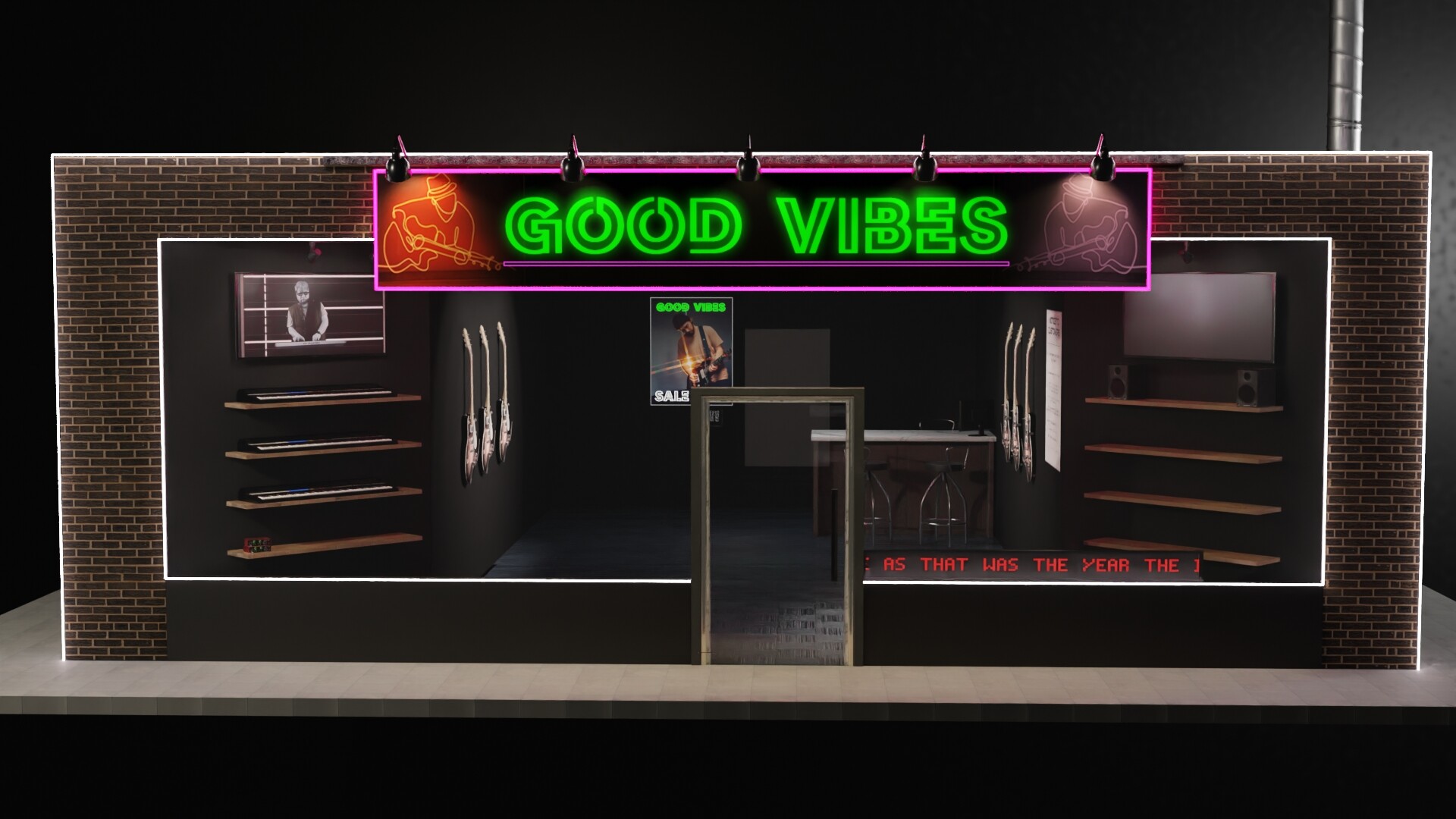
So, an image of the scene was requested - not a problem, just don’t expect too much it is literally me ‘just having a go’. I think targets for reducing texture size will be the assets ‘within’ the shop, chairs, guitars etc, because everything else is basic geometry. Yes that is me on the TV haha, it’s actually a movie clip (only a few mb)

In terms of GPU I will get an upgrade on the pipeline, though it’l probably be a 12GB RTX3060 i think, i know faster si acheivable but prices are slowly coming down and it idoes give you a bit of VRAM headway even though there are faster 8gb cards out there

1 Like

Looking at this image, I would not expect such a simple scene to even reach 1 gb of memory use. I suspect some object in it must have a problem that makes it heavier than it should be.

I would make a copy of the .blend file and try deleting each object one by one. This would allow you to see if it’s one thing in particular that’s in cause.


By the way, this is likely unrelated, but there seems to be a problem with the brick wall. On the right side, you can see the bricks have a black triangle pattern in them. This looks like the kind of problem caused by overlapping geometry, like you might have duplicated some faces by accident. it could also have other causes, but it’s likely a modeling problem or messy geometry.

3 Likes

Haha I have been caught out, i was hoping nobody would mention the brickwork.

Basically it’s my lack of skill coming forth- I have made the shop out of a cube by hollowing it with a smaller cube (boolean operations for the win!) , however have now the issue of texturing the exterior properly, in this scene I’ve effectively wallpapered it with a new mesh hence the collision where they are in contact - the real solution here is to get my book blender book out and remind myself how to wrap textures against simple geometry properly.

I could have modelled the shop in something like solidworks and exported it into blender or modelled it directly without modifiers, I am unsure if this would provide a performance benefit.

Yeah, I’m a newbie :frowning:

1 Like

The wall is probably not a performance problem in this case, only visual. The polygons are messy, but there are likely few of them.

1 Like

The combination of GPU memory and shared GPU memory (part of the system memory) enables 4Gb VRAM to perform more than a certain amount of work (lendering is a little slower)

However, for quick work, the preview should not exceed VRAM.
(By covering unnecessary objects, etc.)

I’m working on 3Gb VRAM.
There are a lot of inconveniences :slightly_smiling_face:

3 Likes

Amazing ! your work definitely showcase how much we can put into these 3Gb even if that’s not super convinient !

2 Likes

I am not entirely sure what you’re getting at here - are you saying there are ways and means of sharing memory?

I wanted to tell a beginner that 4Gb of graphics memory is not bad :sweat_smile:

As the specifications are low, you pay attention to optimization and manage memory.
These experiences will help you later.

However, if the scene is large or you plan to do animation, buy a graphics card with high memory.

1 Like

Ah with you.

I do like the idea of doing what I can with what I have, whilst my computer system right now isn’t ‘grand’ in terms of what money could buy today, it’s actually quite reasonable for gaming, CAD work, music production and video editing. It really isn’t a bad machine, everything but this considered. I’d still grab an RTX3060 at the chance though :slight_smile: but I probably wouldn’t go overkill either because it’s diminishing returns for extra money.

1 Like

While latest GPU’s would be a glorious thing, if there is anyway you can manage it, getting a 3060 sooner rather then later would be a good idea.

Trying to use Blender and render with Cycles (and to some extent even Eevee) with only a 4GB GPU would just drive me nuts. Sure you can try all sorts of tricks, etc to push that little 1650 as far as you can, but at the end of the day, if you really have any plans to stick with Blender and try to make the most of it that you can, then all you are really doing is just holding yourself back so much.

The CPU is fine, the 32GB system RAM isn’t a problem, but I can promise you the difference between a 1650 and a 3060 for Cycles rendering is just TOTAL night and day. It’s not just that the 12Gb VRAM will let you do SO much more and serve you well for a long time, it’s those RT cores and being able to render using OptiX.

I’m not even talking about final renders here, the first thing you will notice is just how much faster you can adjust and iterate all your shaders to see the effect that making adjustments to values and sliders is really having on your render.

With denosing nowadays, even 150-200 samples can give you a very good idea of how things look. Now you may think doing that now and seeing the result in 20-30s on the 1650 is pretty good and you can live with it.

But it’s when you can see that same result in 5s that your world does actually change. Where before you knew the length of wait time, your mind may wonder, or you go to check a website quickly and then once done start to refocus.

With a 5s quick preview render, you stay totally focused on what you are doing, there’s no point in thinking or looking at something else, since by the time you ALT-TAB away, the render is done. This makes you more productive, you are way more likely to test things out, try variations and explore stuff you likely wouldn’t have otherwise. Which in turn drives faster progress with Blender, better results, making you want to continue and do more, etc, etc.

Yeah, I know, it sounds like I’m really overselling a simple GPU upgrade, but if CG and wanting to create ‘stuff’ really drives you, then a 10x speed up in GPU performance (which going from 1650 to a 3060 is) actually will change your life.

  • Yes I am available for the motivational speaker circuit :laughing:
2 Likes

Don’t apologise for upselling a graphics card upgrade, if the benefits are stark then I’m happy to try and pin it as an action point. It’s been at the back of my mind for a while, the main reasons for sitting on it are:

  • Price of GPU’s have been ridiculous, I built my machine just before the pandemic, and there have been times I could have sole my GTX1650 GPU second hand for a profit over what I spent on it. RTX? Forget it, but these prices whilst still seemingly inflaeted are coming down now, and whilst I’ve had the RTX3060 favourited, it used to be in the £400’s, now there are times it’s in the upper £2xx’s. Still need to save up, but i’ve had the 3060 on my favourites for over a year and in a way I’m glad Ive been waiting as the covid premium has been completely insane.

  • I need to be sure I’ll get value from it, I’m still unsure how good I’ll get at this blender animation/cgi thing, I’ve gone as far as setting up a small greenscreen in an unused corner of my unit, but I don’t know how good I’ll actually get to be and a bit concered about investing hundreds only to brick wall further down the line. Might just be a false concern but it’s been one of those things the longer I manage without it, if I keep going when the time/opportunity does come the easier it’l be to justify the outlay.

  • ultimately GPU isn’t the only expense as I want to mix it with photography/video somewhat so there’s also a reasonable camera to budget for too :frowning: somewhere down the line (using a gopro at teh moment and its putting in a valiant effort). Good example of this is setting it up on a hill in timelapse mode to record footage that can be used for skyboxes in blender etc

It is very tempting though, I’ve had the GPU offers page of my local retailer bookmarked for months :smiley:

So I spent the evening optimising, reducing texture sizes manually etc etc etc - I find blenders behaviour a bit odd because at times it dropped (even in viewport shading mode) as little as 1.3gb then suddenly for no reason it’d side at 3.7gb, so it’s been hard to measure the impact. However in general terms I managed to get it to average out about 2gb.

I’ve since added some detail and it’s crept back up, I’ve fixed some issues and whilst I still need to finish the brickwork it’s looking, I’m sure you’ll agree, a bit better than before. Though I am really on my limit now, I’m getting errors about half the time for GPU rendering.

If it really has to be a better GPU then fair enough, I’m just aware I wanted to make quite a few buldings in this scene and if one is killing a 4gb card, then an 8/12/16 isn’t necessarily going to hold up well is it :frowning:

So I might still need to learn better optimisations.

1 Like

Yes and no. If every building is all unique and detailed geometry, along with totally different textures for each one, then it all starts to add up. But if you start to duplicate some as instances and reuse various image maps here and there and you can fit a lot in 12GB VRAM.

There’s a general theory that you only need 7 different things, which if random mixed up, no one will notice any patterns or that it’s just 7 things endlessly repeated.

Hi there! With Split Render Tool add-on I’ve managed to render big scenes with low GPU memory. It splits the image into tiles, and merge them automatically (no user interaction needed).

Demo: https://oliviercrespo.gumroad.com/l/SplitRenderTool_DEMO

Documentation: https://github.com/OlyDJ/SplitRenderTool/wiki

Video: https://youtu.be/YtLWObFs2yU

Thanks for the replies everyone :slight_smile:
@Oliver, that looks interesting as a a bit of a workaround until new GPU time, thank you. I like the idea, technically it’s working on the workaround rather than solution principle but if it works well what it does is make blender more accessible to those without monster rigs. That’s a good thing. :slight_smile:

@thetony20 - you’re probably right on the psychology front, it sounds daft I may be working too hard, for the end animation we won’t be zoomed right in on the building anyway, it just wants to look interesting and dynamic enough to not look awful :smiley:

Tell you what I have done over the night, is I’ve looked at potentially using google cloud (which work made me do a course on) to set up render instances, obviously not free but when it comes to doing a full hardcore full resolution detail cycles render that might be an option, as I imagine even an RTX3060 could take a few days doing hundreds of frames and might save me trying up my pc - though this would only be viable for final renders.

I’ve also looked at sheep-IT, this is a community based distributed rendering effort and that seems really good as well. Again, for the final stuff.

I still can’t beleive this software is free. I could study it for years and still not have a clue what its capable of.

1 Like