I’m having issues with the gpu render, not sure what I did but now everytime I render an image on my current file it comes out with all sorts of texture artifacts, the scene works fine on viewport render and CPU render comes out without artifacts at all but i dont wanna use the CPU it because its slow. Already checked for backfaces, duplicated geo, z fighting, tried moving everything to a new scene and I still dont know what’s causing this… Does anyone had this issue before? How did you manage to fix this? Thanks

Welcome  ..
..
Quick thought:
Sometimes people change for example CUDA to OptiX or vice versa.. also only using GPU and not CPU+GPU mix..
(And the usual question: Actual drivers ?? .. OS.. etc.  )
)


Whow. Strange effect - never had such an issue!
Do you use UDIM Textures?
What file format do the textures have? Did you try an other file format?
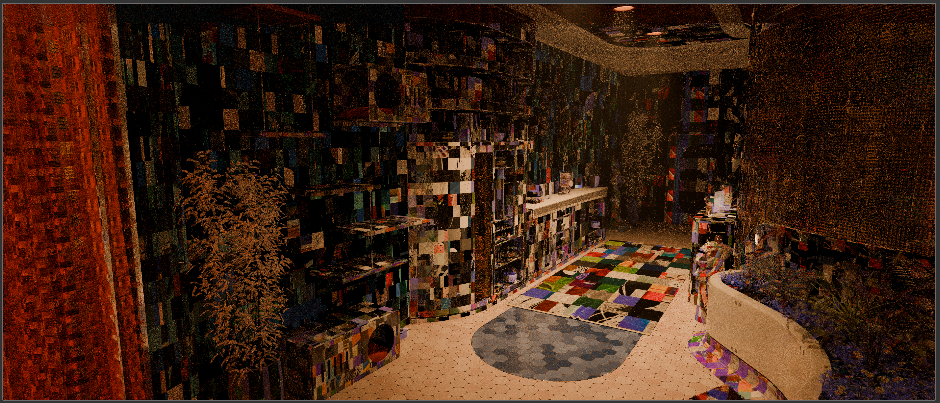
im not really versed on UVS and all, just enough to make the material work so Im not sure how ot trouble shoot that
After seeing the second image: could this be overlapping geometry or Z-fighting ?
..and the GPU just select it differently as the CPU ??
Yeah, i’ve search for duplicated geo that could cause this but didnt found any, guess I’ll have to manually move things and do render tests until I find the culprit…
UVs was just a guess. It reminded me a bit of a texture that consists of mulitple images / tiles (like udim) and that is projected incorrect. (but: it should be the same effect when rendering with CPU. It was just a guess…)
How does e.g. the diffuse texture of the corrupt carpet look (screenshot)? How does the UV look (switch to UV-Tab, select the carpet object + make a screenshot of the UV Layout.)?
I FIGURED IT OUT! It was the texture cache messing up everything, once I turned it off the ender worked as usual again. 