7 Likes

1 Like
Commit keys you like by baking them in!

Multiple Layers. Multiple Strokes. Buttery Smooth.
1 Like
Now available on Superhive (formerly BlenderMarket):
https://superhivemarket.com/products/grease-pencil-auto-interpolate
Working on some exciting new features for Version 1.3  . The idea i had was to automatically create organic, smoother transitions that feel less robotic. Working nice in testing!
1 Like
Version 1.3 Beta Released. Test the New Dynamic feature to get organic motion arcs between Keyframes!

1 Like
Now with Bezier stroke interpolation support, you can seamlessly animate SVG files and vector artwork like never before. Whether you’re bringing imported graphics or creating smooth transitions between complex curves, this feature opens up a bunch of animation possibilities.
Make your vectors dance! 
1 Like
Blender 5 Adds “Pen” Tool for Curve Drawing in Grease Pencil. Game changing!!
Version 2.0 is HERE! Completely rebuilt from the ground up for faster performance and more possibilities!
3 Likes
v2.0.4
Added static linking for Linux cross-distro compatibility (Ubuntu/Arch/CachyOS/Fedora/etc)
 GP Auto Interpolate v2.3.0 - What’s New!
 Auto-Link (One-Click Matching)
Don’t want to manually pair everything? Hit “Auto-Link” and let the algorithm figure out stroke correspondences for you. 
 Manual Link Mode
Select any two strokes across keyframes and pair them exactly how you want.
The matching algorithm doesn’t require you to manually link every stroke - For complex cases, you only need to provide a few manual hints and the algorithm will figure out the rest! 

-
 “Manual” Button - Enter link mode to start pairing strokes
 -
 “Link” Button - Connect your selected stroke pair
 -
 “Unlink” Button - Remove a pairing you no longer need
 -
 “Done” Button - Exit link mode when finished
 -
 Orange overlay to show which strokes are paired together
 LineArt Import
Turn your raster drawings into Grease Pencil strokes!** 


Whether scanned drawings, photos of sketches, or digital raster art - Go to File >>> Import >>> [GPAI Line Art (.png, .jpeg) and get them converted directly into editable Grease Pencil strokes!
2 Likes
1 Like
v2.3.2
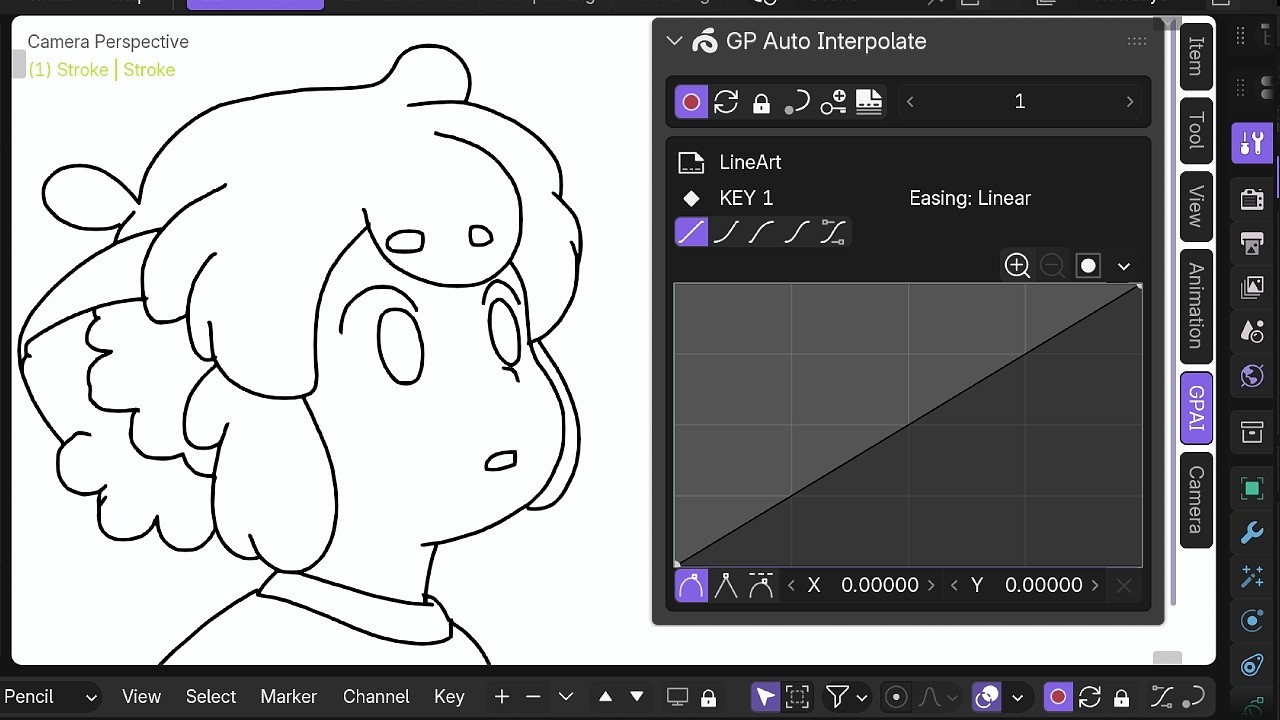
Custom Easing Curves
- Draw your own easing curve! Click the easing button, select “Custom”, and shape the curve exactly how you want.
 Layer Filter
- New lock button lets you choose which layers to interpolate. Exclude background layers or anything you don’t want processed.
Improved Correspondence
- Stroke matching is now more reliable. Manual links stay accurate after matching, and there’s a new “Clear All” button to reset links.
 Auto-Updates
- Addon now automatically updates its internal Geometry Nodes setup when you install a new version.
 Baking - Multi-Layer Support
- Bake Single Frame
Previously only worked on the active layer. Now bakes all selected layers at the current frame. If no layers are selected, it falls back to the active layer.
- Bake Selected Range
Also only worked on the active layer. Now it bakes all layers that have selected keyframes in the timeline. Each layer processes its own selected ranges independently.
1 Like
Hello!
I have been trying out a bit the addon which overall is really nice and seems to go in the right direction for non destructive interpolation and with less keys.
I was wondering if that’d be possible to have an N-Panel as an option for quick access to your operators but also to keep visually the float curves interpolation that are currently in place between two keyframes, always visible when the interpolation is on?
So you can visually always have an idea of how it’s setup but also you can adjust on the fly potentially, without having to click so many times to access the small float curve widget/window. Also scrubbing to a different pair of keyframe would show the float curve of that pair. Having the possibility to save/reuse certain float curves could be handy as well.
I have a rough mock up I could share, but it seems I don’t have rights here to post it yet.
Thanks
1 Like
I can upload the mockup now!
So you’d get stored curves per Keyframe pairs that are easy to see and adjust anytime. The panel is roughly made, probably can be prettier, I added some infos on which range that curve is taking into account.
2 Likes
This is awesome! @allanmichaut
thank you for the demo! No worries, I’ll implement them!
1 Like
Hey there, lovely plugin! When trying to use multiple different easings on a grease pencil object, it appears to be really finicky. Sometimes it will apply my ease to all the other keyframes, and sometimes it doesnt. (it almost always happens consistently when using custom easing…) Is this something on my end? Or is this a bug/limitation? (I’m using the Linux version)
1 Like