I’m pretty sure people have setup the camera to be looking directly out the eyes of a model many times. But what i’m curious is if it would be possible to set a camera in both eyes and then maybe one centered. Then set the 2 off eyes to the red and blue color what ever needed to make 3D effect. Would this work? I’m sure i’m way off on how to make the 3D effect, but if it’s workable to make a full rendering short premade intot he 3D setup, that would be rather entertaining to try and do that. Any sugestions on how to do this effectivly would be quite nice.
The basic principle behind all stereo 3D image-making is using two cameras (real or virtual) set apart by what’s called the inter-ocular distance, meaning that distance corresponding to the space between two human eyes (it can vary a bit). An image from each view is recorded (rendered) and then recombined on viewing in some fashion – red/blue anaglyphs are only one method. Today’s movies use a polarization technique, and older stereo imagery used a special viewer with mirrors or prisms. Older stereo cameras (still) had two lenses and recorded the stereo pairs side-by-side on the same strip of film.
So in answer to your question, it’s not only possible but has been done since the invention of stereo photography. In another 3D app on the Mac, years ago, I built a plug-in for making stereograms that produced very good red/blue pairs like these:
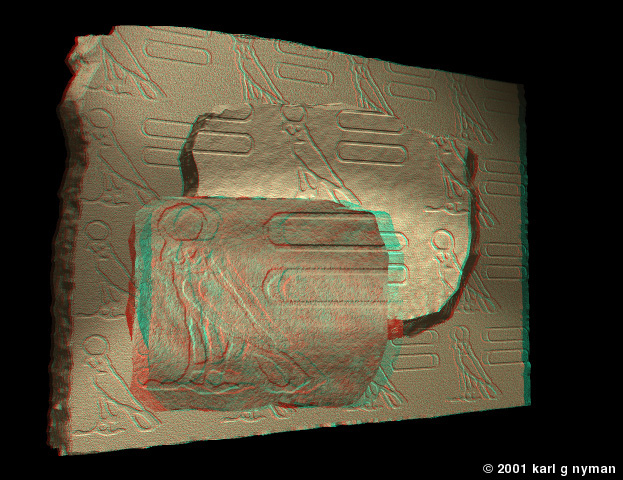

No reason a similar approach can’t be done in Blender, and I think I recall seeing a link to something like that but can’t remember where. Might be worth a search.
No reason a similar approach can’t be done in Blender, and I think I recall seeing a link to something like that but can’t remember where. Might be worth a search.[/QUOTE]
Yeah, found a tut on Vimeo for doing still shots. So that made me curious for doin full animated images ^^
it is actually sad that blender does not better support 3d rendering
Blender has all the tools needed to build a stereogram-generator, most scriptable 3D apps do. Setting up the dual cameras isn’t that hard, though the stereo pairs would need to be rendered separately. It’s mainly a matter of learning the math behind the methods, so you get proper inter-ocular spacing for a particular scenario and scene scale, and making sure the cameras stay oriented properly to one another during camera moves. For animation, you simply need to render each “eye-view” of the stereo pair separately as image sequences for later processing.
While it might be possible to render each frame as a stereo pair before moving to the next frame in the animation, the complexity isn’t worth the effort as it doesn’t save any rendering time and simply rendering the cameras separately is much simpler. Digital repeatability makes this trivial.
Doing polarized 3D is a specialized post-production step, I imagine (but maybe getting within reach of amateurs??), and shutter glasses are more complicated than needed, so either red-blue anaglyphs or “cross-eyed” stereo pairs are what amateurs normally produce. Some people can’t maintain the cross-eyed eye orientation long enough for animations, so red-blue is common for that application despite the color pollution that results. Using the compositor, it shouldn’t be terribly difficult to do the red/blue anaglyph filtration needed for even “full-color” anaglyphs like those above.
Wow there Chipmasque have you set one up before? If so I dont’ supose you’ld be willin make a Tutorial on it. I’m as you can plainly see very much a newbie to all this, but tryin to learn all the neat thing that would love be able make myself. Well, even if you not up for makin tutorial, maybe I can hunt down guy did the one on Vimeo and put request there. I think was blendercookie person that did it.
At this point I don’t have time to design & build one, but I can point you in the right direction.
First, dig up all the info you can on making stereograms & stereo photography, regardless of the “camera” used. Some of it is pretty technical but you should be able to dig out the main points useful for building a stereo camera rig in Blender. Without a background in the principles, you can spend a lot of time messing around and getting less than optimum results. You’ll learn about ways to control the stereo effect so you can actually set the planes of the stereo space, and plan for some things to pop right off the screen, others to sit in the BG, and some to fit right in between. It’s quite an art in its own right.
Next, learn all you can about Blender’s Constraint options, because I think that’s where you’ll find most of your most useful tools. When I built my stereo rig in another app, there were not many constraints, so I had to basically script them – they were pretty simple, actually, just basic copy location code. Blender’s new constraint library can replace a lot of that, if not all.
Then it’s just a matter of designing and building the “rig,” not an armature-based rig in this case, but a dual-camera-platform. I suppose you could use an armature, come to think of it, it’s one of many possible ways. The chief features of this dual-camera platform is that it keeps the cameras rigidly oriented relative to one another on a plane, lets both cameras point at a common subject, and allows the distance between the cameras to be variable within some not-very-large limits. Think of a rather abstractly mechanical version of your eyeballs in your skull – it keeps them spaced properly, allows them to rotate to point at a subject, and if you tilt your head, their orientation is kept constant. Having variable spacing between the virtual cameras (adjustable inter-ocular distance) allows for differences in scene scale, and can be used to mute or exaggerate the stereo effect.
Then you just render first from one camera, and then the next, whether it’s a still or an animated sequence. Animating the camera platform is just like animating a 2D camera, and you could build animatable controls for the cameras as well.
Viewing stereograms can be simple or complex. The easiest method is to set them up side-by-side and use the crossed-eyes technique, but not everyone can do this successfully or comfortably. Red-blue anaglyphs can be made from normal renderings by using the Compositor color manipulation nodes to filter the original images into red-tinted and blue-tinted versions, which are then superimposed on one another. I can’t tell you the exact system of nodes needed, that’d take some experimenting, but I was able to do it in a somewhat less advanced shader system (also node-based, btw), so it shouldn’t be all that difficult. You might even be able to skip the Compositor step by using special lighting techniques like heavily filtered red & blue lamp sources. Again, it’s an area where experimentation would be needed.
A simple rig can produce good stereograms, but for maximum control over the effect, learn all you can about the theory and math, and use it to build in lots of controls, so every aspect of the scene can be managed. It’s not useless study, either. Stereo movies are here to stay (finally – back in the 50s & 60s they were a fad that eventually fizzled out), games are not far behind I think, and being knowledgeable in the art can be a solid resume point if you’re looking to work in the industry.
Guess I’ll play with it here and there. I got a long way to go before I dink about with things like scriptings though. But in mean time, here’s hopin someone that knows what doing figures setup for animating a setup and hopefuly places tut on how he did it  Maybe some luck i’ll stumble across a decent means to do it myself. Say can the Node Editor things be animated? If that was possible, then I totaly could see how the already existing setup be used and integrate Node editor into the factor.
idk if anyone is interested in this, but i setup a very quick and simple way to make a red/cyan anaglyph. It can have two seperate image sequences attached, or just 2 separate images taken with a camera, with a slight distance apart.
http://dl.dropbox.com/u/30694260/3d%20setup.blend

Well, I found way back to the Tut found on how to do a Anaglyph on Blendercookie and they had a link to guy that did a lil tut on how to do a animated version! So guess realy wasn’t as complicated as I was imaging was going end up being. I realy hope this link for anyone reading this helps them. http://www.youtube.com/watch?v=l9eSe3Pztew&feature=youtu.be
That looks pretty good, blazr_raidr, though for a closeup like this the stereo effect is kind of weak. That’s what learning about stereography can help with, giving the info that lets you control how strong the depth effect is, and determine which parts seem to float in front of the screen and which appear behind the screen plane. It’s a bit like using Blender itself – most anyone can set up a scene and render it, but to get the best results, you need to learn about the app in depth, and also about lighting, and scene composition, etc.