2D and 3D Cut-Out Animation with Blender, Krita, and Armory SDK: The Hatshepsut Project
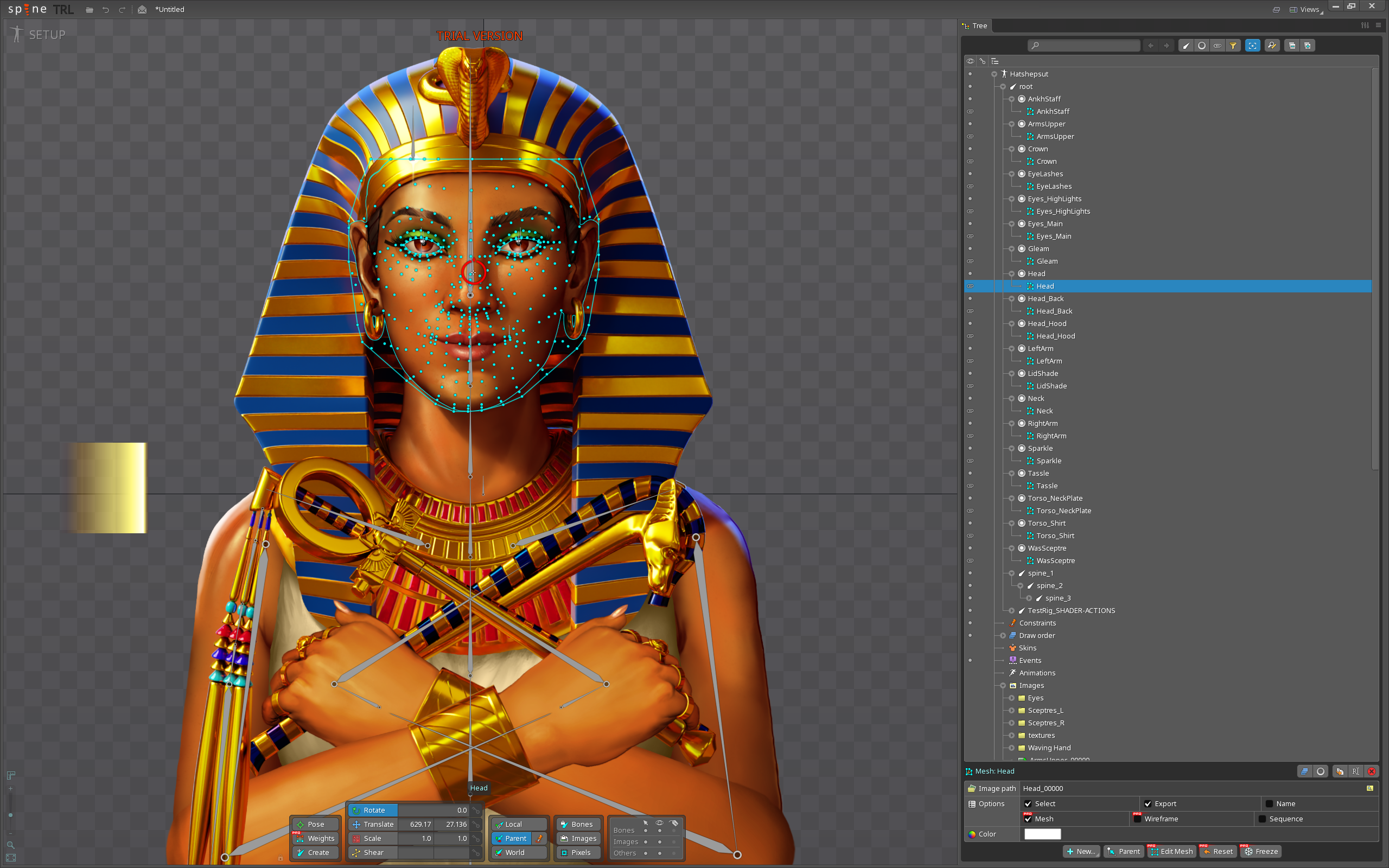
I wanted to share a project that combines traditional painting, open-source technology, and shader-driven animation — my portrait of Queen Hatshepsut.

Concept
Hatshepsut ruled Egypt in the 14th century BCE and was one of history’s most capable leaders.
She led major trade expeditions to Punt, re-established wealth across the kingdom, and commissioned some of Egypt’s most impressive architecture.
Her reign marked a time of peace, prosperity, and artistic flourishing — so much so that male successors tried to erase her memory from monuments out of insecurity.
This artwork re-imagines her as she likely appeared in life: poised, calculating, dignified, and utterly self-assured.
Pipeline Overview
- Krita – all painting, texture maps, and design work
- OCA-Krita / OCA-Blender – My custom version of OCA tools for exporting layered artwork from Krita into Blender with fully compatible animated layer reconstruction.
- Blender – 2.5D layout, lighting, shadow casting, and shader setup
- Armory SDK 2025 – final real-time implementation in HTML5/WebGL
So yes, while you’re looking at a finished looking image, that’s a still of the animation and the animation will be real time and played in the browser. So probably my next post will be in ‘Work in Progress’, then in ‘Animations’.
Here’s the details of what else I’ve acheived as part of this project:
Armory R&D
Transparency and Depth Sorting
For correct alpha stacking, I used:
Write DepthandRead Depthenabled- Lighting disabled for the alpha layers
- Blending modes tested:
- Alpha Over – standard SRC_ALPHA / ONE_MINUS_SRC_ALPHA
- Additive – ONE / ONE
- Multiply – DEST_COLOR / INV_SRC_ALPHA
Each object has a unique sorting index in Armory’s props.
Long-term, I’m working toward element-based sorting so geometry can be batched while preserving transparency order.
Shader Animation System
Armory lacks direct animation for shader parameters, so I built a hybrid system.
For every object that fades:
- Two Value nodes in the material:
fade_test(runtime value)fade_test_preview(Blender viewport preview)
- Both are marked Parameter in the Armory tab.
- A Math: Maximum node ensures preview or runtime can take precedence.
- A Math: Multiply combines the alpha from the image with the fade value and plugs into the Principled BSDF alpha.
Each object has a control empty named ctrl_<ObjectName>.
Its X-axis movement drives both the Blender preview and the Armory runtime fade.
Blender uses this driver expression for 1:1 timing: (location.x + 1) / 2
–
Armory reads the same X-position through a Haxe trait (ShaderActions.hx) that updates all uniforms at runtime.
Result: Blender and Armory match perfectly.
Automation and Helper Scripts
Python setup scripts now:
- Add
fade_testandfade_test_previewnodes - Set up custom properties and drivers
- Optionally create control empties per object
- Handle default blending and parameter flags
This means I can convert any multi-layered 2D character into an interactive 3D scene with minimal manual setup.
Current Results
- Real-time shader fades verified
- Accurate alpha layering
- Full consistency between Blender and browser builds
Next steps include baking the custom property animations for runtime, optimizing shader merging, and testing geometry batching with index-based sorting.
So although the above still is pretty much done, there’s still work to do to get this animating realtime in the browser.
Why this project is worth watching:
This pipeline allows artists to treat Blender like spine of COA — where every Krita paint layer can be animated, lit, and exported for real-time presentation, but with far more freedom, simplicity and flexibility.
The focus is on Armory SDK which means the user never needs to leave Krita and Blender to produce real time web-based experiences.
From acting like an easy to share technical and artistic demo, to being great for generating interactive visual novels, this project should give you all an idea of what is possible using just these applications.
All open-source, all local, and all under the artist’s control.
Happy blending,
-Simon