Help me How To Deactivate Shortcuts that Carry A Property?

Hey, There!

I’m having a problem here to get some certain default shortcut that I want to deactivate. I know that using this line of code will do that:

bpy.context.window_manager.keyconfigs.active.keymaps['Window'].keymap_items['wm.quit_blender'].active = False

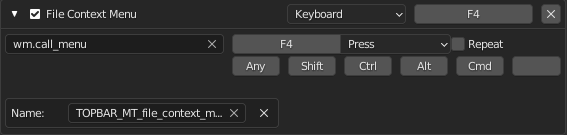
But with this code, I cannot get all the shortcut that I want to deactivate. This is due to the fact that some shortcut has property like name, like this example:

image.

So, what is need to be added in the code to deactivate this kind of shortcut?

To disable it, have you tried simply deleting it?

Hi! Thanks for replying. I already found the answer that I’m looking for in this post: How to modify a key and register another key at the same time in an addon? - #2 by iceythe

For your question, No, my goal is having a script that simply toggle between what is existing and my own shortcut. I think if I delete the shortcut, I will have to add code to add the deleted shortcut back, wouldn’t I?. Is there a way to store deleted shortcut, like in the link above?