


Even with just one subdivision level instead of two, I get these errors (or maybe they are less visable with subd, nvm):

Without subd only bevel:

Model:
My biggest issue are errors like these I still getting them:

Even with just one subdivision level instead of two, I get these errors (or maybe they are less visable with subd, nvm):
Without subd only bevel:
Model:
My biggest issue are errors like these I still getting them:
2 second of YT searching  There is a lot of these:
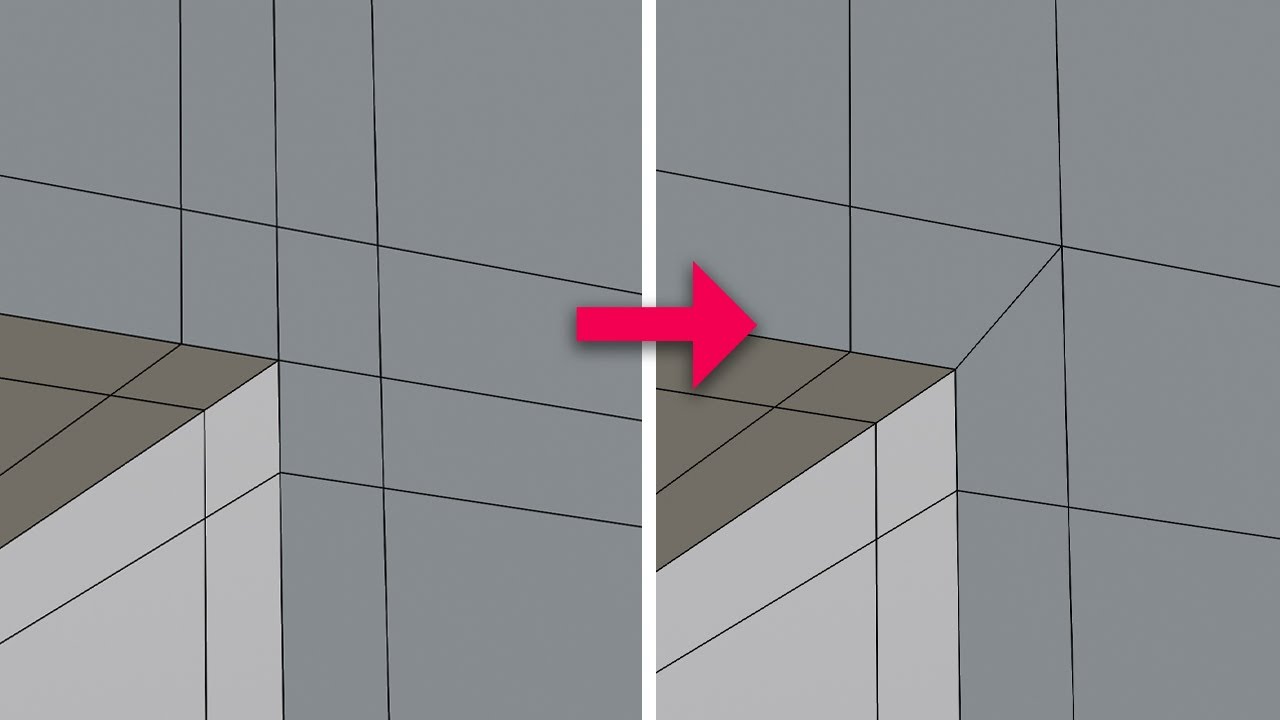
Subdivide after bevel is some not so nice idea. The bevel does addd pronounced edges on some not so straight areas and subdividing them will not make them “smoth” ( ← pun intended).
So you might “simply” use the old school and very effective support loop method. Or subdivide the piece where it needs mor curvations and also maybe using some bevel shader…
I’ve tried many combinations and different methods, but I still can’t get the bevel that connects with six edges to look right. I’m unable to follow the editing process shown in the video, because each support edge affects a different edge, so merging them didn’t work. I thought that simplifying the mesh would help — even starting from a basic cube — but I still couldn’t get it to work.

Using simple topology to create well-aligned edges manually seems the fastest way to use the Subdivision modifier.
To use the Bevel modifier, it’s helpful to understand its characteristics and configure it accordingly.
If you create a model using the suggested method and then use the Subdivision modifier, the edges will be messy when viewed in wireframe.
To avoid this, use the Bevel modifier after the Subdivision modifier.


