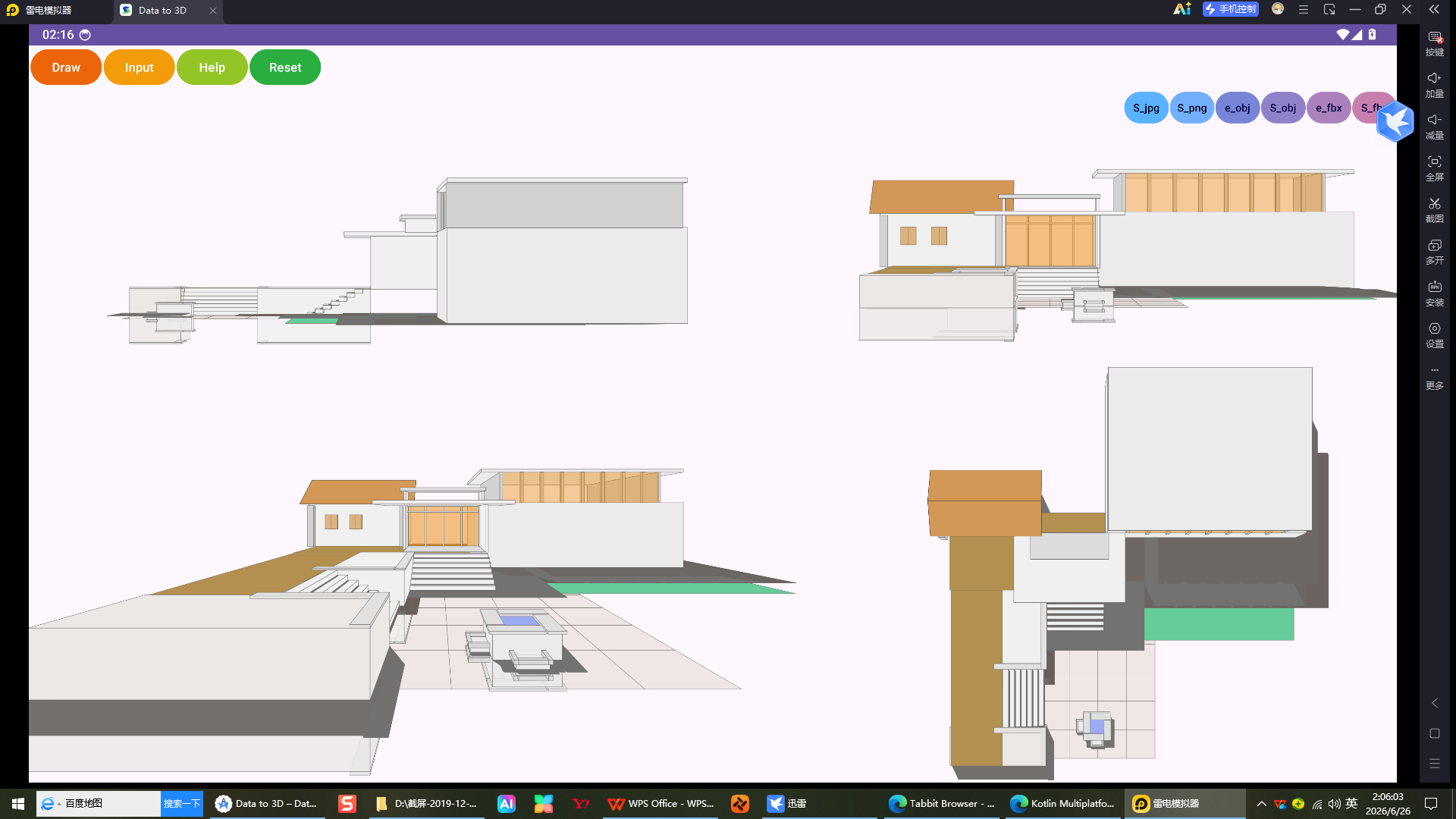
As a 3D software and painting enthusiast, I have developed an app that can generate 3D objects and set multiple angles for display. I hope to combine it with Blender to expand its use. Currently, I can only export or share obj and fbx files. I hope to have further extensions. I don’t know if there are any good methods, but who can give me some guidance? Thank you! Attached are several screenshots of the app running in an Android emulator.

There are two three ways:
Official Way # 1
Write an extension (add-on) that lets Blender communicate with your add-on. The very simplest will be one that launches your program, lets the user use it, then automatically export the object data back into Blender. If your app allows itself to be manipulated by an outside application it can very much be a two-way relationship, making using your app from Blender very convenient.
Official Way # 2
Using Blender’s scripting capabilities, rewrite your app as an extension that runs inside of Blender. This is obviously much more work than the other way, but does have the nice feature of being wholly contained within Blender. IMHO it would be a lot more work though.
Unofficial
Download Blender’s sources and integrate your app into it, recompiling to create a custom version of Blender. This would produce the slickest possible variation, but I suspect that this would not be a very popular way for people to use your app — not many people are willing to stray from the official Blender version just for the relatively small (though neat) capability your app provides. (It is very much a more obnoxious version of official way #2 as well — you would be basically rewriting your app inside Blender.)
Thank you very much for your detailed and helpful reply. I really appreciate you taking the time to outline the three approaches so clearly.
Among the options you presented, I think Official Way #1 (writing an extension that lets Blender communicate with my app) suits my needs best. It strikes a great balance between practicality and maintainability, and I like that it keeps my app independent while still enabling smooth two‑way interaction.
I’m genuinely excited about the possibility of combining my app with Blender – being able to offer a seamless workflow between the two would open up some really interesting use cases, and your suggestions have given me a solid direction to start with.
Thanks again for your insight!
Thanks again for your previous response – it was very helpful.
I’ve been leaning towards Official Way #1 (writing an extension to let Blender communicate with my app), and I have a few more practical questions before I dive in:
What language should I use to write the extension? I assume it’s Python, since that’s what Blender’s scripting API uses – but I just want to confirm.
Where can I find good tutorials or documentation to get started? Any recommended resources would be greatly appreciated.
What approach would save the most time? Are there any tools, templates, or best practices that can help speed up the development process?
I’m really looking forward to making this integration work – your advice has already given me a clear direction.
Thanks in advance for your time!
Well.. there is the API docu and also within blender when switching to the Scripting workspace to use some "scripting " templates ( Text editor → Templates → Python ) and to look at and learn from. Also looking into the source of any shipped with addon can help.
In fact directly via Blender → Help Manual →

Thank you for the additional pointers – the API documentation, the built‑in scripting templates inside Blender, and the source code of shipped add‑ons are exactly what I needed. I’ll be studying them carefully and will start experimenting with the templates right away.
Your suggestions have given me a clear and practical path forward, and I really appreciate your patience and help.
Thanks again!
Yes, Python. Blender uses the standard cpython implementation, but with a much-reduced library. IMHO you should, as far as it is possible, stick to using Blender’s Python installation and only add additional libraries if absolutely needed with your application’s install process. (You can tell Python to load libraries from anywhere, including your application’s install directories.)
The good news is that if you are familiar with C then Python is a breeze. If you are coming from something like VB then life will be a bit weirder, but in any case the language is very popular and easy to learn through basic google searches, though a quick crash course on it is a good idea.
The less good news is that you have a lot of learning ahead of you.
Things to bookmark for unending reference
Just about anything you find online will get you started in Python, but the likely best place to start is right from the horse’s mouth: https://docs.python.org/3/ , with the tutorial and library reference being places you should bookmark.
The next step is to get familiar with Blender’s Python API, called “bpy”. https://docs.blender.org/api/current/index.html . Just work your way down the page.
Online tutorials for writing Add-ons
There are bazillions of options online. Again, you should start with the talking horse: https://docs.blender.org/manual/en/latest/advanced/extensions/index.html
A fellow by the name of Michel Anders has made an entire video course about creating add-ons that you may find helpful as well. https://github.com/varkenvarken/Blender-add-on-development
An Extension is another name for an add-on, just built to be distributed online through Blender repositories. This behavior may not be useful for your add-on, though whether or not you want to provide updates to the extension automatically online is up to you, of course.
Development Setup
Get used to how Blender keeps directories. Don’t be afraid to break things. Blender is easy to clean up for most cases (and easy to re-install for the cases where you really break something).
I would personally create a user-account on your PC just for developing the add-on. (This is pretty standard for developing any major software.) The reason I suggest this is it just keeps your personal Blender setup uncontaminated so you can continue to use Blender normally while developing your add-on.
IDK what else to start with. Whenever you have a question along the way, feel free to ask here.
EDIT: Oh, yes. A pointer:
Operators
The way Blender’s UI works is different than you may expect. The key to programming Blender’s UI is understanding Operators — everything happens through operators.
The next hurdle is understanding how to manage a layout. Again, follow the docs and you’ll get to basic examples to get you started. You can always look through Blender’s sources too to get a good idea of how Blender itself does things. On Windows that’ll be in your AppData roaming directory, something like:
.../AppData/Roaming/Blender Foundation/5.0/scripts/bl_ui
IIRC.
1 Like
Thank you so much for this incredibly detailed and generous reply. I honestly didn’t expect such a comprehensive set of resources and practical advice – you’ve gone above and beyond to help me get started.
Everything you’ve shared is immensely useful: the pointers to the official Python docs, the Blender API (bpy), the add‑on development tutorials, Michel Anders’ video course, and especially your insights about development setup and the importance of understanding Operators. I’ve bookmarked all the links and will be working my way through them systematically.
I realise that integrating my app with Blender is going to take some time and effort – there’s a lot for me to learn, from Python itself to the Blender API and its UI paradigm. But your encouragement and the clear roadmap you’ve laid out make me feel much more confident about the journey ahead
Thank you again for your help. I’ll definitely refer back to your advice often, and I’m sure I’ll have more questions as I go – it’s great to know that this forum is such a supportive place.
1 Like