Hi. I am new to blender.
I want to make a hollow cube(4 cm x 4 cm x 4c) with inner thickness of 1.5cm.
And top surface, it has a 2 cm x 2 cm window.
I can make a cube with window, but i can’t make a hollow cube with a window on top surface.
Hi. I am new to blender.
I want to make a hollow cube(4 cm x 4 cm x 4c) with inner thickness of 1.5cm.
And top surface, it has a 2 cm x 2 cm window.
I can make a cube with window, but i can’t make a hollow cube with a window on top surface.
Hi,

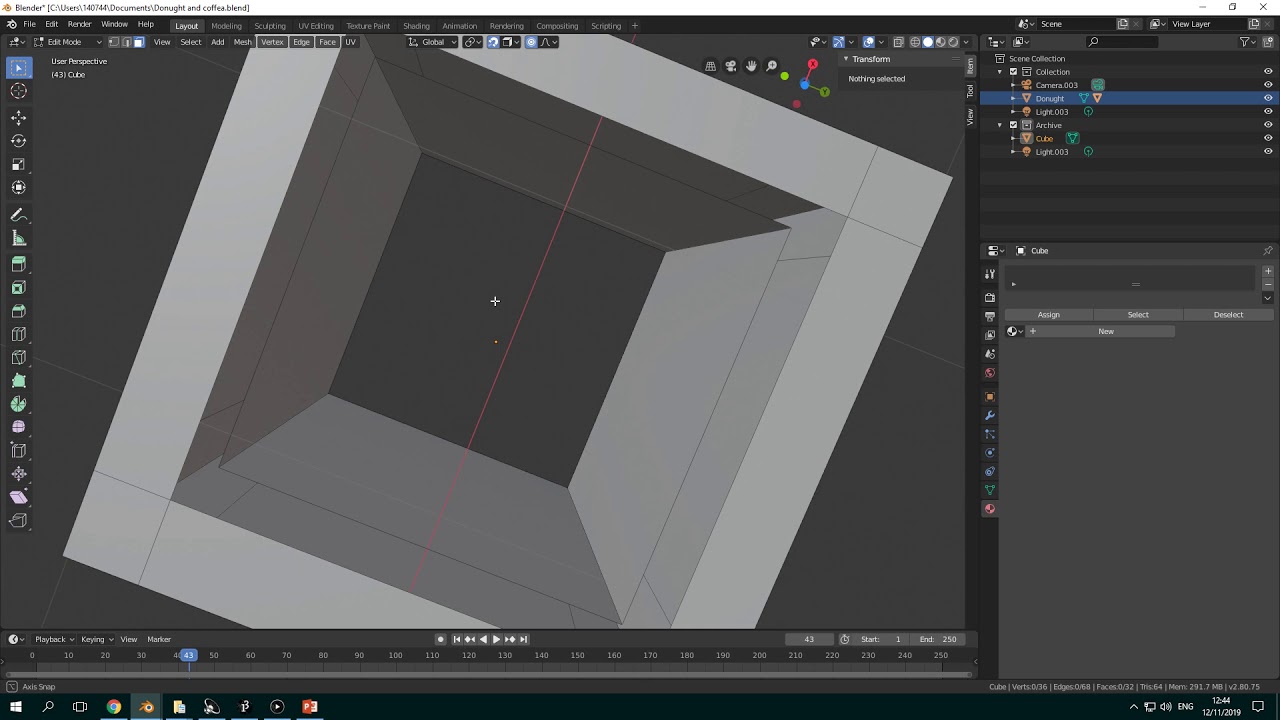
If you meant something like this below:
You can achieve this by using a Wireframe modifier.
Here’s the blend file anyway:
hallow_cube.blend (815.3 KB)
Yes, but the cube has closed surfaces except window on the top.
Thank you for your kindness!
It helped me a lot and saved valuable times.
Try also this, I set the hole size to 2cm x 1.5cm x 4cm as you asked:
hallow_cube_new3.blend (808.4 KB)
P.S. I set the width to 4cm because it looks much wider on your photo, it is not about 2cm. The hole looks more like a rectangular instead of a square
Thank you again.
But cube size should be 4cm x 4cm x 4cm with all closed surface except at the top it has 1cm x 2cm window.
The cube should be hollow with wall thickness of 1.5cm.
I tried to change using your file but hard for me.
It is already 4cm x 4cm x 4cm
Yep, it is  Just check cube’s modifer that goes by the name of Solidify
Here you go:
hallowcubenew.blend (808.4 KB)
Try this one
hallowcubenew1.blend (811.8 KB)
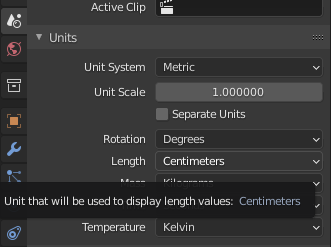
Also change your Length units from meters to Centimeters:
Hmm… something is weired.
Why is winodw at the top surface so small?
How can I change the dimension of the window?
It’s now 0.25cm
You need to understand how to work with dimensions by change them manually. I cannot give the exact result, but only the similar one:
hallowcubenew2.blend (792.6 KB)
Check this one, I made a hole with the dimensions you’ve been asking for:
newcube.blend (812.9 KB)
All except thickness, as I see it, done correctly. If I set thickness up to 1.5 cm, it creates weird inner cube inside of the main one:
So I left it on 0.15 cm instead
that’s actually not going to work…
okay, so if wall thickness is 1.5cm, then you have 3cm of wall (remember, 2 sides)… this will leave you with a hollow area that is 1cm x 1cm x 1cm, before having your window added. since you have the window 2cm x 1cm on the surface … well, it’s twice as long as the hollow area in the cube.
did you really want the wall thickness at 1.5cm?
@goorman 's use of .15cm does fit the image better, and would leave plenty of room for the window even at 2x1cm.
That is why, as I have shown above, If I set it up to 1.5 cm it started looking kinda weird. I think it is better to have it on something around 0.15 cm.
aye, i kinda figured. another possibility would be .75, which would allow space for window, and then the wall thickness .total. (for both sides) would be 1.5cm.
it may be easier if @Dhk instead specified how big the hollow inside the cube is (with the caveat it must be at least a 2cm cube to fit said window)
Thank you for your help and insight! @KDLynch , @goorman .
That’s right, my initial design was wrong and not based on real possibility
What I want to make is a hollow sphere with about 4 cm x 4cm x 4cm and small window at the top(1 x 2cm). Thickness of the hollow sphere don’t need to be 1.5cm on all area. It should be 1.5cm thickness on the bottom(opposite to the surface with window).
I want to 3D print it and 'll do some experiement with it.
0.15cm wall could be sturdy enough to 3D print?


