all i want to write is e and then superscript hyphen, as in electron and then its negative charge. I can write the e. but the hyphen, how can i make it superscript? I entered unicode U+207B in text editor… and then what? how does it connect to that text object? or that is not the way? all i want to write is “e” followed by superscript hyphen
I just searched for superscript. The first result was the lingojam site with its superscript generator. ˢᵉᵉᵐˢ ᵗᵒ ʷᵒʳᵏ
Apparently windows users can also do it in Word. That app is useful after all…
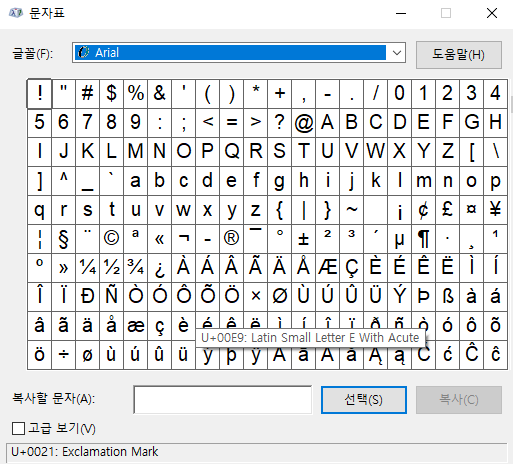
If you are a Windows user, you can use the character map.
The discourse docu apout formating…
…is not very precise… but looking at:
This is <b>bold</b>.
This is [b]bold[/b].
This is **bold**.
This is bold.
This is bold.
This is bold.
I tried this:
This has <sup>superscript</sup>.
This has superscript.
Yes I can write it in word. And then what, how to transfer it in blender? As image?
Ups…  … i need more
If you want to use the Text Object, then you could create two different font types (the original and an upperscript version of it) with a Font editor; And then use Bold/Italic to change between them… 
I had a play after thinking some more and I see what you mean. Superscript becomes invisible… Unfortunate.
I guess doing the text in anything else that can export the text as a path / .svg then importing it into Blender. Can Word do anything like export paths? Have not used Windows for a few years, and it was probably 20 years ago when I last used Word. What is the other Windows text editor??? Can that do it?
Using Gimp / photoshop / Inkscape may be better. You may have to import the text from Word, to export it as a svg.
You can split the text & make the hyphen font smaller than the ‘e’.
Or just adding a wee mesh rectangle after the ‘e’. 
And naturally Blenders default font has the hyphen and the plus at a different size. SMH…
Ok I guess it is not easy to write a simple superscript in text in blender. I will just write them separately and then join two objects.
