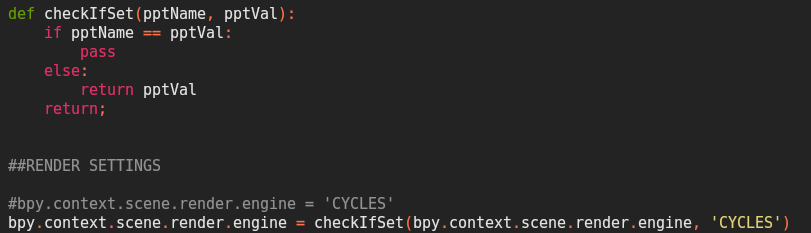
So I have a few lines of code that will check if it is set to a value.
In the image I made a function that checks if pptName is set to pptVal and if it is already set to pptVal it would just pass to the next line of code.
But the issue here is if I call checkIfSet(<.some property key>, <.some property value>) it just tries to check if the value of the first argument is equal to the 2nd argument (in my cause it tries to check if BLENDER_EEVEE == CYCLES). But if you run the normal code(commented 2nd last line) it works fine. How can I make this new function?
It’s a basic Python question. Currently you’re assigning pptVal just to a name pptName which just happens to store value from engine attribute but attribute itself is unrelated now. If you want to change it, assign value to the attribute directly.
Actually the issue was that I have part my code that selects all markers in the video sequencer and deletes them (last part of screenshot)
This however causes a warning to shown when there are no markers.
And then I assumed all the values might need to be checked if they are assigned already or not. Stupidly overthunk, totally on me.
To solve it I then just add a marker then do the select and delete operations this works for both if there are markers in the video sequence tab or not.