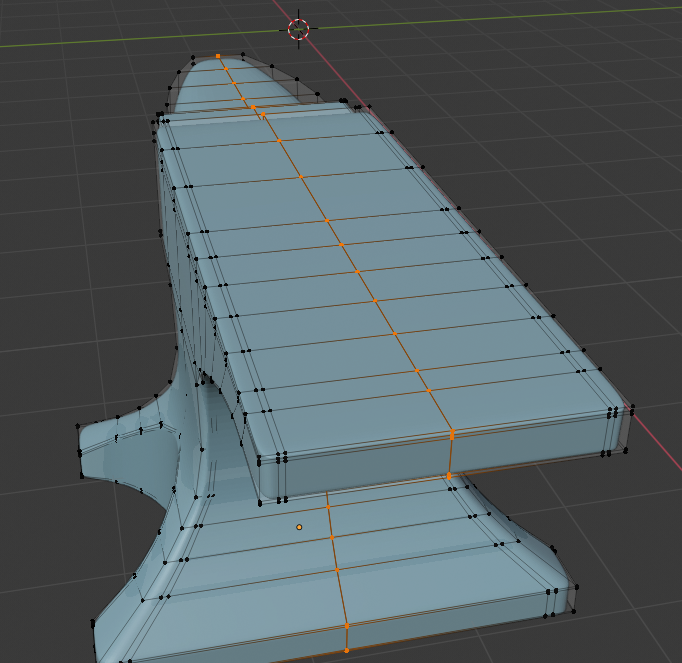
I imported a model into my scene, but for some reason all the vertices are unmerged, the model has about 2000 vertices. the vertices that are supposed to be merged to each other are so close to each other they basically touch… How do I merge all the vertices that are close to each other without having to manually merge each one??
Use ‘remove doubles’. The button in in the left tool shelf (hotkey ‘t’) and when you press it, you get a panel for setting the merge distance, and, up in the info panel header, you can see the 'removed nnn Vertices" information. Adjust the merge distance until the correct number of verts are removed.
Control Z will undo the operation if you remove too many and the mesh gets distorted. Depending on the mesh, you might have to do a little hand work, but Remove Doubles should take care of most of it.
1 Like
Thankyou that worked! So does that mean the object had multiple vertices at each point?
well it is possible, but not having seen the file it is impossible to say!
but yes each disconnected edg has a vertice at each end so if all the edges were just single edges then each edge would have a vertice overlaid on the postition of the edge adjoining it. removing doubles simple merges all the vertices that are overlaid into a single vertice at each edge connecting point. whereas if you just tried to merge the vertices using alt M then everything would merge to one vertex and you’d cry. (or press ctrl Z, whatever’s easiest)