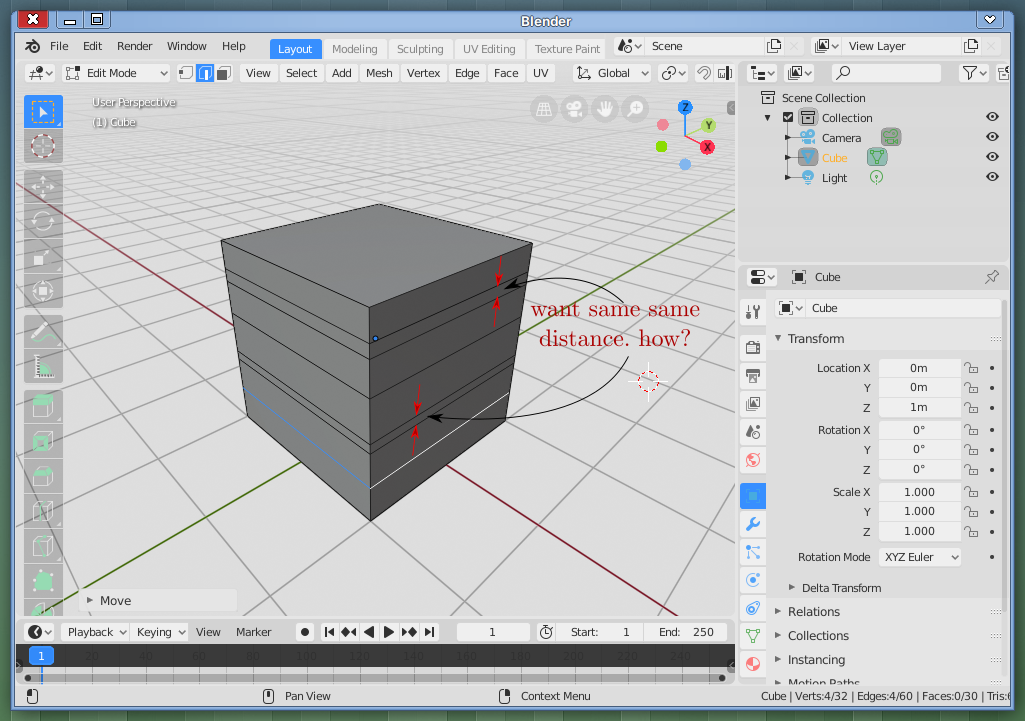
For example, say I have 6 loop cuts in a cube. I bring the first and second loop cuts closer by pressing sz and moving the mouse some. Now I want to bring the 4th and 5th loop cuts closer the same distance as the first and second loop cuts. How can I achieve that?
Also how can I distribute the cuts evenly? Say the first and second cuts are one object (for a lack of better terminology), the 4th and 5th cuts are one, 3rd cut is its separate object, so is 6th. I want all these objects evenly distributed on on the surface.
Selecting the loop and Ctrl+B doesn’t do nothing. Only edges and vertices at the boundary works. Loops at the surface doesn’t. Can you please show how? A screenshot, maybe.
I am sorry, I am new to Blender but is LoopTools some addon? I don’t find no ‘LoopTools’ when I search. Also, right-click = selection and left-click = 3D cursor. Where do I get LoopTools?
Right-click select, hmm! It sounds like you are using Blender 2.79
In 2.8 LoopTools is enabled by defaul ( I think?), in 2.79 you’ll need to enable it in the Preferences. It comes with Blender by default though.
In that case, press… W? instead of right-clicking. I think. I didn’t use Blender 2.79 for a long time now…
A few years ago when I used blender to do some mock up in Blender 2.7, I got used to right-click select. Blender with it’s sharp learning curve, I forgot everything and 2.8 being very different than 2.7 I am learning everything again. But the right-click select stuck with me.