Hi guys,
is there a way to check which camera is using Blender when rendering is launched as headless?
Or, is there an option to force to use a camera when a rendering is launched with Blender in headless mode?
thanks in advance
Hi guys,
is there a way to check which camera is using Blender when rendering is launched as headless?
Or, is there an option to force to use a camera when a rendering is launched with Blender in headless mode?
thanks in advance
Hello there. May I ask what do you mean by headless mode?
When you run Blender without the user interface.
If headless mode turns on by using a command in cmd or similar there might be a chance to write and launch the python code that helps with camera selection. GPT might be helpful here.
if this is related to rendering you can use the metadata/stamp feature to print the camera name on the render.
This script is older, and I’ve not tried it - but, worth a glance:
Thank you… I’ll check your suggestions.
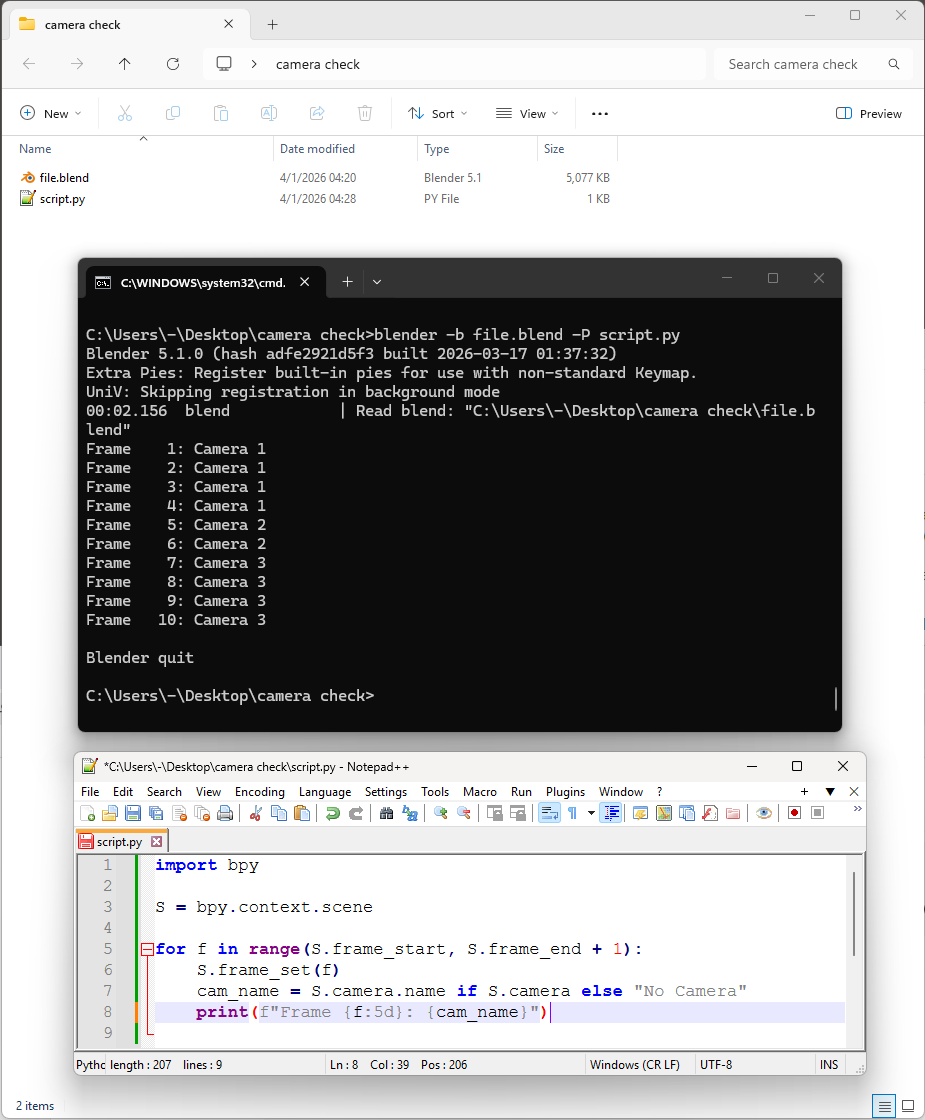
You can do it with Python, but actually there is no such a thing as the camera a scene is using for rendering. A scene can use many cameras for rendering. Here are all the docs for CLI rendering
So you can do this:
blender -b file.blend -P script.py assuming blender is in your system path
import bpy

S = bpy.context.scene

for f in range(S.frame_start, S.frame_end + 1):
    S.frame_set(f)
    cam_name = S.camera.name if S.camera else "No Camera"
    print(f"Frame {f:5d}: {cam_name}")
And you can of course change anything with Python and save the file, but it depends on the scene how you would set cameras - you may just set the active camera, or you might need to change what cameras are associated with what timeline markers. But you can do anything from a Python script of course.