Hi! Suppose I have an object with keyframes for location, rotation, and scale, as well as shape keys and maybe other modifiers, and I am at a certain frame number, and so see the object on my screen in some position in the middle of an animated sequence with some degree of shape keys applied. I want to copy the object the way it looks now into a new object which will have no keyframes, no shape keys, and so on. It will look identical, but be a new object with no modifiers or anything. Basically I want to bake all currently visible modifications to a new object. Is there a simple command or short script to do this?
I deleted my last answer because it does not always work.
I have been trying this out and if you have modifiers (mirror array subdivide etc) and shape keys with key-frames the “object menu - convert -mesh” will get rid of the the modifiers and the shape keys (with their key-frames) leaving the object as it is in that key-frame.
The funny thing is that if there are no other modifiers it does not work for the shape keys.
Also it does not apply location rotation and scale.
Edit:
Even stranger looking at the terminal after closing the blend I found this error
So it looks like Blender does not like the fact that it applied the shape keys and got rid if their key frames
I was on 2.9.3.1
As I said it only applied the shape keys when I had other modifiers on the object.
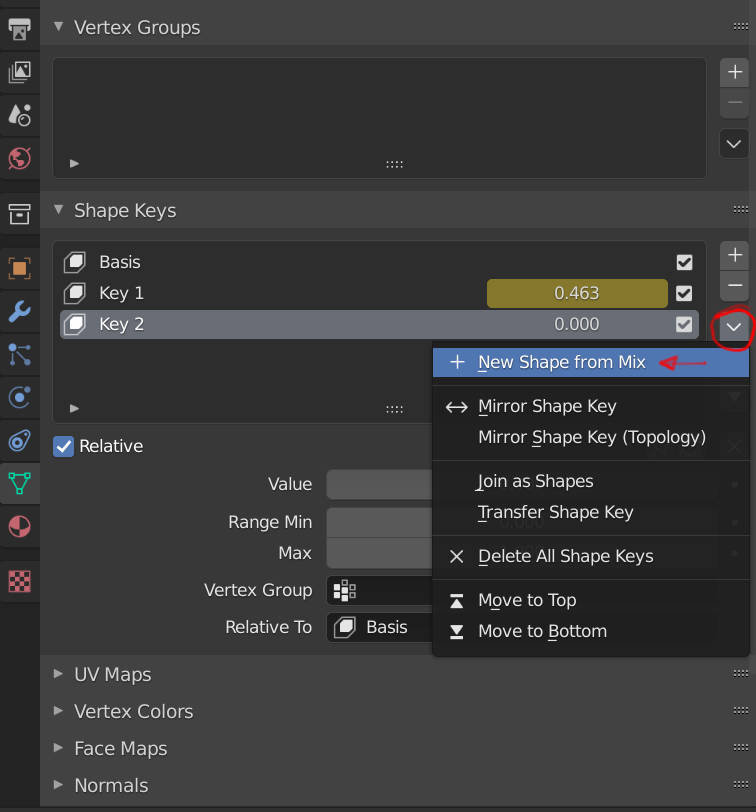
You may have to apply everything separately, for the shape keys go to the keyframe duplicate the object and make a new shape key from mix.
Just add any object > add Geometry Node Modifier > swap its default input with Object Info Node > select the source object. Output Geometry.
After Appying the Modifier it also adds the proper Material automatically, but you can do it manually before that.
…at least I think it works.
EDIT: I realize it’s not a Python Support kind of answer, but feels like it’s worth noting the option.
Duplicates a stated object w/ to a stated transform.
Makes the duplicated object’s mesh a unique, single-user data-block to avoid getting a, " modifier cannot be applied on multi-user data."
Applies any modifiers the duplicate mesh has.
import bpy

# USER VARIABLE - DESIRED OBJECT
o = bpy.data.objects["Cube"]
# USER VARIABLE - TRANSFORM FOR DUPLICATE
t = [4,0,0]

# DUPLICATION PROCESS
d = o.copy()
d.data = d.data.copy()
bpy.context.collection.objects.link(d)
d.location = t

# APPLY ANY FOUND DUPLICATE MODIFIERS
def apply_modifiers(o):
    c = bpy.context.copy()
    c["object"] = o
    for _, m in enumerate(o.modifiers):
        c["modifier"] = m
        bpy.ops.object.modifier_apply(c, modifier=m.name)

apply_modifiers(d)
Kudos to @testure for the apply modifiers section. testure’s original code can be found here.
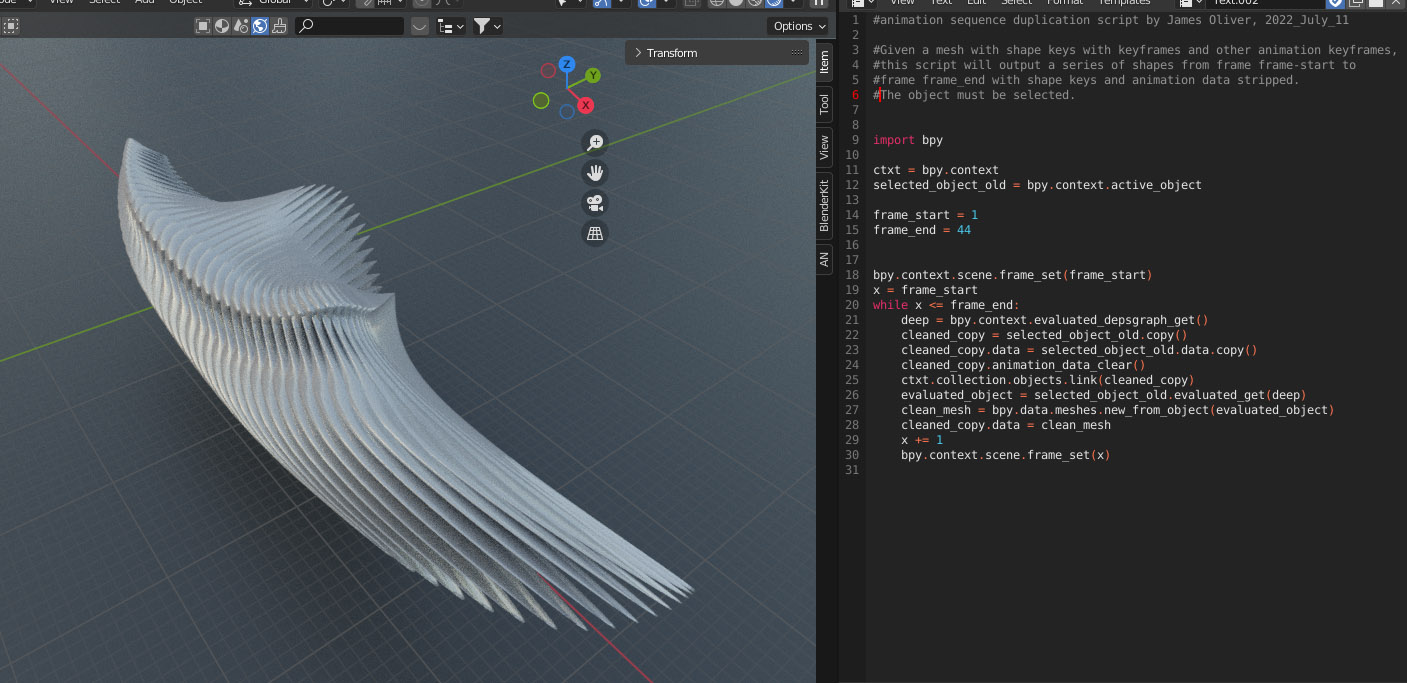
Thanks everyone for your input! It was helpful! I finally managed to put together a script that does what I want. I really wanted to produce a new mesh for every frame of an animation sequence, but with shape keys applied and removed, like the old dupliframes, but taking shape keys into account. I finally got roughly what I wanted with this script:
#animation sequence duplication script by James Oliver, 2022_July_11

#Given a mesh with shape keys with keyframes and other animation keyframes,
#this script will output a series of shapes from frame frame-start to
#frame frame_end with shape keys and animation data stripped.
#The object must be selected.


import bpy

ctxt = bpy.context
selected_object_old = bpy.context.active_object

frame_start = 1
frame_end = 44


bpy.context.scene.frame_set(frame_start)
x = frame_start
while x <= frame_end:
    deep = bpy.context.evaluated_depsgraph_get()
    cleaned_copy = selected_object_old.copy()
    cleaned_copy.data = selected_object_old.data.copy()
    cleaned_copy.animation_data_clear()
    ctxt.collection.objects.link(cleaned_copy)
    evaluated_object = selected_object_old.evaluated_get(deep)
    clean_mesh = bpy.data.meshes.new_from_object(evaluated_object)
    cleaned_copy.data = clean_mesh
    x += 1
    bpy.context.scene.frame_set(x)
It can be used to do such things as the following, or perhaps a spiral staircase or something.
I am very new to trying to work with Python scripts. I really, really want a feature like the old dupliframes, but which also includes interpolations of geometry in a mesh from shape keys. I want to make interpolations of geometry for biomorphic form repetitions and whatnot. I found a script online by Gabriel Beloin that works for Blender 2.41, but of course it doesn’t work in the newer versions. I am basically clueless as to what to do to make it work. Here is the script:
I have not used dupliframes I am not familiar with these workflows, but the script looks simple enough to be ported. The question is if is better to go for geometry nodes or animation nodes, if needed.
I explored the link and for the last couple of days have been trying to figure out how to do what I want using animation nodes and geometry nodes, so far without luck. That isn’t to say that it can’t be done. I am new to using both node systems. Using animation nodes, I found a rather clunky and inelegant way to get roughly what I want, but I can’t seem to find a way to keep the result and convert it into bare geometry without shape keys.
For what I want to do, it is essential to be able to use shape keys. Imagine, for instance, that you want a series of ribs in a rib cage, or feathers, or vertebrae, or a ridge of spines on a monster’s back. All of these are more interesting if the shape evolves along the sequence. I don’t want merely to arrange a series of identical instances of an object along a curve. I want to do rather rich sequences of evolving shapes. So I need to be able to use shape keys. Shape keys can be used in animation nodes. But I don’t see how to get a usable result. And geometry nodes don’t include shape keys, if I am not mistaken. Maybe there is a workaround. I don’t know.
That old script works perfectly for a really old version of Blender, like 2.41, but it would be nice to have one that does the same thing in the latest version of Blender so that I can take advantage of all the newest features, the nicer interface and so on.
It is important that the output result is just simple geometry without modifiers, without shape keys. I want to be able to take it into other programs like ZBrush. I’ve been trying to learn the basics of Python and scripting in Blender, but it looks like it would take a very huge time investment to learn what I would need to learn to figure out how to port the script! Maybe years!
Also, using the animation system for this is nice, because you can use all the existing keyframing stuff to do all sorts of interesting things that simply distributing objects along a curve wouldn’t allow. Basically all I want is a way to convert the sequence of changes in a mesh in an animation to a static collection of simple meshes that can be exported as an OBJ, potentially as complex as something like these strobe light time exposures:
After much hair pulling and trying this and that and searching all over and taking bits of code from here and there, I managed to patch together something that does what I was hoping for.
#animation sequence duplication script by James Oliver, 2022_July_11

#Given a mesh with shape keys with keyframes and other animation keyframes,
#this script will output a series of shapes from frame frame-start to
#frame frame_end with shape keys and animation data stripped.
#The object must be selected.


import bpy

ctxt = bpy.context
selected_object_old = bpy.context.active_object

frame_start = 1
frame_end = 44


bpy.context.scene.frame_set(frame_start)
x = frame_start
while x <= frame_end:
    deep = bpy.context.evaluated_depsgraph_get()
    cleaned_copy = selected_object_old.copy()
    cleaned_copy.data = selected_object_old.data.copy()
    cleaned_copy.animation_data_clear()
    ctxt.collection.objects.link(cleaned_copy)
    evaluated_object = selected_object_old.evaluated_get(deep)
    clean_mesh = bpy.data.meshes.new_from_object(evaluated_object)
    cleaned_copy.data = clean_mesh
    x += 1
    bpy.context.scene.frame_set(x)
It’s probably imperfect, as I don’t understand much about how Blender handles data. So it might involve memory leaks or something. But it works for modeling something that I will likely export as OBJ anyway.
Here is a new version with one more line that deletes modifiers on the generated objects, in case you are making a series of meshes from one animated by an armature or something.
#animation sequence duplication script by James Oliver, REV 2, 2022_July_13

#Given a mesh with shape keys with keyframes and other animation keyframes,
#this script will output a series of shapes from frame frame-start to
#frame frame_end with shape keys and animation data stripped.
#The object must be selected.


import bpy

ctxt = bpy.context
selected_object_old = bpy.context.active_object

frame_start = 1
frame_end = 100


bpy.context.scene.frame_set(frame_start)
x = frame_start
while x <= frame_end:
    deep = bpy.context.evaluated_depsgraph_get()
    cleaned_copy = selected_object_old.copy()
    cleaned_copy.data = selected_object_old.data.copy()
    cleaned_copy.animation_data_clear()
    ctxt.collection.objects.link(cleaned_copy)
    evaluated_object = selected_object_old.evaluated_get(deep)
    clean_mesh = bpy.data.meshes.new_from_object(evaluated_object)
    cleaned_copy.data = clean_mesh
    cleaned_copy.modifiers.clear()
    x += 1
    bpy.context.scene.frame_set(x)