In 2.79 I am making a series of models in a single Blender file. I’ve made about 30 of them so far no problem. But I hit some buttons by accident that broke my UV Editor. Now the grid has gone from being a square to being a stretched out rectangle, and when I unwrap a model, no UV mapping appears on that stretched out grid, or anywhere.

Hi, i don’t have 2.7,9 but you are clearly not in uv view it looks like image view.
While this is the correct way to look at the UVs (UV/Image Editor)… one might have to double check if there are any UVs… like here in the old Suzanne… with no UVs.

They also might be outside of the view… so a select all and view center may help.
…ohh wait it was about the aspect ratio…
I do not really know how to make the grid without any images selected…not 1:1
Consider switching to a newer version of Blender.
I don’t know your workspace background but learning and troubleshooting old workflows on very old versions will eventually make you learn it twice. A lot of things have changed since 2.79, especially in the UV editing world.
Hey thanks for your reply.
But now I am confused because that little icon in the lower left corner has been present during every successful UV mapping session I can remember. If that icon means that I am not in the UV editor, then why have I been making tons of UV mappings using whatever this editor/view is? To really clear this up for me, can you send me a screenshot of a Blender 2.79 session wherein the real UV editor is open?
Aside form my confusion, I did discover why this editor, even if it not the actual UV editor, was all massed up. It was stuck viewing an image that had no content. The image was from a render that I had accidentally given the command to create, and later aborted. So the accidentally created blank render image had hijacked my normal UV making space. To fix this, I had to give the command to view some other image that happened to be in the scene, and then toggle something else (I forgot what) to get it to select no image at all, thus returning this UV making space to normal so I could use it normally.
But I’m still a bit worried that this might happen again when the scene has no other image to select. I’d be totally stumped about how to get this UV making workspace to select no image at all and act normally.
I think as @st-fox all ready suggested you will greatly benefit from downloading newer version of blender the layouts are clearly marked to avoid confusions. i don’t remember what 2.7 looked like and i could be wrong about the icon.

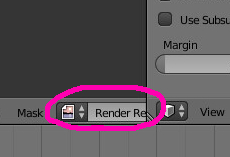
The current view is for viewing rendered images.
This would be an image view that automatically applies when you run the rendering.
Select the specified UV image, or create a new image if the specified image does not exist.

That’s how the publisher of this article is shown in the attached image. 
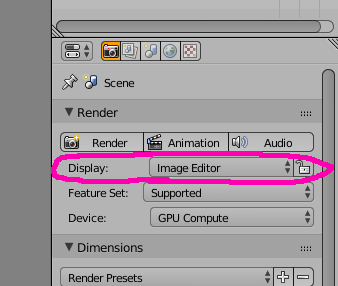
I tested blender 2.79, and when I render it, it will show up in image editing.
But this is temporary and it disappears with ESC.
Maybe I chose the rendering image by mistake in the image editing.
Yes indeed… i wondered about the non 1:1 ratio…
Now we can all appreciate even more the way the new versions improved through the years sins 2.7. But there will always be someone that is stuck in the past. 