I’m getting this weird moving noise or flickering in my Blender animations, even though I’m using a denoiser. I notice it mostly in daylight scenes and bright areas.
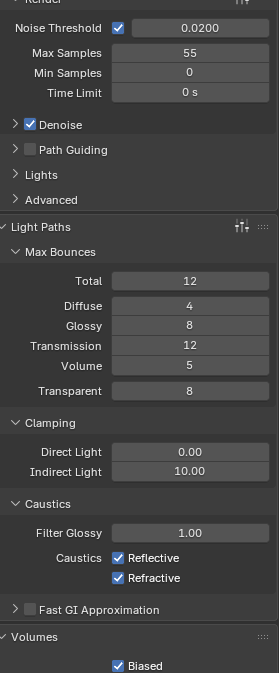
I’ve attached my current render settings. What should I change to fix this? I want the animation to look clean without having to increase the max samples too much, since that would make rendering take a lot longer.
You need to increase samples - 55 is too low. I’d use something like 128 as a minimum. Also you can try playing with min. samples and increase it to about 32. Depending on your scene and Noise threshold. Ideally you would increase samples to a high value and only tweak the threshold which would basically skip the majority of samples where they are not needed.
I’d uncheck caustics and I’d try with something like 4096 samples and let the adaptive sampling do the optimizations. Check at least on a few frames to see how it plays. Generally it’s just a matter of throwing more sample unless you have very high frequency details like grass or else.
There are some stuff that can output less noise like scrambling distance, and probably more tricks…
Nowadays I use mostly eevee so I hardly remember what I would do with cycles.
Anyway the strategy is always a bit the same : try to make a noise free render either by adding more samples, making a clay render, adding or removing lights …
Once you know the cause of the issue it’s possible to fix it !
Everything people have said is true and this can be fixed by using lots of samples, but there is an alternative that might work even better: increase the render resolution instead of the samples. The flicker will be finer and harder to see. It will still help even if you reduce the image back after the render.
I’m rendering my animation at 1920×1080, and I’m wondering if I should try to increase a resolution for testing.
I’m currently using 256 samples with a 0.01 noise threshold, but I’m still getting flickering. I don’t really want to increase it to 4096 samples because it’ll take way too long to render.
I’ve noticed that the flickering mostly happens in my daytime scenes, both with and without fog, while my nighttime scenes look fine, even with fog.
Also, I’ve noticed that when I render to OpenEXR, the final result looks a bit more overexposed than it does in Blender. Do you know why this happens and how I can fix it? Do I need to do any color correction in another program?
That’s unusual, I would expect day scenes to be the least noisy. What kind of world background are you using? That’s the one difference between a night and day scene, so that could be the culprit.
The render settings you have tried should be enough for a daytime outdoor scene.
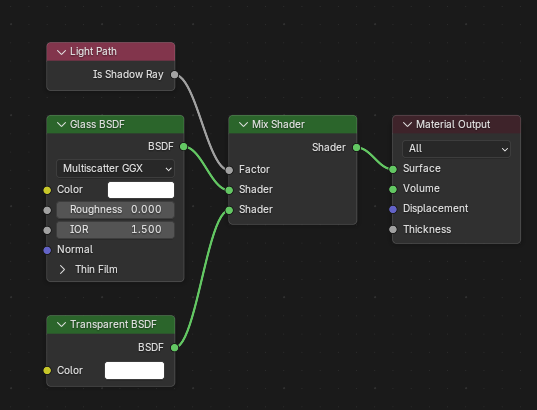
I notice the lights from the train are flickering. Are they behind glass? If yes, have you disabled the shadow on the glass? You wouldn’t want to light the entire scene with caustics.
If I’m not mistaken, the color management (agx, filmic and others) isn’t included in the exr file, so the look of the render will depend on how the other software interprets the file and its own color management.
You could do color correction by hand, exr can tolerate it well as it’s an HDR format. You could also see if the software you are using has options for color transform like Blender does and find something similar.
The flicker is caused by the denoiser creating slightly different results on each frame, and this becomes more apparent the more noise there is. You can use more samples, and should try modifying any problematic materials, and ray visibilities, you could also render with Turbo Tools X (an addon that I develop), and then once rendering completes, you can publish with the temporal stabilisation option enabled, which will allow you to remove the flicker without needing to remove so much of the noise via increased samples.
Common causes of excessive noise that lead to denoising flicker are:
Extremely bright light sources. These often go un-noticed if filmic or AGX is enabled in colour management. I usually set these to view = standard, look = None, exposure = 0, Gamma = 1. That way I can see if I have a nuclear explosion happening.
Extremely small light sources (especially if bright)
Glass/Transmission that casts shadows. You can use a light path node to prevent shadows from glass, or in the object properties panel, you can use the object → visibility → ray visibility panel, to disable shadows (if the object is all one single glass shader)
Volumes that are visible to shadow and diffuse rays. As light rays pass through volumes, they will get scattered so sparsely that other surfaces receive insufficient lighting values. In that case you can use the same ray visibility panel above, and untick shadow and diffuse for your volume object. You’ll still get shadows in the volume itself (godrays), but other objects will be lit as if the volume isn’t there. Not ideal for all scenarios, for example clouds, but even then, it’s faster to cast the shadows with a easier to render stand-in that’s not visible to the camera.
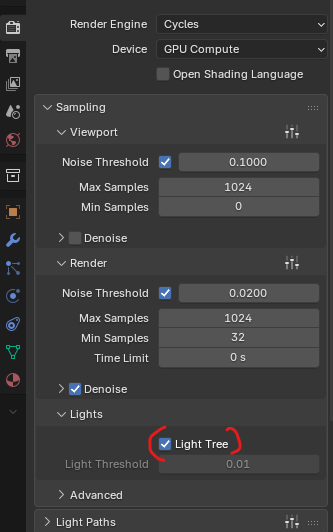
Do you have a large number of light sources? If yes, make sure that “light tree” is on in the render settings, it helps reduce noise when there are lots of lights.
HDRI counts as only one light source, so I don’t think light tree will help if it’s the only light source.
Maybe something about the materials? I do manage to get some noise with HDRI if my objects have high bump and low roughness materials.
If not, I can’t figure out how you managed to make an HDRI noisy, could you upload a file? No need to include the whole scene, I would like to see the render and world settings.
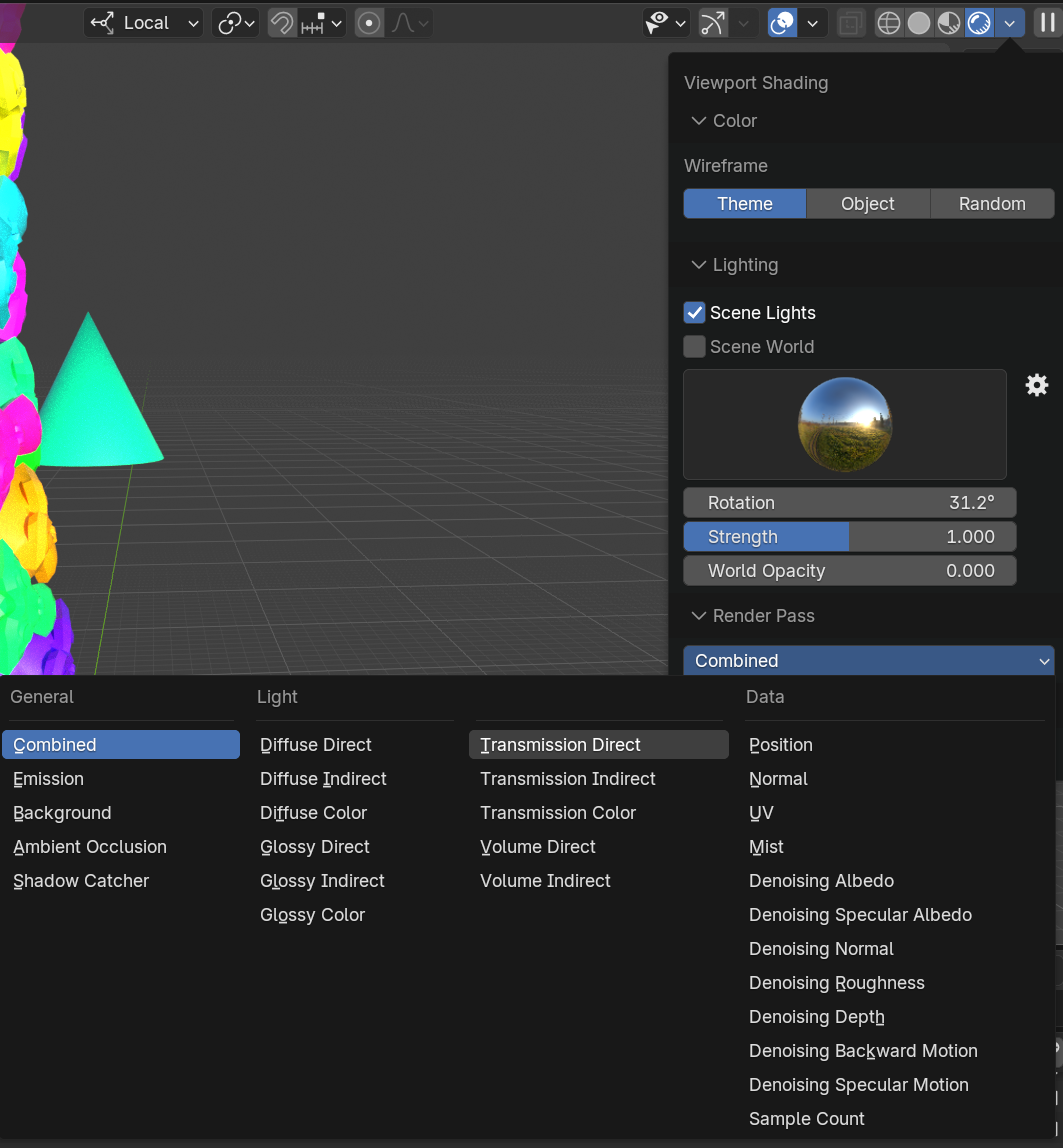
You could also look for clues by inspecting the passes in the cycles viewport, find the noisiest pass, and then try some of the above suggestions to see which one reduces it:
If a different HDRI doesn’t produce noise, you could also try increasing the worlds surface settings map resolution a bit (if you’ve manually set it low), or making a blurry copy of your hdri, and then use a light path node to use the original for the camera, and the blurry one for any problematic rays.
I’ve tried several different HDRIs, both 2K and 4K, but I’m still getting the same noise and flickering. So I’m not sure if the HDRI is actually causing the issue or if it’s something else in my scene.
Thanks for checking this out, I really appreciate it! What do you think could be causing the issue on my end? Could it be the materials or the lighting? I’m mixing two different materials using Mix Shaders, and I’m also using some fog. Everything else seems to be working fine, but the flickering is causing problems in the animation.
The fog must not be the cause, as I used it in my test render.
You already said you tested with different materials. My test scene has only untextured surfaces. Do you get the problem if you use only basic principled shaders with no textures? That could be something to try.
Maybe the camera settings could be in cause? You didn’t include the camera in your uploaded file, but I see that your viewport clip distances are extreme and that can cause artifacts. What camera clip start / clip end values are you using on your camera?