Hi guys ! I am currently doing a character for a video game/website, he does not move and his head has to follow the camera. The thing is, when camera is too much on the side (or behind), i want him to stop to follow it. I added a “Limit Rotation” to it, but it doesn’t work at all (either above or below Track to constraint in the “Add bone contraint” panel).
Basically the Limit Rotation works perfectly when i rotate manually the head, but not at all with Track To. How can i proceed ?
Thanks !
Use IK not Track To:
Limit the rotation of the bone in question, the one with the IK constraint, using its IK properties as shown.
Blend File: limit-track.blend (546.7 KB)
Just move the Target bone to see how it works. Don’t forget to set the chain length on IK Constraints…
Cheers, Clock. 
The rotation track and lock works like a charm  There is still a small problem tho : it is the top of his head (so top of bone) which tracks the camera, and not his face. I need to change the axis of the bone that tracks the camera (like with “track to” basically)
It looks like, for bones, Locked Track is much easier to use than Track To, is it what you’re talking about?
No. Locked track can move an object/bone on only one axis, this is not what i need. Basically, imagine a camera moving around you, you follw it with your head. But when the camera goes behind you, you cannot follow it anymore, that’s what i want to achieve here
Oh yes sorry, so what did you do exactly (rotation track and lock?), it’s not clear to me.
By the way, Damped Track seems to work fine for this
So first, i added two bones constraint to the head bone : “track to” and “limit rotation”, but “limit rotation” wasn’t working at all with “Tracks to”, but worked normally when i was moving the bone by myself.
Then i posted the problem here and tried Clockmender’s solution. The tracks and limit rotation work, but it is the top of the bone that tracks the camera ; and i need to be his face doing it
Does this method help:
Blend File: limit-track.blend (590.8 KB)
Just grab the target bone in the second armature and move it around, the Pivot bone then rotates about its Y axis within a range, I have added a simple mesh to show what it does… If this is still not what you want, show me an image with some movement drawn on it please.
Cheers, Clock.
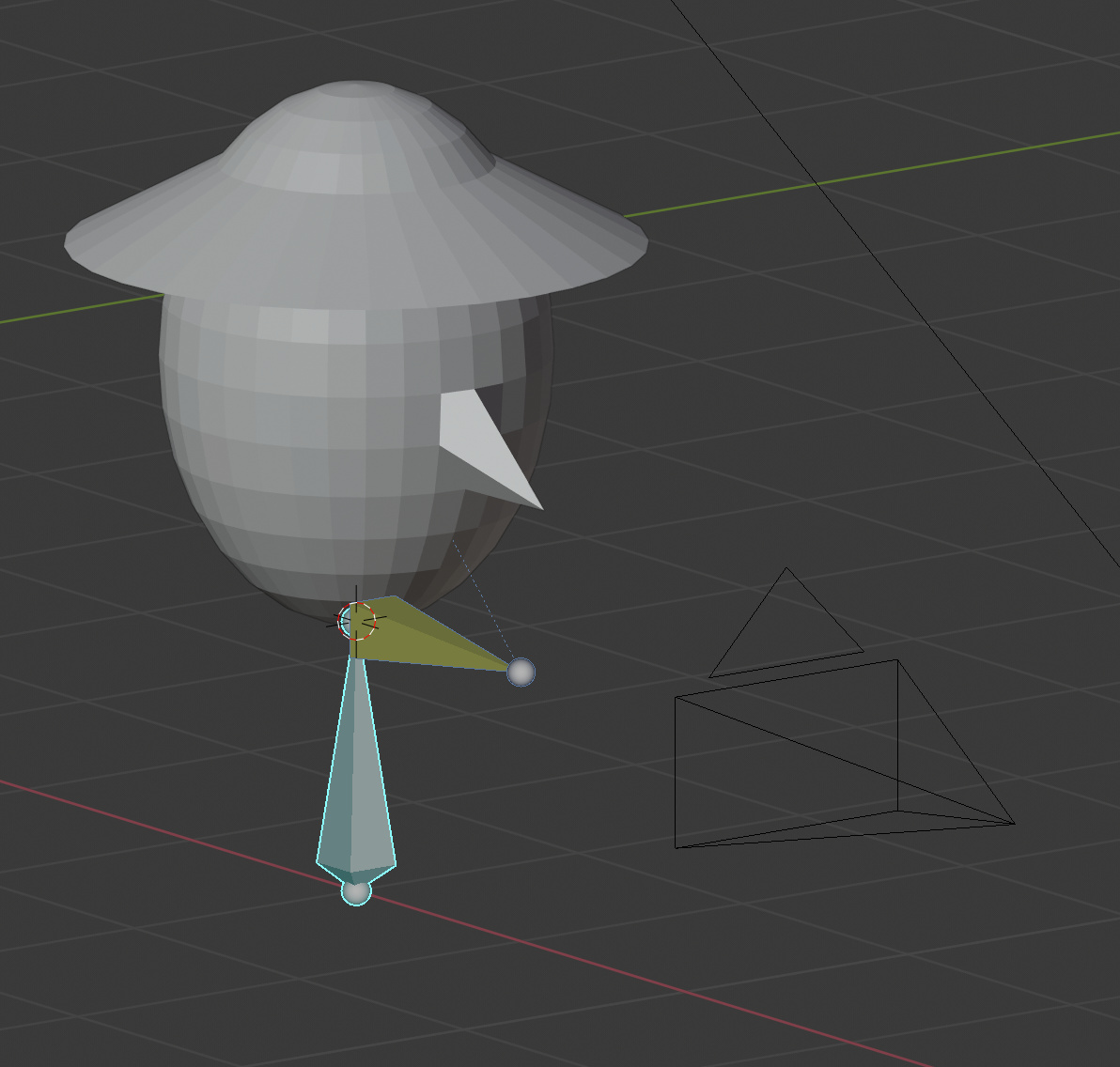
It is not the rotation the problem. It is the side of the bone that target my camera. Let me show you with an image :
Here, let say the yellow/black cube above is my camera. My character’s bone head is follow it and stopping rotations where it should, this part is good. The problem is, as you can see, that it is the top of his head that follow the cube/camera, and not his face.
With a “Track To”, you have the option to change the bone/object axis that follow the target, but with IK i did not find any equivalent of this. A solution, that i thought about when trying your seconde file, would be to add a bone perpendicular to the head one (kinda like a pinocchio nose), but i want to find a more “clean” way to achieve what i need
Rotate the head bone through 90 degrees in EDIT mode, so it points out of the front of his face, rather than out of the top of his head and then use the original IK system I showed you:
Blend File: limit-track.blend (667.8 KB)
Either move the new camera, or move the neck bone and see what happens! You can still tilt his head by rotating the head bone about its Y axis; select it, key R YY and move your mouse.
Cheers, Clock.
…Am i such an idiot to not think about this solution .-.
I works perfectly Thanks all !