In this example I try to make the Script Editing workspace template add and enable the two add-ons located in the same folder as the blend template file, but the current code doesn’t seem to work:
# ##### BEGIN GPL LICENSE BLOCK #####
#
#  This program is free software; you can redistribute it and/or
#  modify it under the terms of the GNU General Public License
#  as published by the Free Software Foundation; either version 2
#  of the License, or (at your option) any later version.
#
#  This program is distributed in the hope that it will be useful,
#  but WITHOUT ANY WARRANTY; without even the implied warranty of
#  MERCHANTABILITY or FITNESS FOR A PARTICULAR PURPOSE.  See the
#  GNU General Public License for more details.
#
#  You should have received a copy of the GNU General Public License
#  along with this program; if not, write to the Free Software Foundation,
#  Inc., 51 Franklin Street, Fifth Floor, Boston, MA 02110-1301, USA.
#
# ##### END GPL LICENSE BLOCK #####

import bpy
from bpy.app.handlers import persistent
import os

@persistent
def load_handler(dummy):
    #import os
    from bpy import context
    screen = context.screen
    for area in screen.areas:
        if area.type == 'FILE_BROWSER':
            space = area.spaces.active
            params = space.params
            params.use_filter_folder = True

    path_to_script_dir = os.path.dirname(bpy.data.filepath)

    file_list = sorted(os.listdir(path_to_script_dir))

    script_list = [item for item in file_list if item.endswith('.zip')]

    for file in file_list:
        path_to_file = os.path.join(path_to_script_dir, item)
        bpy.ops.preferences.addon_install(overwrite=True, target='DEFAULT', filepath=path_to_file, filter_folder=True, filter_python=False, filter_glob="*.py;*.zip")

    enableTheseAddons = ['Textension', 'Code Editor']

    for string in enableTheseAddons:
        name = enableTheseAddons
        bpy.ops.preferences.addon_enable(module = string)


def register():
    bpy.app.handlers.load_factory_startup_post.append(load_handler)


def unregister():
    bpy.app.handlers.load_factory_startup_post.remove(load_handler)
This folder should be unzipped and placed in bin\Release\2.91\scripts\startup\bl_app_templates_system\, to try it out: Script_Editing.zip (224.4 KB)
There was several errors in the above script(taken from here: https://blender.stackexchange.com/a/135045/37272 ). They are now fixed, if the script is run from the text editor, but the question remains: how to make it install textension when chosing the Script Editing workspace template, because this still doesn’t work?
# ##### BEGIN GPL LICENSE BLOCK #####
#
#  This program is free software; you can redistribute it and/or
#  modify it under the terms of the GNU General Public License
#  as published by the Free Software Foundation; either version 2
#  of the License, or (at your option) any later version.
#
#  This program is distributed in the hope that it will be useful,
#  but WITHOUT ANY WARRANTY; without even the implied warranty of
#  MERCHANTABILITY or FITNESS FOR A PARTICULAR PURPOSE.  See the
#  GNU General Public License for more details.
#
#  You should have received a copy of the GNU General Public License
#  along with this program; if not, write to the Free Software Foundation,
#  Inc., 51 Franklin Street, Fifth Floor, Boston, MA 02110-1301, USA.
#
# ##### END GPL LICENSE BLOCK #####

import bpy
from bpy.app.handlers import persistent
import os

@persistent
def load_handler(dummy):
    #import os
    from bpy import context
    screen = context.screen
    for area in screen.areas:
        if area.type == 'FILE_BROWSER':
            space = area.spaces.active
            params = space.params
            params.use_filter_folder = True

path_to_script_dir = bpy.app.binary_path.replace('blender.exe','')+"/2.91/scripts/startup/bl_app_templates_system/Script_Editing"
file_list = sorted(os.listdir(path_to_script_dir))

script_list =[]
for item in file_list:
    if item.endswith('.zip'):
        script_list.append(item)

for file in file_list:
    path_to_file = os.path.join(path_to_script_dir, item)
    bpy.ops.preferences.addon_install(overwrite=True, target='DEFAULT', filepath=path_to_file, filter_folder=True, filter_python=False, filter_glob="*.py;*.zip")

enableTheseAddons = ['textension']

for string in enableTheseAddons:
    name = enableTheseAddons
    bpy.ops.preferences.addon_enable(module = string)


def register():
    bpy.app.handlers.load_factory_startup_post.append(load_handler)


def unregister():
    bpy.app.handlers.load_factory_startup_post.remove(load_handler)


if __name__ == "__main__":
    register()
Updated template folder: Script_Editing.zip (212.1 KB)
This folder should be unzipped and placed in bin\Release\2.91\scripts\startup\bl_app_templates_system\
I feel you tin2tin, this question has been long prolongued regarding fireing custom .py scripts at the moment of template invoke.
I’ve seen people FIRST unpack the zipped addons, manually DRAG DROP them into the Blender 2.8x, 2.9x prefs folder, then invoking Blender, then applying the TEMPLATE and if the addons were inactive -and if the template had them active- then, at the next theme template launch, they will be activated automatically.
I know, your next question is: then how does it work with custom keyboard shortcut templates?
Welp, it works the same: put all folders in their place and just invoke the template after.
Q: Doesn’t it beat the purpose of creating templates in the first place if I manually have to do this instead of allowing the .py custom ini file to do it?
A: ¯_(ツ)_/¯
There are additional methods which require the ini.py to launch the script as an executable… but that’s out of my reach. That seems to solve your question. It’s on the python API for Blender.
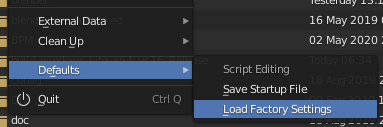
I found out that you’ll have to open the Script Editing template and the restore the factory settings, to even get the init file executed, just selecting the template will not execute the init-file: