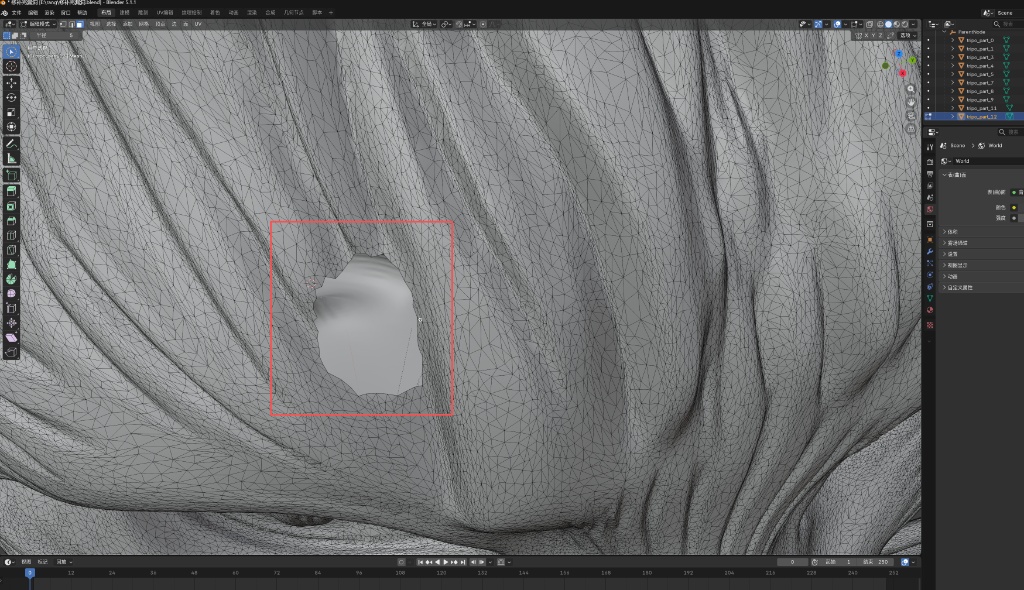
I’m totally clueless about 3D modeling. The model in the picture was automatically generated by me with AI tools. After deleting the extra surfaces in Blender, I ended up with some broken surfaces. How can I fix these broken surfaces while making sure the texture matches the surrounding skin? I’ve tried a bunch of methods, but none have worked. Could you pros please give me a hand?
After deleting excess components, there are cases of surface damage
Hi there,
I would try selecting the vertices around the hole and then pressing the f key on your keyboard, this triggers the fill command, which should fill in the hole.
This site is not for people to fix your AI generated crap for you. Go watch some tutorials and learn how to use the software like the rest of us did. I highly recommend Grant Abbitt.
If you want help with this, you’ll need to repost it in Paid Work and offer payment