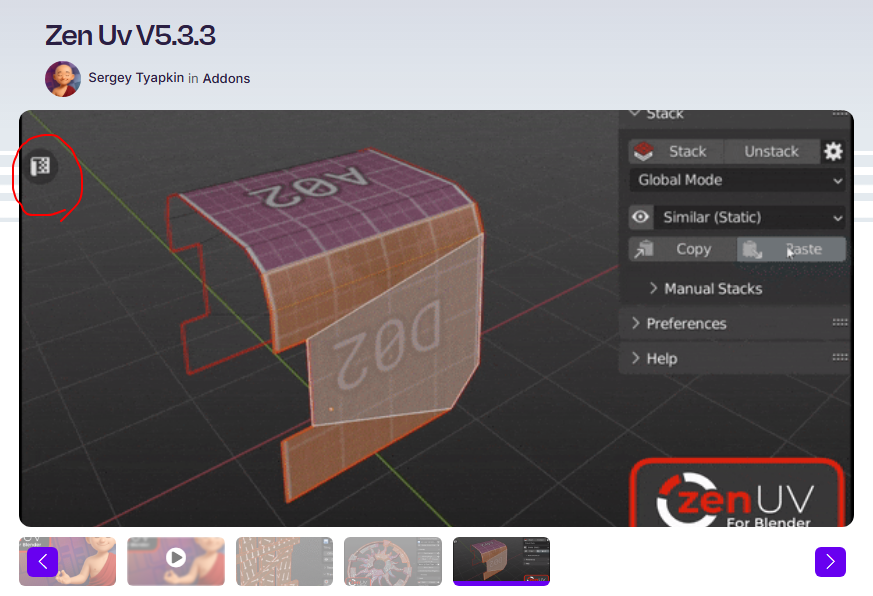
Hey, I’ve noticed over the last few projects that after a few days, the “hide/show UV editor” button on the left disappears; does anyone know how to get it back? Thanks

Hey, I’ve noticed over the last few projects that after a few days, the “hide/show UV editor” button on the left disappears; does anyone know how to get it back? Thanks
There is no such button, on default blender.
By default, editors are only called from editors switch menu, in header of an area.
It is probably provided by addon.
So, that seems to be an issue with this addon.
I did a reverse image search on that image, since it isn’t part of normal Blender. It appears to be from the Zen UV addon (https://superhivemarket.com/products/zen-uv), I don’t know if you have this installed, but if so it might be an update causing it.
That was just my first thought, since @zeauro said it is likely an addon.
Since it’s Zen UV, its panel toggles live in Edit ▸ Preferences ▸ Add-ons: search “Zen”, click the arrow to expand the entry, and the add-on’s own preferences (including which of its panels are shown) are in there. The panels themselves sit on the N-panel.
But the bit I’d actually focus on is that you said it goes after a few days. A setting you deliberately flipped wouldn’t do that on a timer, so I’d treat this as “something is resetting” rather than “I turned it off”. Two candidates I’d check:
1. The add-on itself got switched off (most likely). If Blender hits an error while loading
an add-on — a crash, a partial update, a version bump — it can come back with that add-on
un-ticked. Then every Zen UV button disappears at once, which from the outside just looks
like “my button is gone”. Next time it happens, look at the checkbox next to Zen UV in
Preferences → Add-ons before you change any of its settings.
One 5.x-specific trap here: Preferences now has Get Extensions and Add-ons as separate
entries in the sidebar. Depending on how Zen UV was installed it may only show in one of them,
so check both before concluding it’s gone.
2. Your preferences aren’t being saved. Bottom-left of the Preferences window there’s a
hamburger (☰) menu with Auto-Save Preferences in it. It’s on by default — but if it’s been
switched off at some point, nothing you change in there survives a restart, which would produce
exactly your symptom. If it is off, either turn it back on or hit Save Preferences in that
same menu after you fix the panel.
Quick way to tell the two apart when it next happens: if all the Zen UV UI is missing it’s
#1; if only that one button is gone while the rest of Zen UV is fine, it’s the panel toggle in
the add-on’s own preferences that Kim pointed at.