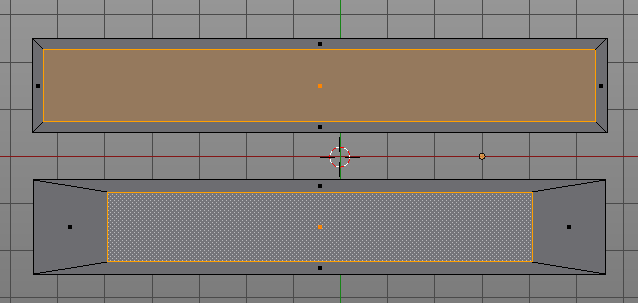
I start from the upper rectangle. My end result should be as the lower rectangle.
Currently if i select the upper rectangle, press e and scale down i obtain the result in the middle. Of course i can manually adjust scaling along each axis but is a bit tedious and not precise, expecially on more complicated shapes.
Is there a one/little buttons method, after i extruded the edge loop, to scale the vertices as the lower rectangle (without having to use inset then delete not used edge loops)?
JA12: many thanks! That addon solved my problem, even though i prefered something more dynamic, at example while scaling press another key to keep consistent distance from original.
eppo: yes it’s all in edit mode; the desired result is the lower rectangle, not the one in the middle…
IkariShinji: the mesh in object mode have scale 1 1 1. It was a plane, then scaled in edit mode and deleted only faces. (upper rectangle)
Alwais in edit mode if you select all that rectangle, then e(extrude) and s(scale) you will obtain the result in the middle of my image, not wanted, unless i am missing something…
JA12 addon he linked is doing what i needed (and will need ) as lower rectangle in my image.
Thanks IkariShinji, yes that’s exactly what i meant. This had been repeated there so many times before, i assumed everyone with more than 10 posts had run over it several times. Sorry for not making straight answer.
If for some reason you decide on scaling in Object mode and after that do some Edit mode operations make sure you issue Ctrl-A -> Apply Scale before, while in Object mode.
If you get unexpected results using operators or modifiers check Objects Scale, Rotation, Location values on N-panel firsthand.

 ) as lower rectangle in my image.