How do I make the inner side of the face between the jaws different from the outer side?
My laptop can’t run anything past 2.7. If anything here has to do with nodes, I am using blender render so the nodes are different. Excuse my bad wording.
How do I make the inner side of the face between the jaws different from the outer side?
My laptop can’t run anything past 2.7. If anything here has to do with nodes, I am using blender render so the nodes are different. Excuse my bad wording.
I’m new to blender so is there any difference in how the options are used in the version used in the video?
There are slight differences inside the nodes (mainly more options), but the overall method work in almost every blender since 2.5.
Also in Blender Render the nodes are different so how do I tell if he is using Blender Render?
I just reread your initial question, it looks like what you need is to make material groups, which is much simpler.
Do you know about any tutorial for that? Also blender 2.7 is different from the latest versions in how it works.
Wouldn’t it be easier to make the cheek 2 sided? You would just need to extrude the inside of the mouth inward and you would immediately get it.
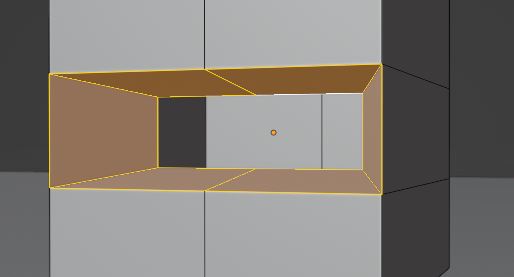
This is a low poly model, are you exporting it to a game engine? If you are, you would have to somehow re-create the 2 sided material there. Making the model 2 sided would be the more straightforward way that just works.
Can you give a link to a tutorial for that? That is if you are able to find it for such an old software.
This is such a simple thing that you won’t find a tutorial for it. But I can just explain it here.
1- Select the edges at the border of the mouth.
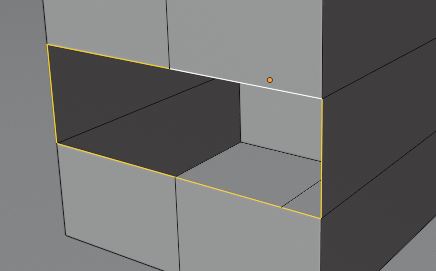
2- Use the extrude tool. Move what you get toward the inside of the mouth.

3- Scale the edges so they are a bit smaller than the outside of the mouth and don’t overlap it.

4- Use the F hotkey to close the end of the mouth.
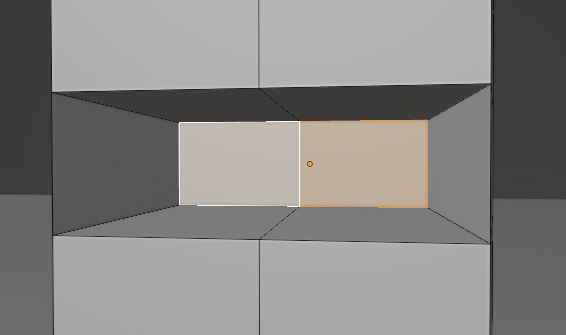
If you don’t know how to do these actions, you should consider looking up beginner tutorials, those are some of Blender’s most basic tools and I can’t explain the whole software in comments.
Now I got it, but I need to know how to texture 2 sides because I am going to use a lot of that in my models and I don’t want extra faces because that might cause problems specific to what I intend to model.
I tried looking it up and it seems Blender render never had a way to do 2-sided materials. I saw some discussions where people would duplicate and flip faces to fake it.
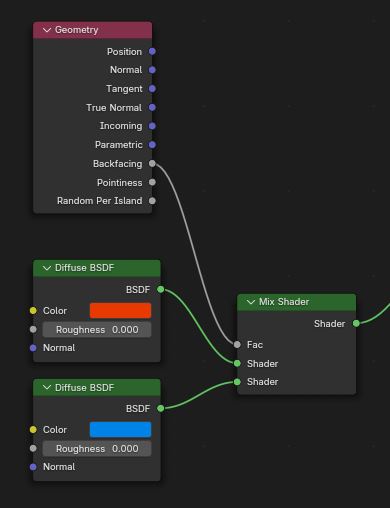
In Cycles it can be done with this setup. This image is taken in the current version, but I’m pretty sure it was the same in 2.78.
If I switch to Cycles Render is that going to cause any problems with what I made while in Blender Render? Do any of those settings affect the model, or just how blender displays it and other things?
Can I put a PNG instead of a color?
In your version, you would have to redo the materials if you switch, because blender render and Cycles aren’t compatible.
What about UV mapping?
UV mapping is considered a part of the model itself, separate from materials and renderers. It even follows if you export a model to an other app.
Yes… you could add textures as you normally would in a normal BlenderRender material, or by adding a texture node and plug it to the diffuse color socket of the material node.
Okay. So I only remake textures (I haven’t given textures) or also give a new material? I assume the material and texture are the same as UV and model so part of each other.