Alas, it is as I’d feared. Thank you for the reply and for all you’ve done so far. I’ll force myself to stop checking every day for updates, haha. Universal Human is the greatest. Nothing comes close to it IMO. Thanks again.
1 Like
Well, now that you’ve posted in this thread you should get notifications at least, which will save having to check manually, if that’s any consolation.  Alternatively you could follow my Twitter or subscribe to Gumroad emails (which you might already be subscribed to).
1 Like
Hi chris , i want to ask you how did you make the supination and pronation for the arm ,did you use shape keys or bones and if there are another thing you add
If the eyes are textured, its very hard to tell its 3D. So inspiring as always.
2 Likes
There’s a bone that’s weighted to the lower half of the forearm, with corrective shape keys to help preserve volume.
1 Like
Hi All,
I understand that UH was not made with mocap in mind and I found some reference to using a separete control rig but I am wondering if anyone could kind enough to share their solution / files used to drive the body and face mocap for UH? I love the rig but for my recent project I would really need to to use mocap. Let me know please if any more detailed help could be provided please 
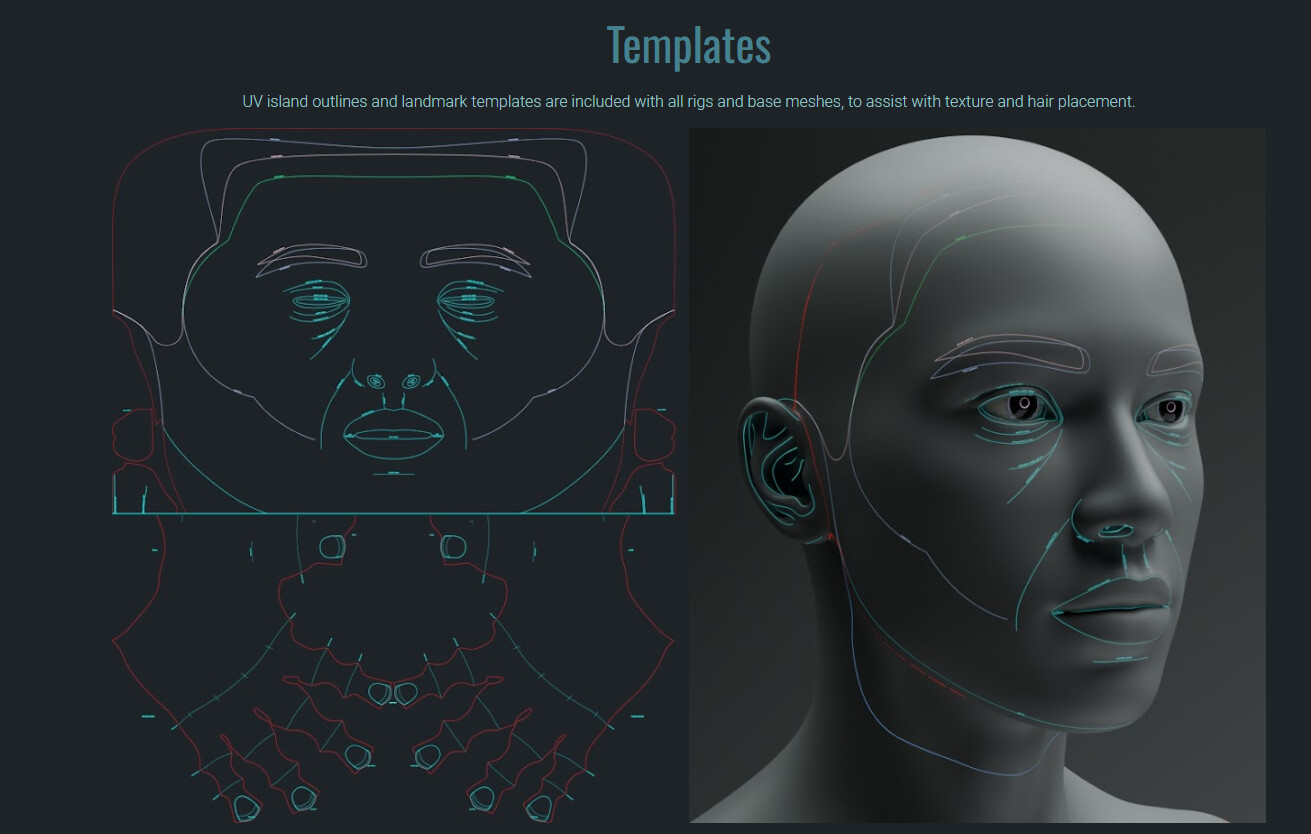
Hey Chris !
Thank you for your work 
It’s amazing.
I have a question. Where I can get that “landmark templates” ? it’s looks very useful
Regards
They’re included in the rig and base mesh .zip files.
Optional? Name any 3d technical artist that is 100% sane
1 Like
Define “sane”…
1 Like
Hey Chris, I was wondering how you were able to make the pores stretch on the skin with the wrinkle maps when the human face is making expressions?
They’re incorporated into the wrinkle height maps, so they dissolve in and out with the wrinkles when the mesh is stretched.
Hey Chris I was wondering how you were able to rig the caruncle to the eyeball?
2 Likes
Incidentally, I’ve noticed nearly all of the uploaded videos (except gifs and YT videos) don’t display anymore. Is it just me, or is BA broken again?
1 Like
Thanks for confirming, I’ve reported it.
Hey Chris I was wondering if your realistic human model has a inside mouth detail because I’m trying to model the inside of my characters mouth and I’m not sure wither to connect the gums to the inside mouth or be separate with the teeth.
Something like this is what I’m trying to say when I mean inside mouth: https://80.lv/articles/001agt-002mrs-organic-art-realistic-subdermal-shaders
@ChrisJones I’d like to clarify something: for the IK/FK switch, it seems you set a driver on the Influence of the IK_Forearm bone, where Bone_Switch* is used as the variable. This Bone_Switch* bone can only move along the Y-axis within a range of about 0.025. I assume you’re using a formula like 1 - var * 40.
However, with that expression my rig starts breaking badly. It feels like the IK can’t handle the driver, but if I remove the driver everything works fine.
So how should I properly set up an IK/FK switch without using a driver?
I’m also curious — does your rig break as well if you manually enter an expression like 1 - var * 40?
Hello, is suitable for ik/fk switches to use a custom property set to integer from 0 to 1, then right click on the property and use copy as new driver and paste it on your copy transform constraint influence of the deform bone that copies either the ik or fk bone transforms.
Or use float instead of integer but 0 to 1.0 to create a slider property rather than a turn on/off property with integer.
Thanks for the advice!
So, as I understand it, the switch will now be on the panel (N) rather than a bone built into the Armature?
I’ll set this idea aside for now, I’m just curious if it’s possible to achieve the approach I described above using a variable bone. Apparently, Chris somehow made it work, but I don’t know exactly how. Maybe he didn’t write a scripted expression manually, but used something else…
1 Like