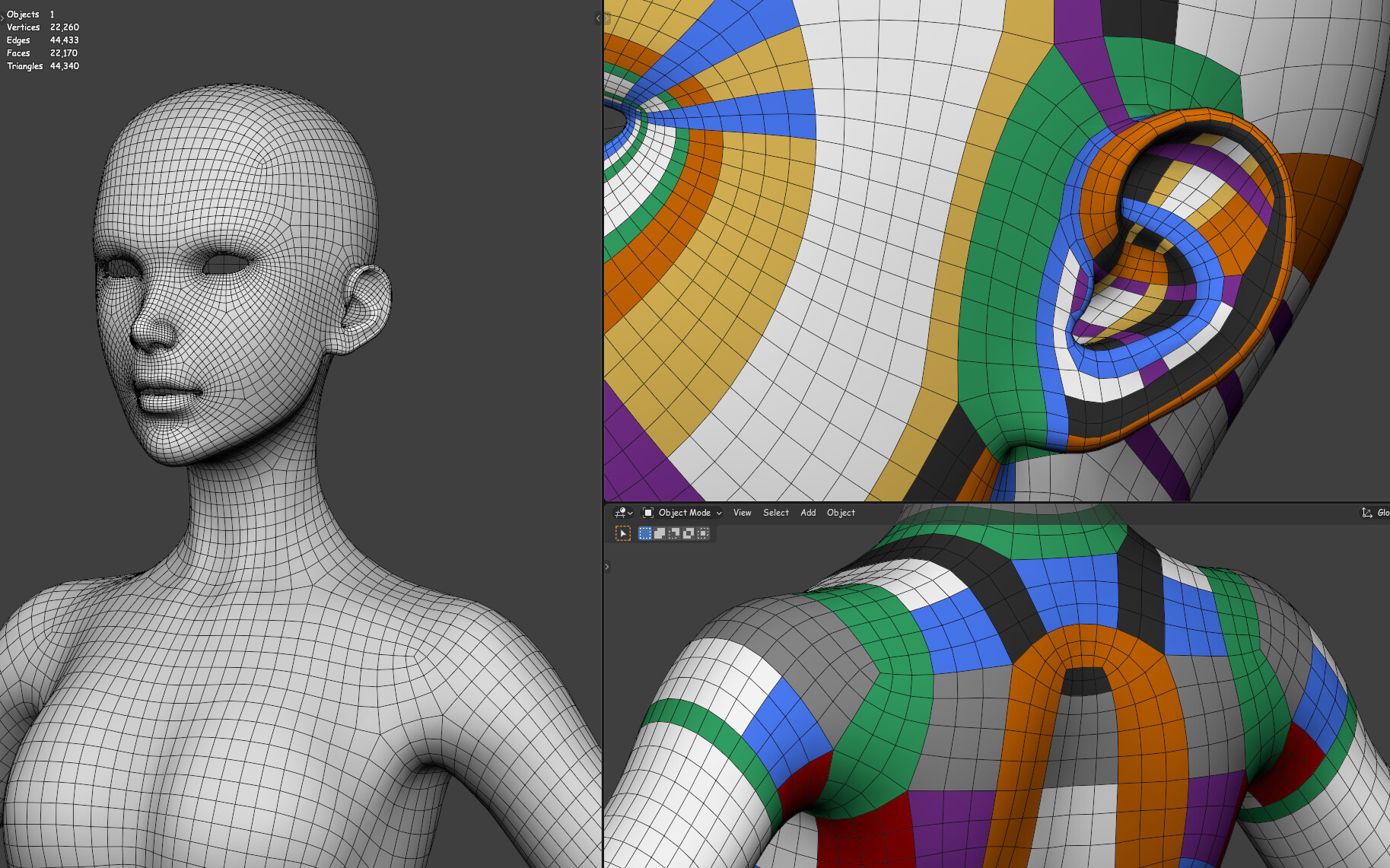
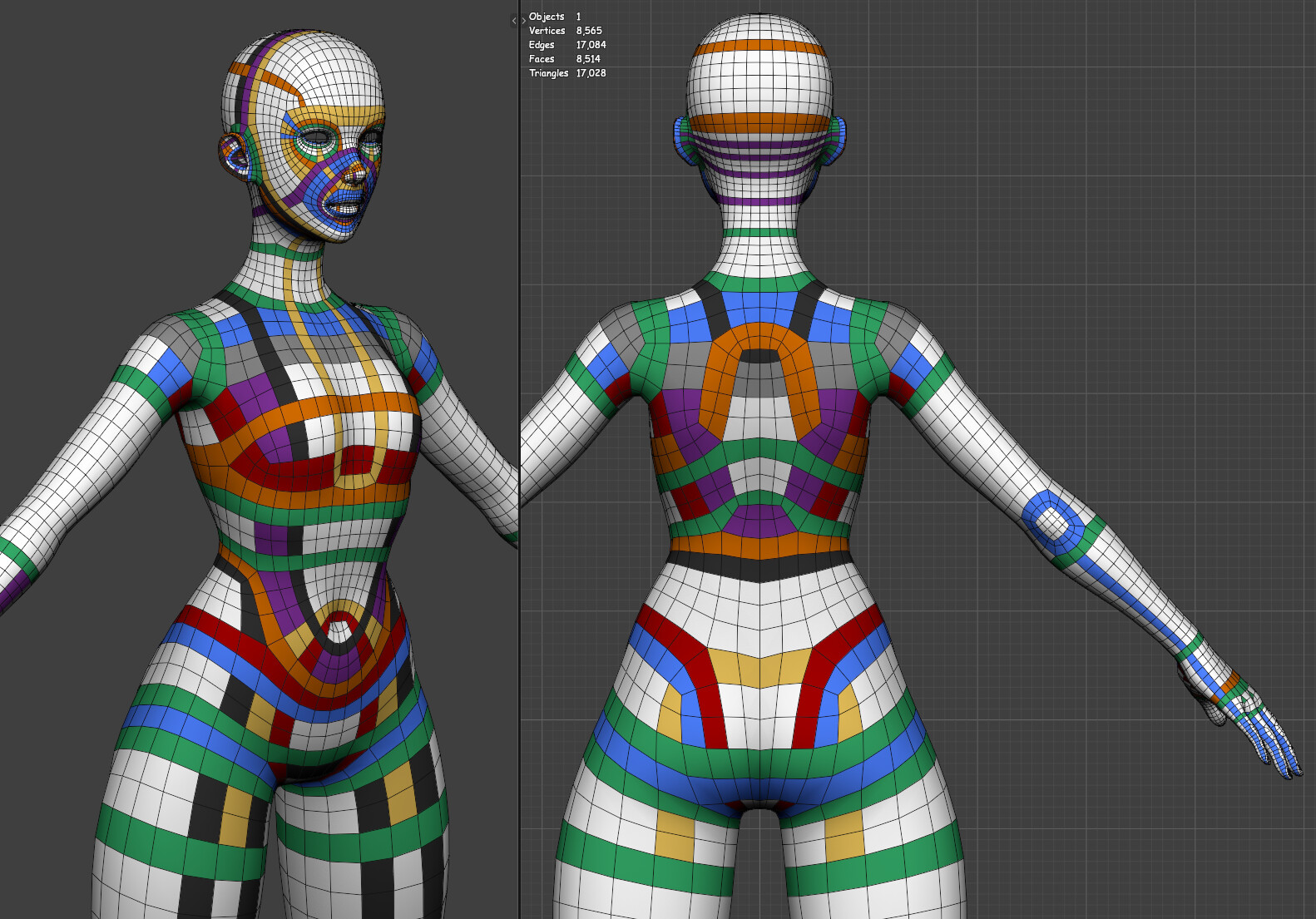
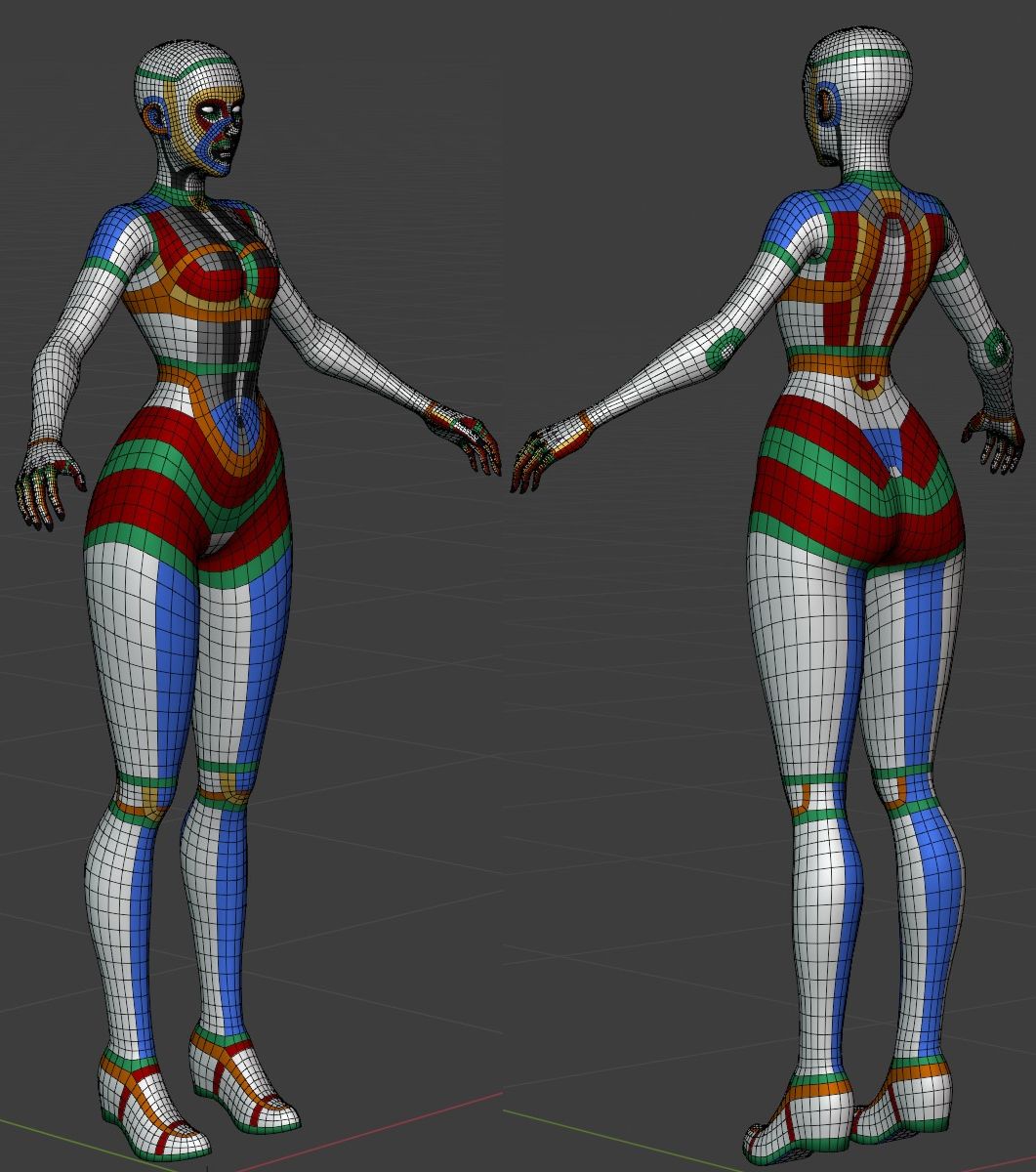
Current version, 9.
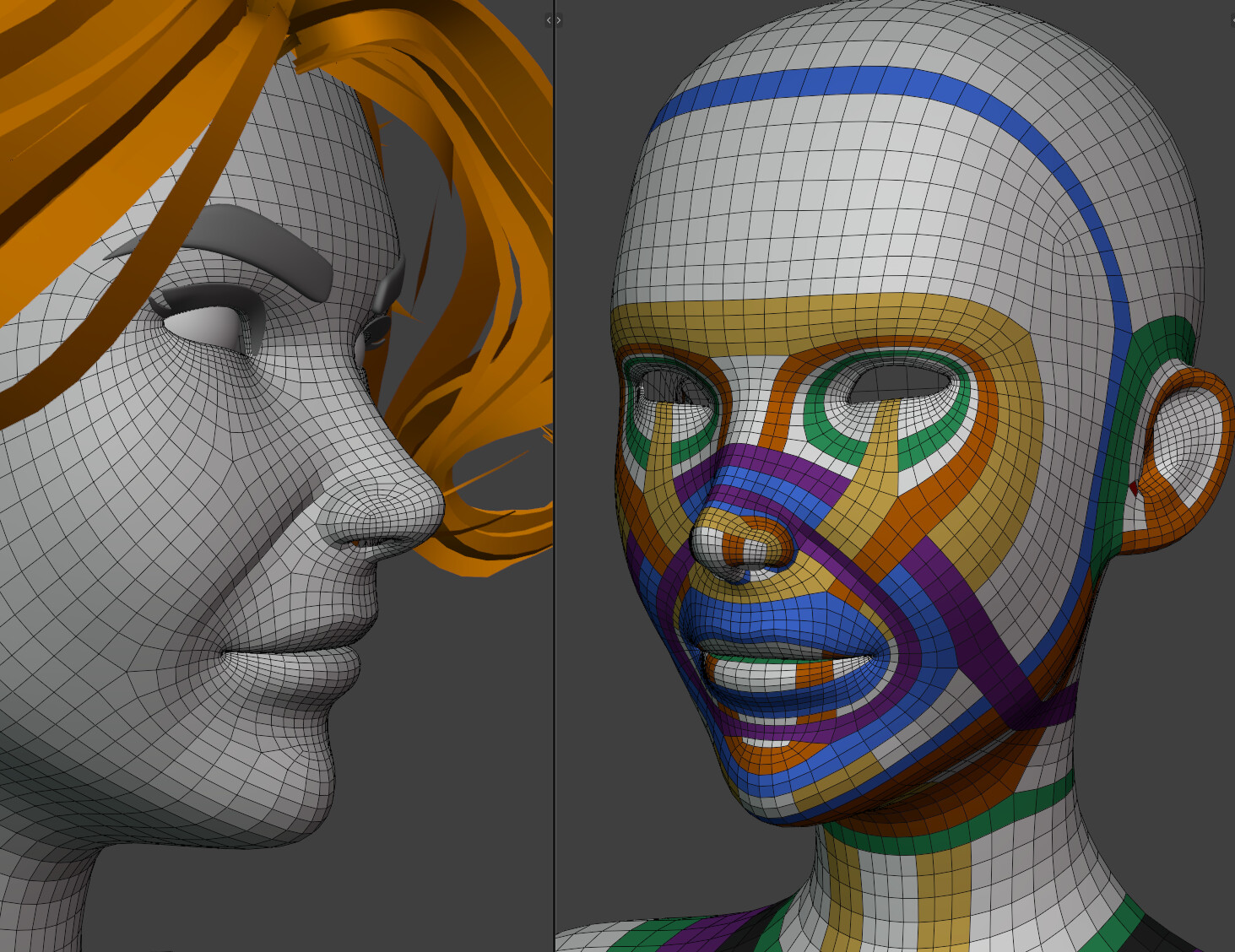
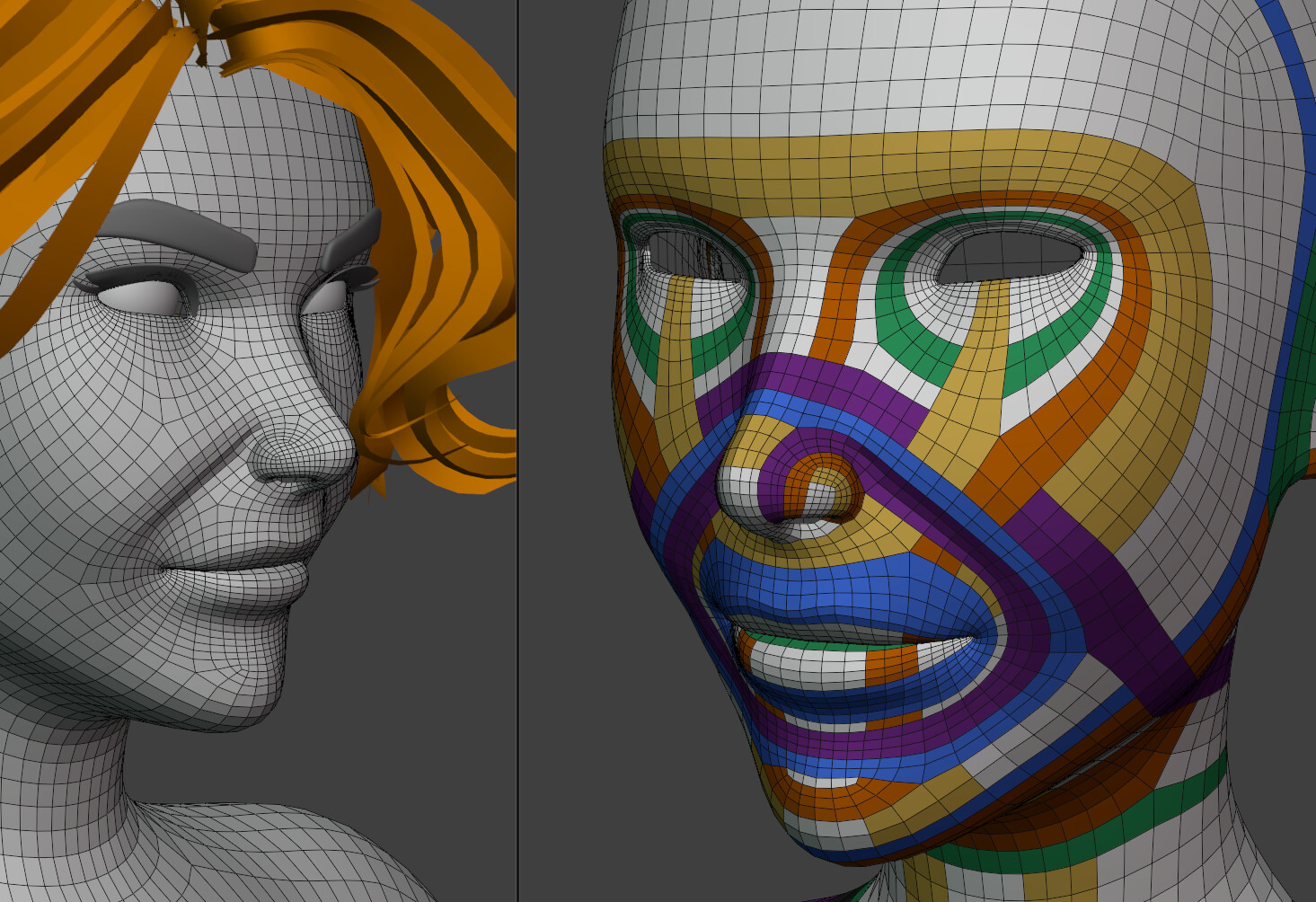
I’m simplifying loops, but adding a lot more geometry. The only consideration is the capacity to hold the main shape and not break under Smooth brush.
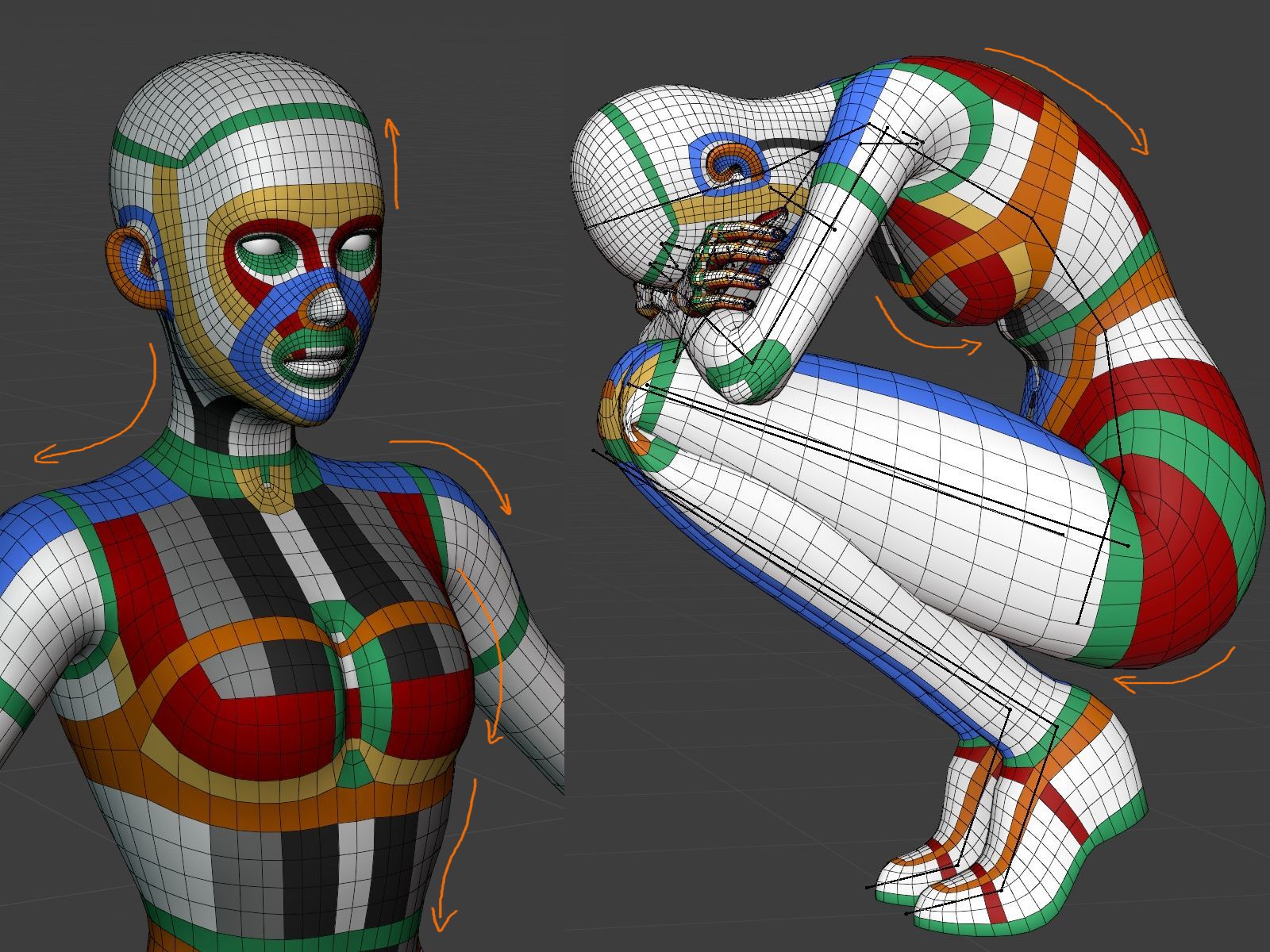
My anxious self can’t handle thoughts of unnecessary optimization right now, so I’m trying to focus on good design and deformation no matter the cost (but still “game-ready realtime”).
Hi, I can’t believe it’s been almost 3 years since I shared my female base mesh on this thread. I also didn’t notice that the link has been clicked over 400 times, which I guess means that it has helped quite a few people so far.
It’s indeed a great base mesh. Looking back, there’s a lot I would change and add to improve it. Actually though, for the last 3 years, I have been doing exactly those things.
If you enjoy my original female base mesh, and think that it’s great, but it’s still a bit far away from actual human figure, then you can get my latest female body template here, and use it as a reference.
It’s quite definitive in term of topology, from head to toe, literally. I posted some fun stuff about it here as well.
It’s easy for me to forget the main intention behind retopology during the process. (Especially if you stretch it over several days) You spent forever trying to redirect some loops in a nice clean way… just to realize that they ended up in the worst possible position for deformation. Like the front side of pelvis area here.
In case someone sees it and decides to reference it, keep in mind: I still don’t know what I’m doing. The decision making is pretty much based on “I want it to look smooth and I don’t particularly care what it’s going to cost”.
Primary considerations: edges are placed to support silhouette first and foremost wherever possible (so to not look jugged at glancing angles).
So… very dense face and hands. Plus loops in shoulders, chest and pelvis are made so that it would be easier to increase resolution there.
And in other places, like scalp area and neck, it should be pretty easy to collapse some parts.
Yeah he truly is gold for info. Kinda forgot this channel. Was searching ng some reference on puntert, that’s how I ended here and got remembered to Dikko. Thanks!
I retopo over existing mesh… both because it’s easier to focus only on topology (without worrying about anatomy and such) and because I’m really bad at poly-modeling
Ahha it’s fine, to each their own I just wanted to be able to see clearly what I’m doing, especially on my old screen.
I’m more worried that this stuff ends up on Pinterest: I wanted someone to tell me what I’m doing wrong, not to add bad/random topology practices to the internet archives
The highpoly loops are getting a little crazy.
At some polycount they probably don’t matter anyway, still I’m trying to keep certain logic as I systematically run into issues:
5-star poles should be moved to comparatively flat areas where strong curvature doesn’t expose them - a pole on a shoulder, for example, will make itself a nuisance even on subdivided mesh;
3-star create a visual disruption when subdividing for sculpting - minimize their count or move to flat areas where possible;
U-turn that only has 1-2 quads inside the turn will shrink aggressively when smoothed - a pain when adjusting base with sculpt tools;
actually, any pole types should not be close to each other - they create weird gravitational anomalies in base - at least two quads between 5-star poles seems to reduce the pull when smoothing;
aim for creating “local” loops - they do not run through half of the mesh and can increase resolution only at certain parts
At first I thought that I might as well just subdivide the mesh once and be done with it, but increasing polycount manually in this case seems more efficient.
It’s really-really dense now (~40k for current needs), but for the most part can still simply be collapsed if needed.
I think you’re good- last I read, hero characters are 50-80k for the current generation. Also- when this is finished, I sure do hope you sell it, I’ll pay a significant amount for this basemesh based on how I’ve seen it deform so far
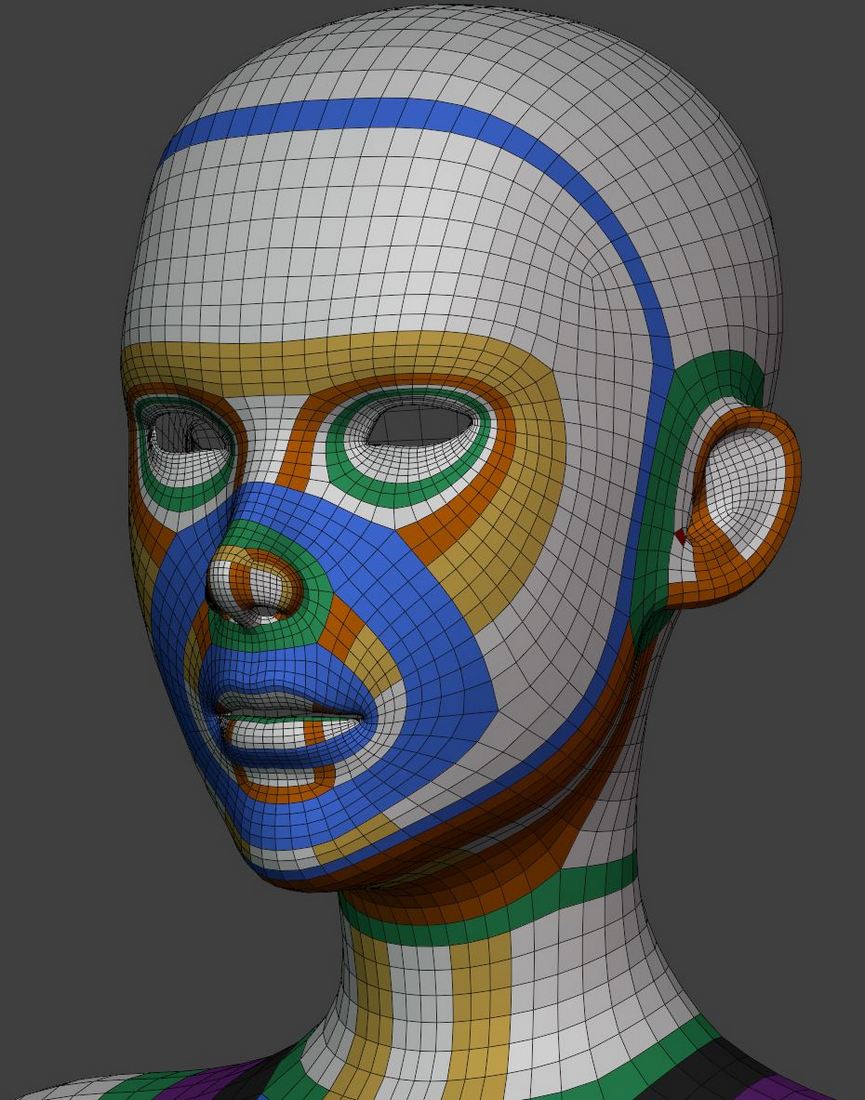
This edge loop to form the smile line seems misplaced to me. If you plan to rig the face getting that smile / frown shape right might be more difficult than it could be.
There might be other stuff that can be discussed but it seems already good enough to make something that would work well.
The mesh is a bit dense to my taste but it’s also something I see regularly in production mesh. I find that it makes skinning and shape keys a bit more harder to manage. But given some time it also allows to have more control over the shape. and it’s true that I tend to do more minimalistic topology ( more cartoony too) and rely a bit more on subdiv to smooth things out.
In general my approach is more trying to make the most of each loops and if something turn out to be lacking definition when doing shapes then I add needed loops. But it’s also ok to make a dense mesh like you did, it might be a bit harder to work with but you have less chances to go back.
What you can do to test the topology is to add a few shape keys :
Make a smiling + eye surprised brown up shape. Then an angry + brown down frown face.
This should be enough to test out the topo and other stuff is likely to work.
Maybe eyes close could be worth trying…
All that if you plan to rig the face, if not then there is no need to make the best topo ever if you’re not going to use it !
Yeah, the polycount skyrocketed since the early versions, but I’ve decided to just go with this for now, because there’s no sense in optimization without a reasonable target (which I keep telling myself for a while now, but somehow feel really bad when looking at mesh statistics ).
I’m going for real-time/game-ready cinematic hero-character type (pretty high polycount) so subdiv or Blender-specific smoothing tricks are a no-no for me.
This mesh is for two different uses simultaneously:
base for sculpting - minimizing anomalies produced under sculpt tools;
base for final topology - supporting animation topology and maintaining logical loops that can be locally collapsed/increased.
Right now the mesh is built around a specific character but, depending on how further tests will go, I will probably collapse a lot of loops for an asset version.
Here’s my plan:
Step 1. Learn how to make a mesh that looks good when posed or even animated (it’s been a cause of misery on every single model I’ve made so far, so it’s a priority).
Step 2. If “Step 1” is a success learn to optimize.
In olden days this approach probably did not make sense, but now “real-time” capabilities are very different, so might as well try it this way…
I would have probably go for the second version but seeing both I might prefer the first. Maybe for a face with stronger feature the second could work better.
In any case this should make things simpler !
And about the mesh density, well I think it’s less about optimization but a simpler mesh might be easier to work with when it comes to skinning or shape keys.
While Chris Jones uses displacement maps so it’s hard to compare, their mesh is super simple yet the result is still top quality. But in the meantime I totally get what you mean, we have to pick our battles so if for now the focus is on topology and expression it’s maybe not worth adding more variables to the equation.
Reworked ears to define two “spirals”. It was more pain than it should’ve been Most loops are going to eyes, under chin or into the “hair” area, so there’s a number of ways to increase/reduce density locally.
Going to try new eye topology as well.
Also the shoulder loop is back again. I’m going in circles, but this time I’ll try to figure out what causes issues (spoiler: poles placement) and see if I can do better than last time.
Naturally, topology, density and colors will keep changing - it’s all simply testing this and that and trying to figure out logic (if there is any).
I need to make a new color palette sometime, I thought I had enough colors
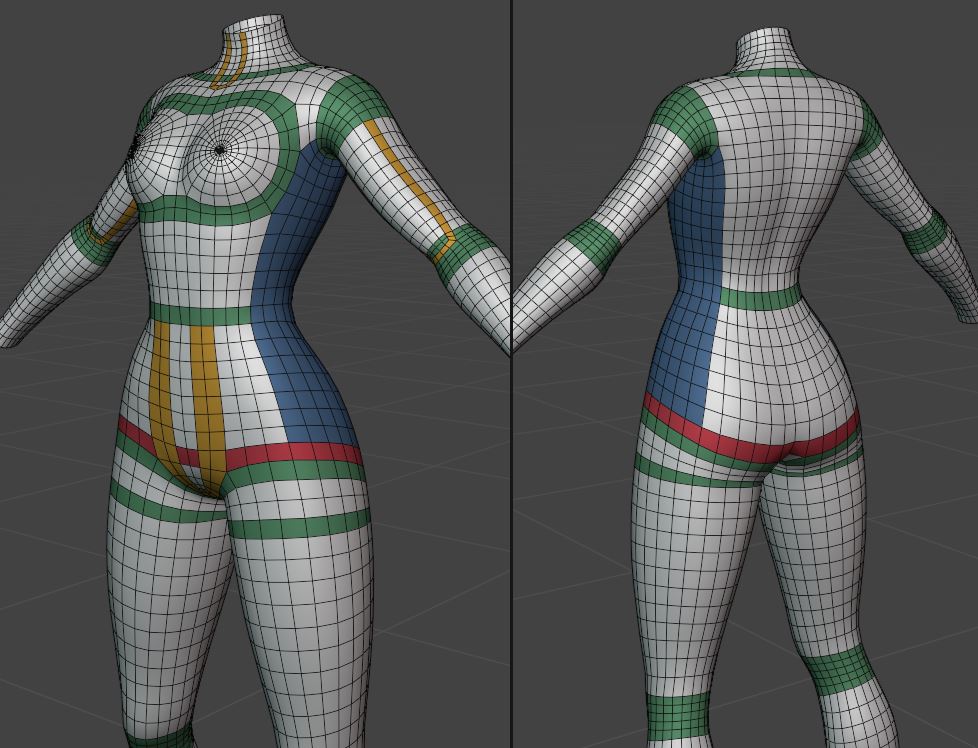
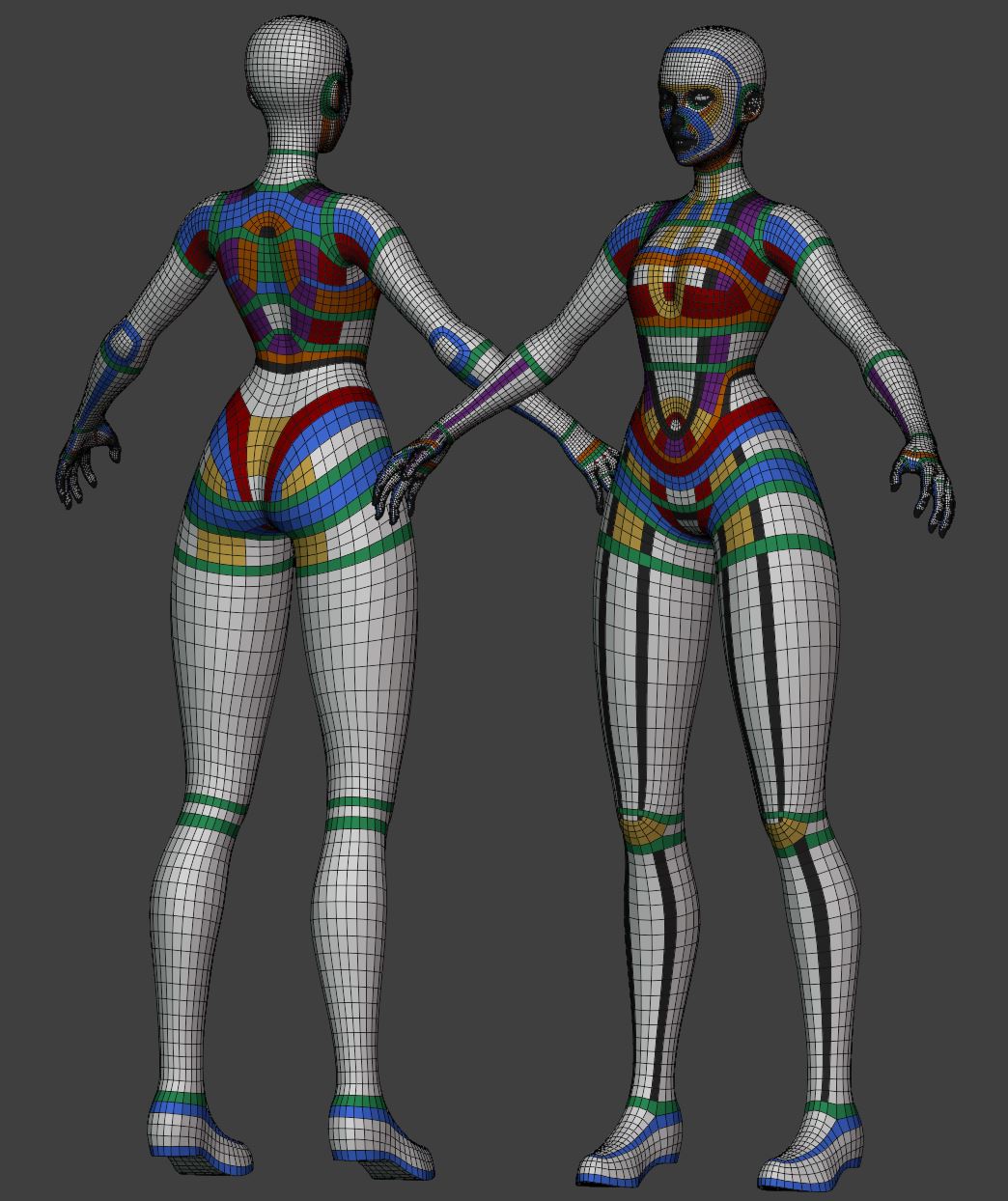
Made this by (in most cases) removing double loops to see how it’ll look.
Hands are least flexible when it comes to adding/removing loops, and as result very difficult to connect to the arm.
The back especially is probably unnecessarily complicated at this density




 How could this happen?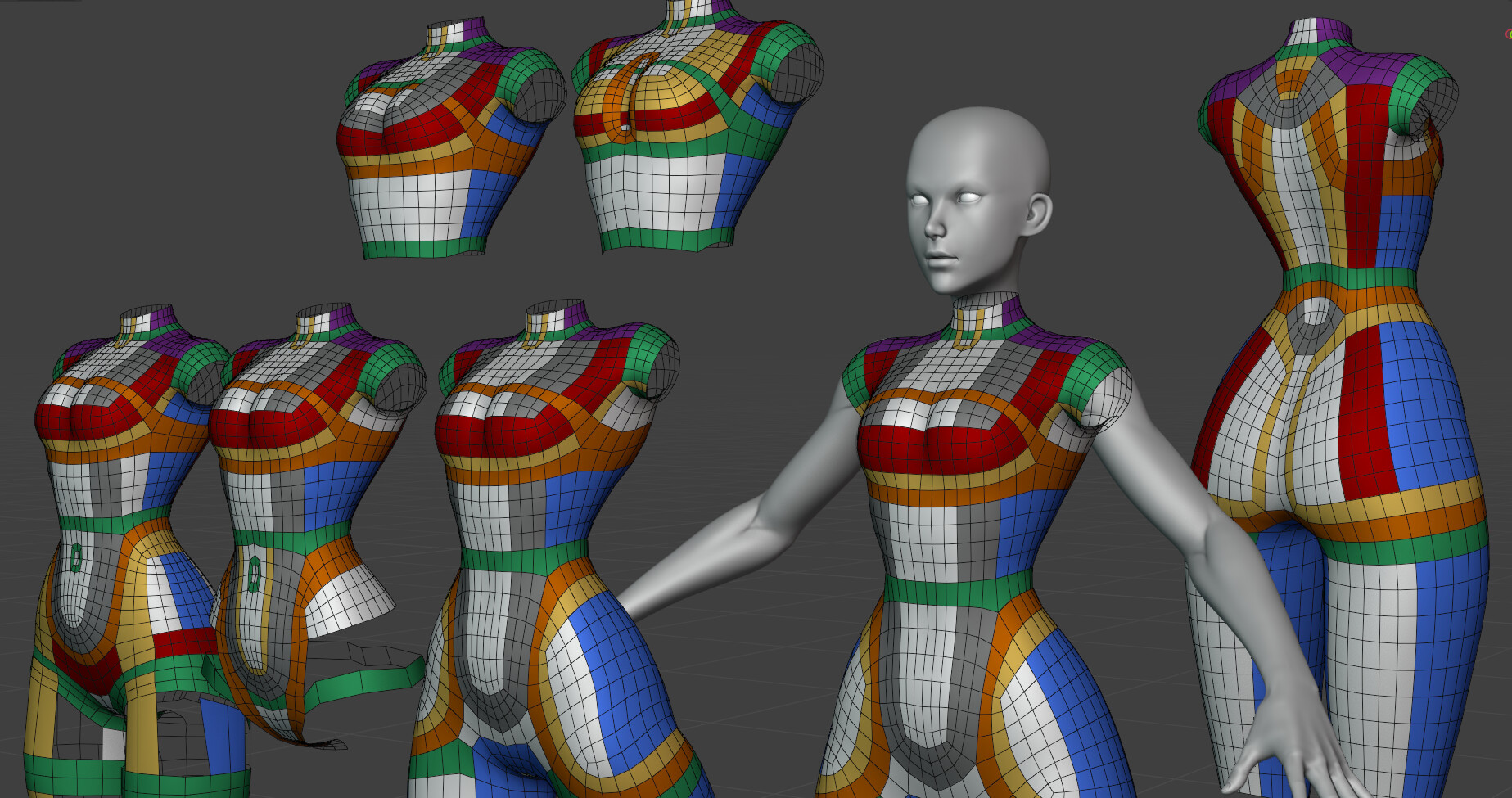

 I just wanted to be able to see clearly what I’m doing, especially on my old screen.


 ).
).