I made an addon to combine animations in both time AND space

Hey everyone,

If you’ve ever tried to create a long, complex cinematic in Blender, you probably know the feeling…

You’re working on a cool action sequence. You’ve got your run cycles, your attacks, your dodges. You think, “I’ll just use the NLA editor to piece these together!” But then you hit a wall. The NLA is great for when an action happens, but what about where? How do you make your character perfectly follow a curved path while running, or trigger an attack at an exact spot in the world?

This frustration is exactly why I created TakeBuilder. It’s a new Blender addon designed to give you precise control over your animations in both time AND space.

TakeBuilder - Feature Preview

TakeBuilder - BETA: Basic Tutorial

So, what is TakeBuilder?

TakeBuilder is a Blender addon designed to simplify building long animation takes from your collection of pre-made clips. Perfect for pre-viz and cinematics, TakeBuilder ensures precise event timing and positioning. Speed up your workflow with features like auto seamless looping for source clips and path following, letting you iterate rapidly and nail your shot every time.

Here are the highlights :

  • :clapper_board: Assembling Actions : Combine multiple animation segments into a single take. It functions like NLA editor (without strips unfortunately).
    assemble_actions2

  • :hourglass_done: Auto Loop : Make your animation clips seamlessly looped. TakeBuilder automatically calculates the difference in position and orientation between the start and end frames, ensuring a smooth transition, no snapping.
    auto_loop

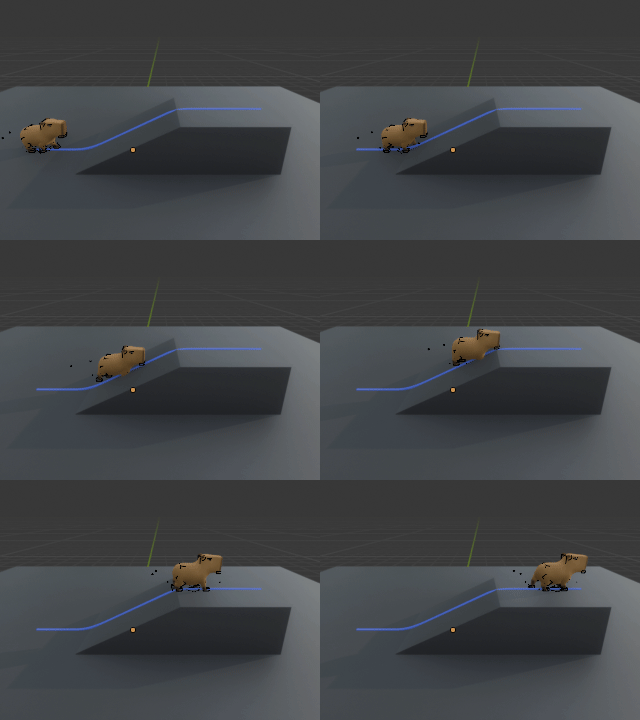
  • :curly_loop: Trajectory Manipulation : Warp the trajectory of you animation clip along a path curve, or play the clip from any position with any orientation.
    6月19日(2)

  • :wrench: Tweak and Rebuild : Refine your take by tweaking parameters and rebuilding it. The source actions remain unchanged during the build process, ensuring flexibility and non-destructive editing
    6月19日

State of Development


TakeBuilder is currently in its early stages, bugs​:beetle: are expected. Despite being under development, it is a functional product with all advertised features working as intended.

If you run into any issues, please don’t hesitate to :closed_mailbox_with_raised_flag:contact us or Join our :heart: Discord :heart:

Planned Updates for BETA

The following features are planned for recent updates:

  • Extend By Distance : Add options to calculate the loop count of actions based on movement distance or target position.
  • Pose Matching : Introduce an auto time offset selection feature for seamless transitions between segments. This feature matches the pose of the previous action to determine the optimal starting point for blending.
  • Slope Alignment : Automatically align character bones (such as feet or spine) to the slope of the path curve.
  • Enhanced Visualization : Introduce gizmos to help visualize timings and positions, making it easier to fine-tune your take.
  • More Robust Hierarchy Handling **: Handle those evil Child-Of constraints with more robustness.
  • Performance Optimization : Add cache to avoid re-calculating the same data.

Get TakeBuilder and speed up your workflow!

I built this addon to solve a real problem I faced, and I truly believe it can save you countless hours. You can get it now on :

Gumroad : https://symphoniestudio.gumroad.com/l/takebuilder

itch : https://symphonie-studio.itch.io/takebuilder

SuperHive Market (BlenderMarket): https://superhivemarket.com/products/takebuilder?num=3&src=new

I’d love to hear your thoughts and answer any questions in the comments. Let’s make animating in Blender even more awesome.

Happy blending!
15 Likes

What is this tool and what problem does it solve?

TakeBuilder is designed for Blender to easily apply existing character animations (like walking, running, attacking) along complex paths and at specific points in space. This addresses a limitation with Blender’s built-in Nonlinear Animation (NLA) tool, which primarily focuses on timing rather than spatial placement of actions. It’s particularly useful for previz in game development or animation.

Can TakeBuilder generate actions from thin air?

No. TakeBuilder is not a procedural animation generater.

TakeBuilder works by taking your existing character animation clips (like a walk cycle or attack animation) and applying them along a path or at specified locations you define in Blender. It is not an animation generator that creates new animations from scratch (e.g., it won’t create a walk cycle for you). You need to provide the source animations.

Can I use this tool with different character rigs?

Yes, you can use TakeBuilder with various character rigs.

However, if you need to use animation clips created for one character on a different character with different proportions or even structures, you will first need to “retarget” the animation. Other Blender add-ons specialize in handling this retargeting process before you apply the animation using TakeBuilder.

Can it handle 4 legged animals?

Yes, it just blends animations, no matter how many legs your character has.

Can the character walk on non-flat surfaces like stairs?

You can define a path for your character that changes elevation (going up or down). However, the tool is currently not smart enough to automatically align the character’s footsteps onto the ground.
下载

You would likely need specific animations for such surfaces or manual adjustments.

A basic alignment feature will be implemented in the BETA cycle.

2 Likes

Can you compare this to Animation Layers- what features would I gain from this combined with AL that I wouldn’t have with AL alone?

Bravo!!! @SymphonieStudio

This appears to do what we have been doing in Iclone and even the Daz studio application for over a decade.

It allows you to mix animations together Regardless of where the root motion of each clip was in it’s original world space.

here is an example of me combining several disparate mixamo motions(converted to Iclone format), that all have different world space root origins but they line up perfectly with a blend between them.

2 Likes

And here is the similar system in the Daz software.
Note how you can move the entire sequence
of actions to a different location in the scene
in case you have already built your other scene elements such as buildings etc, and you need to move the action an open parking lot or some paying client suddenly decides that the action should take place up on a roof top of a building.

I believe most video game animation editors can do this natively but assembling animation in such a truly nonlinear fashion like this in Blender would be a horrible experience even with Tal Hersko’s amazing AL addon.

In Blender, I just select the armature in Object mode and move it. Animation remains relative to the root object position. Works great.

And how do you smoothly add another animation
from a different source ( and keyed or mocap) to that armature that you just moved to the roof top of a 12 story building?
sure you could parent the all armatures to an empty and try to manually line up the empties and that still won’t help with transitioning the individual limb animations
between to disparate motions without torturous grinding in the graph editor.

This is not true nonlinear animation

Awesome. Was this also possible with Poser? I remember Monty Oum used Poser and he used to combine a lot of animations together to create fight scenes.

1 Like

No Poser was an unmitigated nightmare for manual key framing :tired_face:
Great ragdoll engine though.
back on topic I hope to see this new addon for blender get fully developed!

2 Likes

Well, I use the pose library which is different animations… but that doesn’t affect things badly, because the rig is still animating in relative space.

BTW, not saying this addon isn’t useful. Just adding for clarity for other readers that moving a rig to a different position is possible (and easy) in blender with some workflows.

Sadly the pose library cannot automatically
snap and align the root location & rotation of sequentially applied library animations that came from different external (root located) sources like a ragdoll simulation from Cascaduer or poser even after it has been retargeted and saved in the pose library.

Yes you can do it manually by literally key framing the non matching root locations to match each previous pose library animation you applied.
But the OP’s addon will make true nonlinear motion mixing far easier in Blender like it is done on Iclone or Daz studio

And also the ability to traverse an uneven terrain looks promising as it is an
Iclone feature we have had for many years as well.

2 Likes

Anabran 've already replied to you on some points, and I’ll give you an example of a feature I mentioned in the main text. You can specify a path where you can seamlessly combine your animations. TakeBuilder - BETA: Basic Tutorial In this video, the basic functions are demonstrated

1 Like

thanks dude

1 Like

It’s actually inconvenient and time-consuming, which is why this tool was created.
I also mentioned my scenario in The Situation: I’m creating a previz/mockup video for my action game, where the character runs around and fights a building-size monster. The animation involves repetitive actions such as running, rolling, and attacking, which I’d like to reuse to avoid tedious keyframing.

Initially, I considered using Blender’s Nonlinear Animation (NLA) tool, but I soon realized it only offers control over time, not space. Since cinematics require precise placement and timing, I need to play specific actions along curves or at exact points. This led me to search for a more suitable solution.

But what I’m curious about is, how would you solve such a problem?

3 Likes

I never touch the rig in object mode. Unless there is a special case where this makes sense.

Mostly I tell my animators to never do that. It confuses and complicates the animation process.

This is what the root is for in pose mode.

All translations should be keyable in pose mode.

When working with a team, while you can key the object mode rig and have that keyframe stored in the action, it is generally not a valid workflow.

Just to clarify that point for me and my animation pipeline in case you wanted to know, since it was brought up.

And as you pointed out, it is not that simple and more advanced controls are needed.

Your addon I will buy and test because these are the kinds of tools we need in Blender.

We now have action slots but animation layers also add another level of control.

If I would suggest anything I would suggest testing your addon with the Animation Layers addon to see how they are compatible.

2 Likes

Of course, the actual use in a project is the best test for any tool! Looking forward to your reply

2 Likes

This is just incredible!

It is exactly how we build out sequences in Iclone and export as FBX to retarget to an ARP rig in Blender.
you have effectively re-created Reallusion’s
“Motion Director” system inside of Blender

2 Likes

Having used Animation Layers myself, one notable difference that spurred TakeBuilder’s development is that when I changed a character’s orientation through an additive layer, it only changes the direction the character is facing, without altering its actual walk direction.
I use Animation Layers mainly for action editing; TakeBuilder, conversely, is for combining completed actions.
BTW, I am a member of Symphonie Studio.

3 Likes

Yes, always center your rig object :smiling_face_with_tear:. I only intentionally set rotation when the rig is designed to be exported to game engines like Unity . A pre-counter-rotation is needed to fix in-engine rotation problems.

Actually, TakeBuilder currently ignores transform properties at the object level. It is intended to operate on bones, not objects.

3 Likes

Thank you so much for your kind words. The shared challenges we face are precisely why we created Takebuilder, and your feedback is a wonderful affirmation that our efforts are worthwhile. It fills us with pride to know that it is genuinely solving problems for many people.

If you happen to use it in Blender and run into any difficulties, or if you have any suggestions for future updates, please don’t hesitate to reach out to me directly through the forum thread, email (the address is in the main text), or on Discord. I will get back to you as soon as I see your message.

1 Like