When i export a model to .obj for the texture paths i used strip texture paths (file names only)
i noted those 2 problems,
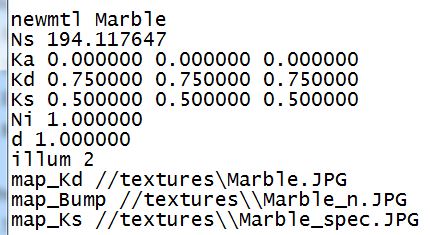
1)the prefix // back of the texture short path (strip path) was missing as a result when i import to blender to not appear the textures
(that was the small problem that i fixed it opening the .mtl and adding the “//” prefix back of each path myself)
and
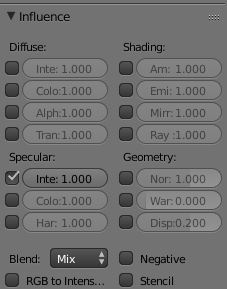
2)at the specular map’s texture settings, in the specular category, the ticked box specular>color had been unticked
while the export and it was the specular>intensity box ticked instead as you can see at the image below:
the specular>intensity should not be checked
the specular>color should be checked
i opened the .mtl file without any luck of finding what i should put at the back of my specular map path (marble_spec)
i tried to put the settings below (i have aslo write their effects for you):
map_ka but it was for ambient map (the ambient was checked)
map_bump there’s no reason to try the map_bump becasue i know it’s for the normal/bump map as it says
map_kd but it was for the diffuse map (diffuse>color)
map_ks it was already checked from the beginning , it was for the specular>intensity map that i wanted to change
map_d but that was for the diffuse>alpha
map_Ni the texture map had dissapeared from the material>texture (so i put it back to ks when i done)
map_Ns the texture map had dissapeared from the material>texture (so i put it back to ks when i done)
So, what i must write at the back of my texture path in order to enable the specular>color ?
it says i must put Ns for the specular highlight component.
when i put Ns then the texture does not even appear in the material (it dissapear)
do you know if i must put anything in front of it?
maybe instant of map_Ns something else like glow_Ns or any prefix?
I had tried to export as .dae before but it does not put the “//” prefix and i don’t know how to adjust it by myself the .dae to put the “//” prefix with notepad.
Do you know any software/converter/viewer/editor that i can adjust the effect maps and export it again as .obj or to any other format?
See here: It is the intended behaviour on Blender’s obj import/export that map_Ks is saved and loaded as specular color. Instead it was only saved as specular color, but loaded as specular intensity.
I take it this is fixed in very recent Blender builds.
ok, if this is fixed in the very recent blender builds let me quess those builds are the not yet published alpha or beta builds
(i already have got the 2.75a version of blender)
when those builds will be published for download?
You can find fresh builds almost daily here.
If you’re on Windows, just get a recent .zipped version, unpack it wherever you like and try it out. It will not interfere with your installed version of Blender.
It worked!
I downloaded the “Blender-2.75.0-git.d9fc988-AMD64” version of blender and i import the .obj without any problem.
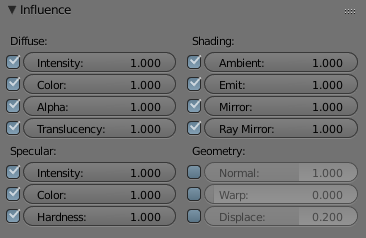
The specular>color map was finally ticked!
only the normal map in the “image sampling” should have ticked the “normal map>tangent space”
but this is a very small problem which it also was at the previous versions of blender.
i’m sure this will be fixed soon (it’s importer’s theme, since it detects a normal map it should automaticly do that)